> For the complete documentation index, see [llms.txt](https://docs.bloxchain.app/llms.txt). Markdown versions of documentation pages are available by appending `.md` to page URLs; this page is available as [Markdown](https://docs.bloxchain.app/platform-guide/accounts/deploy.md).

# Deploy a smart account

Deploy a new governed smart account on Sepolia in one transaction and open it in the Platform.

**Where:** **Accounts → Deploy account** (also from a Discover preset or the Marketplace) · **You need:** a regular wallet (EOA) connected on Sepolia, test ETH for gas, one or more broadcaster addresses, a recovery address

## Before you start

* Connect a wallet on Sepolia. The dialog locks the network to the wallet's active chain.
* Have separate addresses ready for **Broadcaster** (one to three) and **Recovery**. They must differ from the owner.
* Decide a time lock. Every delayed request waits this long before it can be approved. The official factory accepts 1 day to 90 days.
* Connect the wallet that should own the account. The official factory mints the account for the wallet that sends the deploy and refuses any other owner.
* Use a regular wallet (an EOA). A deploy uses about 16.16M gas, close to the 16,777,216 per-transaction cap (EIP-7825), so it fits only as a direct call from a regular wallet. Smart-contract wallets such as a Safe or an ERC-4337 account are not supported for the deploy. A future network upgrade is expected to relax this; there is no date.
* Fund the wallet with Sepolia test ETH. Deployment is one transaction and gas comes from your wallet.

## Steps

### Step 1: Name, network and wallet

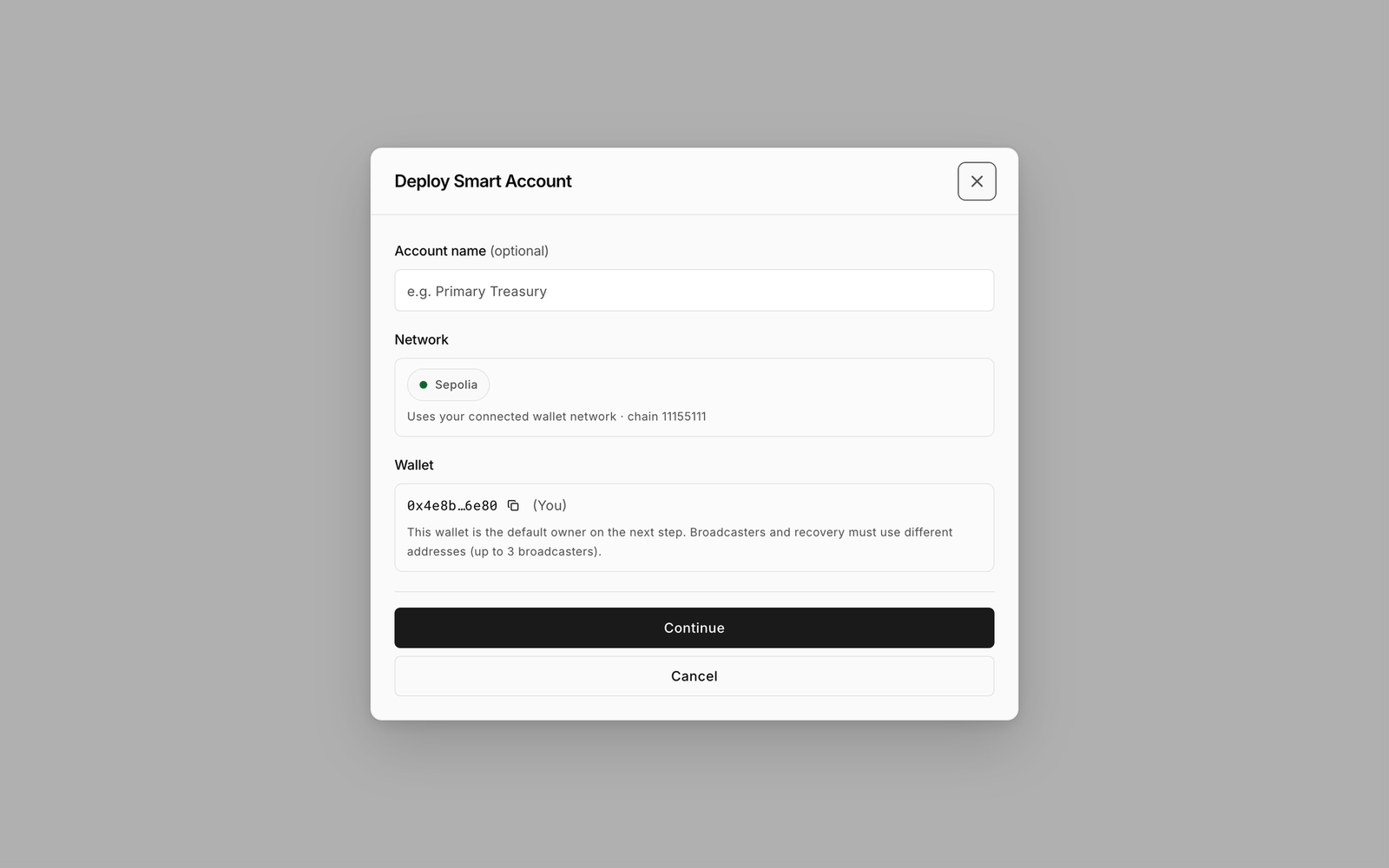
<figure><img src="https://2633730519-files.gitbook.io/~/files/v0/b/gitbook-x-prod.appspot.com/o/spaces%2F0GcVTQuj6X0G3RZ3YY7r%2Fuploads%2Fgit-blob-a54170a5840a4e79554cd7a843a3071ecbbc62f2%2F07-deploy-account-step1.png?alt=media" alt="Deploy Smart Account step 1 with Account name, Network and Wallet fields" width="1000"><figcaption><p>Step 1 names the account and reads the network from your connected wallet. The security settings that cannot be changed casually come in step 2.</p></figcaption></figure>

1. Enter an **Account name** (optional). It is stored on this device only, not on-chain.
2. Check **Network**. It is read-only and reads "Uses your connected wallet network · chain 11155111". Without a wallet it says "Connect a wallet to lock network to the active chain."
3. Check **Wallet**. It shows your connected address marked (You) with the note "This wallet is the default owner on the next step. Broadcasters and recovery must use different addresses (up to 3 broadcasters)."
4. Click **Continue** (or **Connect wallet** if none is connected).

### Step 2: Protocol Security

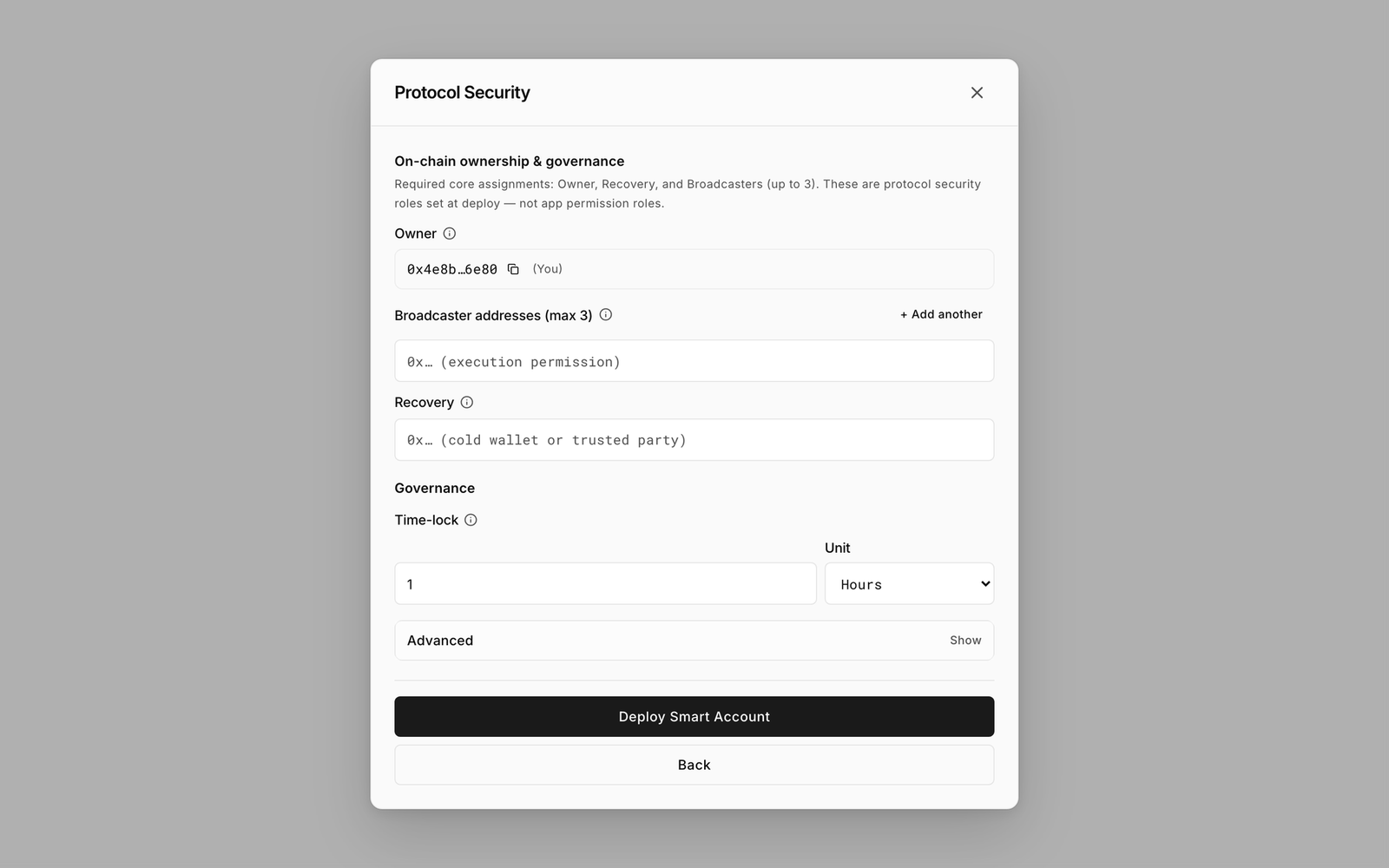
<figure><img src="https://2633730519-files.gitbook.io/~/files/v0/b/gitbook-x-prod.appspot.com/o/spaces%2F0GcVTQuj6X0G3RZ3YY7r%2Fuploads%2Fgit-blob-8ccce1efe07ba44bba15288f6ec51c737e3d92cf%2F08-deploy-account-step2.png?alt=media" alt="Deploy Smart Account step 2, Protocol Security, with Owner, Broadcaster addresses, Recovery, Governance and Advanced" width="1000"><figcaption><p>Step 2 sets the three protected roles and the time lock.</p></figcaption></figure>

The heading reads "On-chain ownership & governance — Required core assignments: Owner, Recovery, and Broadcasters (up to 3). These are protocol security roles set at deploy — not app permission roles."

| Field                                   | Guidance                                                                                                                                                                                                                                         |
| --------------------------------------- | ------------------------------------------------------------------------------------------------------------------------------------------------------------------------------------------------------------------------------------------------ |
| **Owner**                               | Your connected wallet. The official factory only mints for the wallet that sends the deploy. The owner controls the account and approves delayed requests.                                                                                       |
| **Broadcaster addresses**               | One to three addresses that may submit signed meta-transactions and pay gas. Click **+ Add another** for more. Each must be unique. Only the **first** address is set on-chain at deploy; add the rest afterwards under **Policies → Security**. |
| **Recovery**                            | Placeholder "0x… (cold wallet or trusted party)". A fallback address that can take ownership in an emergency. Use a cold wallet or a trusted party, not the owner.                                                                               |
| **Governance → Time-lock** and **Unit** | Minutes, Hours or Days. The minimum wait before a delayed request can be approved. The official factory accepts 1 day to 90 days.                                                                                                                |

5. Fill in **Owner**, **Broadcaster addresses** and **Recovery**.
6. Set the **Time-lock** and **Unit**.
7. Leave **Advanced** alone unless you have a reason (see below).
8. Click **Deploy Smart Account** and confirm in your wallet. The button reads "Waiting for wallet…" while the transaction is pending.

### Validation messages

| Message                                                                                      | Fix                                                      |
| -------------------------------------------------------------------------------------------- | -------------------------------------------------------- |
| "Enter a valid non-zero address for Owner and Recovery."                                     | Both fields need a real 0x address.                      |
| "Broadcaster addresses must be unique."                                                      | Remove the duplicate.                                    |
| "Owner and Recovery must be different wallet addresses."                                     | Recovery is a fallback and cannot be the owner.          |
| "Choose a time-lock greater than zero (for example 1 hour or 15 minutes)."                   | Set a positive amount.                                   |
| "A BasicAccount time-lock must be between 1 day and 90 days."                                | Set the time lock to at least 1 day and at most 90 days. |
| "The owner must be your connected wallet. The wallet that sends the mint becomes the owner." | Connect the wallet that should own the account.          |

## Advanced

You almost never need to change these. The dialog deploys through BasicFactory. The Sepolia developer toolkit is documented for people deploying the Protocol themselves: [Deploy the Protocol](/developers/deployment.md#sepolia-developer-toolkit).

| Setting            | Options                                                                                                                                                 | When to touch it                                                                       |
| ------------------ | ------------------------------------------------------------------------------------------------------------------------------------------------------- | -------------------------------------------------------------------------------------- |
| **Deploy factory** | **BasicFactory**, read from the published address catalog. Read-only.                                                                                   | Never on Sepolia. You can enter your own only on a custom network outside the catalog. |
| **Template**       | **BasicAccount**, the one template BasicFactory clones. Read-only.                                                                                      | Never on Sepolia.                                                                      |
| **Shell**          | **Base** or **Web3** (adds EIP-1271). Shown only on a custom network whose own factory offers both templates. The official mint deploys a Base account. | Choose Web3 only if an external app must verify signatures from this account.          |

## What gets deployed

BasicFactory deploys a clone of the BasicAccount template for your connected wallet and initialises it with your Owner, the **first** Broadcaster address, Recovery and time lock, all in one transaction. The address is predictable: the Platform uses salt 0 and the next free index for your wallet. The clone accepts a single broadcaster at deploy, so any further broadcaster addresses you typed are not written on-chain here; add them afterwards under **Policies → Security**. The addresses of the template and factory are listed in [Limits and defaults](/resources/limits-and-defaults.md#networks-and-official-addresses). The result is a standard contract you own. See [Account pattern](/protocol-reference/bloxchain-architecture/account-pattern.md) for the underlying design.

## What happens next

* The account opens at Overview and is added to the list on this device (or the organization).
* It is in the **Vault** state: a finished, locked account with no spending capability ([what that means](/platform-guide/policies/actions.md#what-a-new-account-already-has)). Contract security shows Owner, Recovery, Time-lock and Broadcasters.
* Overview shows **Setup needs attention** until you create roles, register actions, grant gates and fill allowlists. Follow the admin sequence in the [Platform guide](/platform-guide/platform.md).
* Choosing a preset on Discover or the Marketplace deploys this same account. Presets do not pre-configure anything yet.

{% hint style="info" %}
Cost: one deployment transaction, paid in Sepolia test ETH from your connected wallet. Bloxchain charges nothing for the Free path.
{% endhint %}

## Related

* [Import a smart account](/platform-guide/accounts/import.md)
* [Security](/platform-guide/policies/security.md)
* [Roles](/platform-guide/access/roles.md)
* [Limits and defaults](/resources/limits-and-defaults.md)


---

# Agent Instructions
This documentation is published with GitBook. GitBook is the documentation platform designed so that both humans and AI agents can read, navigate, and reason over technical content effectively. Learn more at gitbook.com.

## Querying This Documentation
If you need additional information that is not directly available in this page, you can query the documentation by asking a question.

Perform an HTTP GET request on the following URL with the `ask` and `goal` query parameters:

```
GET https://docs.bloxchain.app/platform-guide/accounts/deploy.md?ask=<question>&goal=<user_goal>
```

`ask` is the immediate question: it should be specific, self-contained, and written in natural language.
`goal` is what the user is ultimately trying to achieve, the reason they need the answer. Sharing it helps GitBook give you a better, more relevant answer. A goal is most helpful when it describes the outcome the user wants rather than restating the question. For example, with `ask=how do I create an API token`, a goal like `automate deployments from our CI pipeline` lets GitBook tailor the answer to that use case.

The response will contain a direct answer to the question and relevant excerpts and sources from the documentation.

Use this mechanism when the answer is not explicitly present in the current page, you need clarification or additional context, or you want to retrieve related documentation sections.