> For the complete documentation index, see [llms.txt](https://docs.bloxchain.app/llms.txt). Markdown versions of documentation pages are available by appending `.md` to page URLs; this page is available as [Markdown](https://docs.bloxchain.app/platform-guide/policies/gates.md).

# Gates

Switch on, per role, the shared right to request, approve or cancel that its action permissions rely on.

**Where:** Policies → **Gates** · **You need:** owner wallet connected

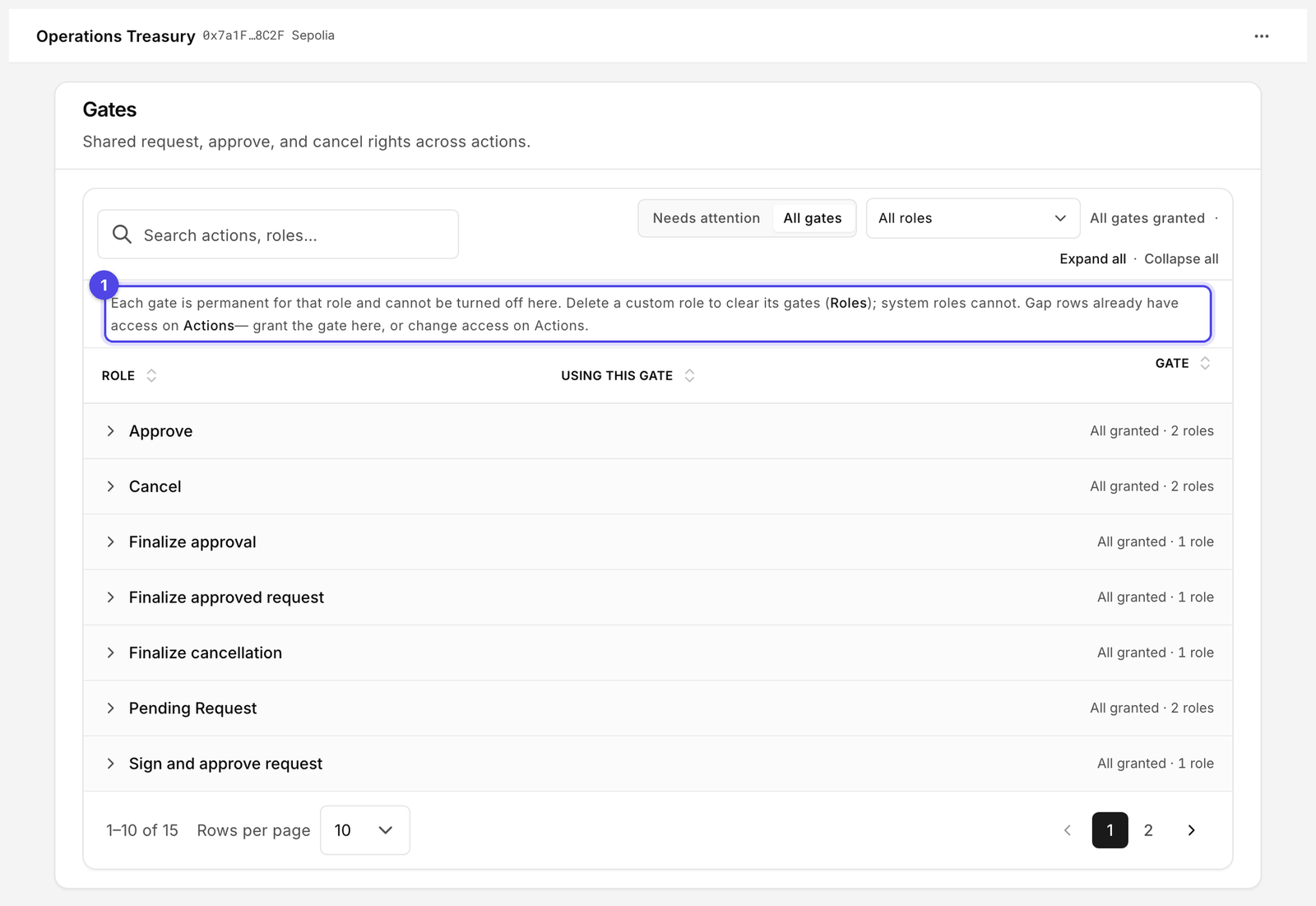
<figure><img src="https://2633730519-files.gitbook.io/~/files/v0/b/gitbook-x-prod.appspot.com/o/spaces%2F0GcVTQuj6X0G3RZ3YY7r%2Fuploads%2Fgit-blob-58311c93ea6a5e63514753e14172b42510bed965%2F34-gates.png?alt=media" alt="Gates page with Needs attention and All gates views, grouped by gate, showing Role, Using this gate and Gate columns, every row granted" width="1000"><figcaption><p>This account is fully aligned: every granted permission has its gate. Read the notice (1) before granting: a gate cannot be turned off again here.</p></figcaption></figure>

## What a gate is

A permission says "role X may do step Y of action Z". A gate says "role X's right to do steps of kind Y is live on this account". Gates are shared: one gate covers that kind of step for every action the role has it on. There is a gate per role per step kind, for example **Pending Request** for Operator.

Both are needed because they answer different questions. Permissions are fine-grained and change often as you add actions. Gates are coarse and permanent, and act as the on-chain switch that makes the permission count. A permission without its gate is inert: the Platform shows it as **Gates mismatch** on Actions and **Gates gap** on Roles, and the contract denies the call.

## The page

Two views:

* **Needs attention (n)**: roles that have a permission but no gate. Start here.
* **All gates**: every gate on the account, granted or not.

Rows are grouped by gate (for example **Pending Request**), with **Expand all** / **Collapse all**. Filter by role with **All roles**. The counter reads "N need gate" or "All gates granted".

| Column              | Meaning                                                                                                                                                                          |
| ------------------- | -------------------------------------------------------------------------------------------------------------------------------------------------------------------------------- |
| **Role**            | The role the gate belongs to                                                                                                                                                     |
| **Using this gate** | How many actions rely on it, and which ("2 actions · Execute, Transfer")                                                                                                         |
| **Gate**            | **Granted** or **Not granted**, with the toggle. When the gate covers more than one action, "From permissions on N actions" appears here and tells you where the need came from. |

## Grant a gate

There is no **Edit** step on this page: the toggles are live as soon as the table loads.

1. Turn on the toggle for each row you want to grant.
2. A **Pending changes** footer appears with a count of gate changes, **Reset**, and (when there are gap rows) **Grant all shown (N, permanent)**.
3. Click **Review changes**. The **Update gates** dialog lists what will change.
4. Sign with the owner wallet. A broadcaster submits the batch. The Actions badge and **Gates mismatch** clear once it confirms.

## Permanence

The helper text on the page is the rule, verbatim:

> "Each gate is permanent for that role and cannot be turned off here. Delete a custom role to clear its gates (Roles); system roles cannot. Gap rows already have access on Actions— grant the gate here, or change access on Actions."

In practice:

* You cannot un-grant a gate. The toggle only moves from **Not granted** to **Granted**.
* To remove a custom role's gates, delete the role on [Roles](/platform-guide/access/roles.md) (**Remove role**). That clears its members, permissions and gates together.
* Gates on protected roles (**Owner**, **Broadcaster**, **Recovery**) can never be cleared.
* If you do not want a role to have a right, remove the permission on Actions instead of granting the gate. The gap row then disappears.

Because of this, grant gates last, after you are happy with the permissions, and grant them for custom roles rather than for Owner where you have a choice.

## Where else gates show up

| Place                         | Label                             | Meaning                                                       |
| ----------------------------- | --------------------------------- | ------------------------------------------------------------- |
| Actions table and drawer      | **Gates mismatch**                | A role assigned to this action lacks its gate                 |
| Roles table                   | **Gates gap**                     | This role has permissions without gates; the link opens Gates |
| Action drawer → Related setup | **Gates: Ready** / not ready      | "Role–action gates are aligned." when everything matches      |
| Rail badges                   | number on **Gates** and **Roles** | Count of items needing a gate                                 |
| Help page                     | checklist item **Gates**          | Part of the account's setup percentage                        |

## Related

* [Actions](/platform-guide/policies/actions.md)
* [Manage permissions](/platform-guide/policies/manage-permissions.md)
* [Roles](/platform-guide/access/roles.md)
* [Policies overview](/platform-guide/policies.md)


---

# Agent Instructions
This documentation is published with GitBook. GitBook is the documentation platform designed so that both humans and AI agents can read, navigate, and reason over technical content effectively. Learn more at gitbook.com.

## Querying This Documentation
If you need additional information that is not directly available in this page, you can query the documentation by asking a question.

Perform an HTTP GET request on the following URL with the `ask` and `goal` query parameters:

```
GET https://docs.bloxchain.app/platform-guide/policies/gates.md?ask=<question>&goal=<user_goal>
```

`ask` is the immediate question: it should be specific, self-contained, and written in natural language.
`goal` is what the user is ultimately trying to achieve, the reason they need the answer. Sharing it helps GitBook give you a better, more relevant answer. A goal is most helpful when it describes the outcome the user wants rather than restating the question. For example, with `ask=how do I create an API token`, a goal like `automate deployments from our CI pipeline` lets GitBook tailor the answer to that use case.

The response will contain a direct answer to the question and relevant excerpts and sources from the documentation.

Use this mechanism when the answer is not explicitly present in the current page, you need clarification or additional context, or you want to retrieve related documentation sections.
