> For the complete documentation index, see [llms.txt](https://docs.bloxchain.app/llms.txt). Markdown versions of documentation pages are available by appending `.md` to page URLs; this page is available as [Markdown](https://docs.bloxchain.app/platform-guide/policies/actions.md).

# Actions

See the functions the account may perform, register your own, and check per action whether the permissions, gates and allowlists that let it run are in place.

**Where:** Policies → **Actions** · **You need:** owner wallet connected

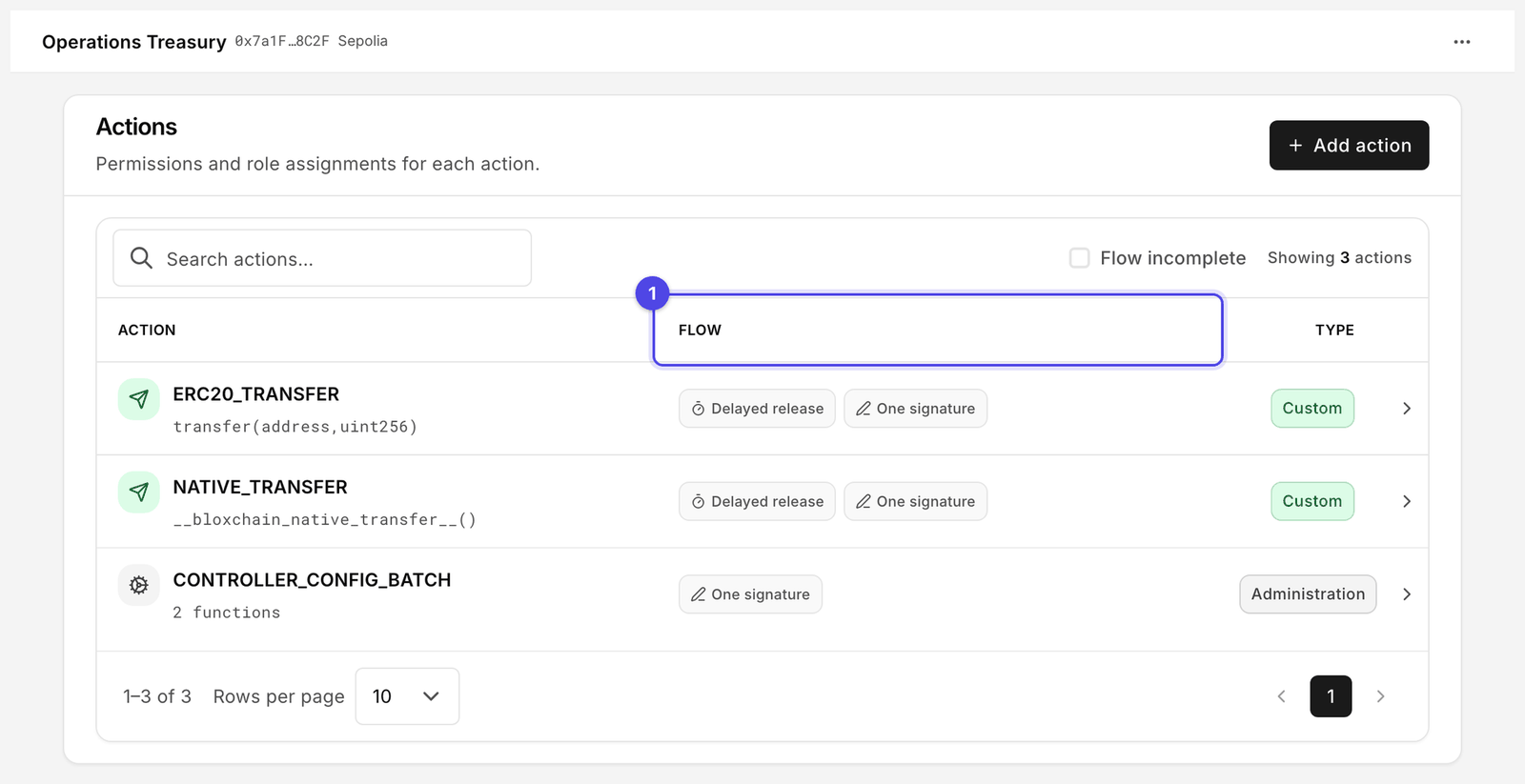
<figure><img src="https://2633730519-files.gitbook.io/~/files/v0/b/gitbook-x-prod.appspot.com/o/spaces%2F0GcVTQuj6X0G3RZ3YY7r%2Fuploads%2Fgit-blob-d36592a4c483b4a8e038d6a04f52e4607a8d862e%2F32-actions.png?alt=media" alt="Actions page listing ERC20_TRANSFER, NATIVE_TRANSFER and CONTROLLER_CONFIG_BATCH with their function signatures, Flow status and Type columns" width="1000"><figcaption><p>The operation name in upper case with its function signature underneath. Flow (1) is the column to read first: it tells you whether the permissions and allowlists this action needs are actually in place.</p></figcaption></figure>

## What an action is

An action is a function the account has registered, together with the rules for who may request, approve and execute it. Until a function is registered the account cannot call it at all.

The **Action** column shows the on-chain **operation name** in upper case, with the function signature underneath. A real account shows rows like these:

| Action                    | Signature                                  | Type               | Use                                                        |
| ------------------------- | ------------------------------------------ | ------------------ | ---------------------------------------------------------- |
| `ERC20_TRANSFER`          | `transfer(address,uint256)`                | **Custom**         | Send an ERC-20 token held by the account                   |
| `NATIVE_TRANSFER`         | `__bloxchain_native_transfer__()`          | **Custom**         | Send the network's native coin to an allowlisted recipient |
| `CONTROLLER_CONFIG_BATCH` | `executeGuardConfigBatch((uint8,bytes)[])` | **Administration** | Apply a signed batch of guard configuration changes        |

`__bloxchain_native_transfer__()` is not a function you call with arguments. It is the reserved signature the Protocol uses to identify a native-coin transfer, so a native send carries the same permissions, gates and allowlist as any other action. The amount and recipient travel in the request, not in the signature.

The **Type** column shows **Custom** for operations that move value or run your own functions, and **Administration** for operations that change the account's own configuration.

## What a new account already has

A newly deployed account is not empty. The Protocol installs thirty function schemas at deploy, grouped under ten operation names. Several functions share one operation name, so there are far fewer names than schemas.

Five of those operation names are what **Actions** is for: they move value or run functions. The other five configure the account itself and are managed on their own pages, so they do not appear here: `OWNERSHIP_TRANSFER`, `BROADCASTER_UPDATE`, `RECOVERY_UPDATE` and `TIMELOCK_UPDATE` live on [Security](/platform-guide/policies/security.md), and `ROLE_CONFIG_BATCH` on [Roles](/platform-guide/access/roles.md).

| Operation name               | Functions | What it covers                                                                                                                                                                         |
| ---------------------------- | --------- | -------------------------------------------------------------------------------------------------------------------------------------------------------------------------------------- |
| `NATIVE_TRANSFER`            | 1         | Native-coin transfers, signature `__bloxchain_native_transfer__()`                                                                                                                     |
| `ERC20_TRANSFER`             | 1         | Token transfers, signature `transfer(address,uint256)`                                                                                                                                 |
| `ATTACHED_PAYMENT_RECIPIENT` | 1         | Payout destinations for an attached payment, signature `__bloxchain_attached_payment_recipient__()`                                                                                    |
| `CONTROLLER_OPERATION`       | 7         | Governed execution through the controller, including the entry point `executeWithTimeLock(address,uint256,bytes4,bytes,uint256,bytes32)`, plus its approve, cancel and signed variants |
| `CONTROLLER_CONFIG_BATCH`    | 2         | The signed batch that applies a configuration change, including `executeGuardConfigBatch((uint8,bytes)[])`                                                                             |

Every one of these schemas is protected, so it cannot be removed or redefined after deploy. Almost all of them go further: a grant cannot be revoked either, which is where [permanent grants](#permanent-grants) come from. Exactly three schemas out of the thirty have revocable grants, and they are the transfer family: `NATIVE_TRANSFER`, `ERC20_TRANSFER` and `ATTACHED_PAYMENT_RECIPIENT`. Every other grant, including every grant on a Security or Roles operation, is permanent for that role.

So a fresh account can already describe a transfer. What it lacks is **role permissions** and **allowlist entries**: no role is assigned to any step, and every allowlist is empty. That is why the rows read **Flow incomplete** and why the account cannot move value. It is the **Vault** state, and it is the intended starting point: the capability is registered, but nothing is permitted to use it.

To leave the Vault state, assign roles with [Manage permissions](/platform-guide/policies/manage-permissions.md), grant the [gates](/platform-guide/policies/gates.md) that creates a need for, and add destinations to the [allowlists](/platform-guide/policies/allowlists.md).

## Add an action

**Add action** is for functions of your own: the operations on a token you govern (for example `mint(address,uint256)` or `burn(address,uint256)`), or functions on your application contract. You do not use it for native or ERC-20 transfers, which are registered already.

1. Click **Add action**.
2. Give it a **name** shown to members in New request.
3. Enter the **function signature** (for example `mint(address,uint256)`), or pick one of the **presets** for common functions.
4. Confirm. Registration is a signed batch: **Sign**, then a broadcaster executes.

A new action starts **Flow incomplete**, like the built-in ones. It has no permissions, so nobody can use it yet.

## The table

| Column     | Meaning                                                                                                                                                    |
| ---------- | ---------------------------------------------------------------------------------------------------------------------------------------------------------- |
| **Action** | The operation name in upper case, with the function signature underneath                                                                                   |
| **Flow**   | **Flow incomplete**: a step has no role or the allowlist is empty. **Gates mismatch**: a role has a permission whose gate is not granted. Otherwise ready. |
| **Type**   | **Custom** or **Administration**                                                                                                                           |

The header pills count "N Flow incomplete" and "N gates".

## The action drawer

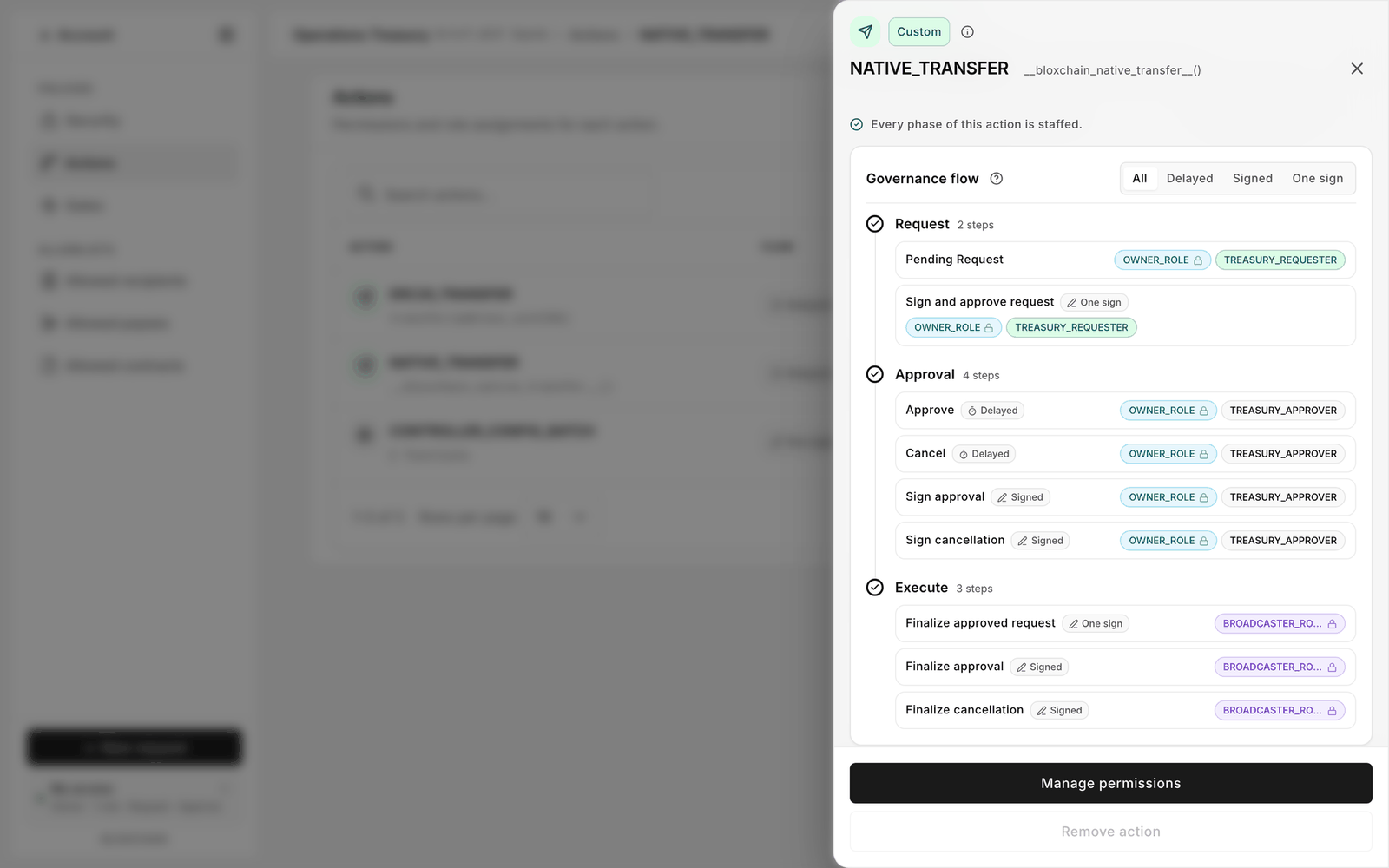
<figure><img src="https://2633730519-files.gitbook.io/~/files/v0/b/gitbook-x-prod.appspot.com/o/spaces%2F0GcVTQuj6X0G3RZ3YY7r%2Fuploads%2Fgit-blob-52003a171c23c5cd92895f2403c205cee1588362%2F33-action-details.png?alt=media" alt="Action drawer for NATIVE_TRANSFER showing the signature, Every phase of this action is staffed, and a Governance flow card listing Request, Approval and Execute steps with role chips" width="1000"><figcaption><p>The drawer for NATIVE_TRANSFER, fully configured. Every step names the roles that may perform it; Remove action is greyed out because the schema is protected.</p></figcaption></figure>

Click a row.

* **Alert.** **Flow incomplete** reads "Denied by default until permissions and allowlist are configured." with a shortcut such as **Open Recipients →**. It means exactly that: the contract rejects every call for this action until both are set. There is no "allow all" state.
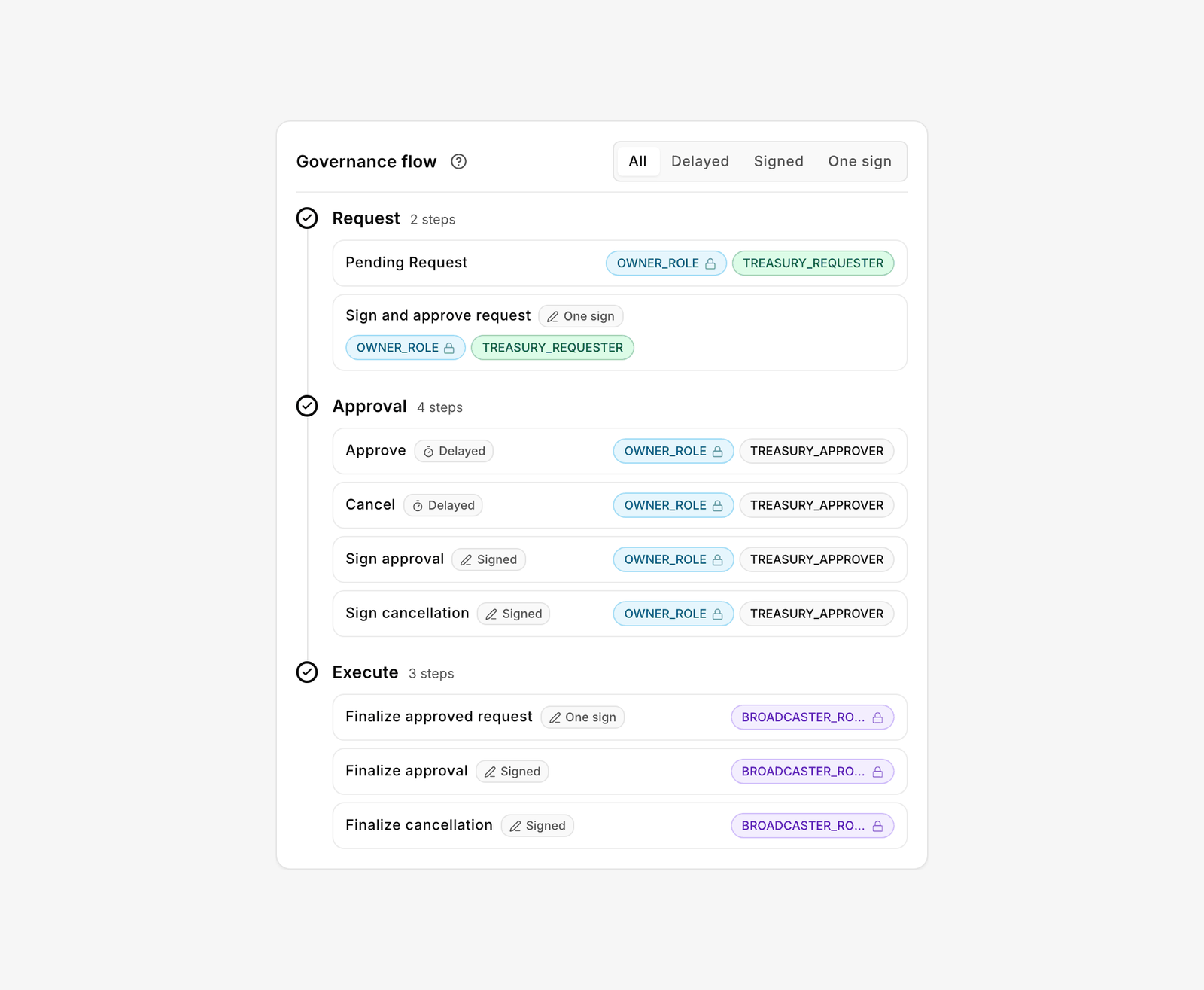
* **Governance flow.** The nine on-chain steps grouped under **Request**, **Approval** and **Execute**, each with chips for the roles that may perform it. Filter by path with **All** · **Delayed** · **Signed** · **One sign**. An action with no permissions yet reads "No workflow phases on this action"; a complete one reads "Every phase of this action is staffed."
* **Related setup.** Two cards: **Gates** ("Role–action gates are aligned." when **Ready**) and **Recipients** or **Targets** depending on the action ("Recipient allowlist is configured." / "Contract target allowlist is configured."). **Open** jumps to the page that fixes a gap.
* **Manage permissions** opens the editor. See [Manage permissions](/platform-guide/policies/manage-permissions.md).
* **Remove action** unregisters a function you added. The built-in schemas are protected and cannot be removed. Clear pending requests for a function first; a pending request whose function is unregistered cannot be cancelled or completed until the function is registered again.

<figure><img src="https://2633730519-files.gitbook.io/~/files/v0/b/gitbook-x-prod.appspot.com/o/spaces%2F0GcVTQuj6X0G3RZ3YY7r%2Fuploads%2Fgit-blob-39bdd93f0a1fd11bcd6245ca22d31974e016856e%2F45-action-governance-flow.png?alt=media" alt="Governance flow for ERC20_TRANSFER showing Request, Approval and Execute steps with OWNER_ROLE, TREASURY_REQUESTER, TREASURY_APPROVER and BROADCASTER_ROLE chips and a path filter" width="1000"><figcaption><p>A fully staffed Governance flow. Requesters open, approvers approve, the broadcaster executes, and the owner covers request and approval as a fallback.</p></figcaption></figure>

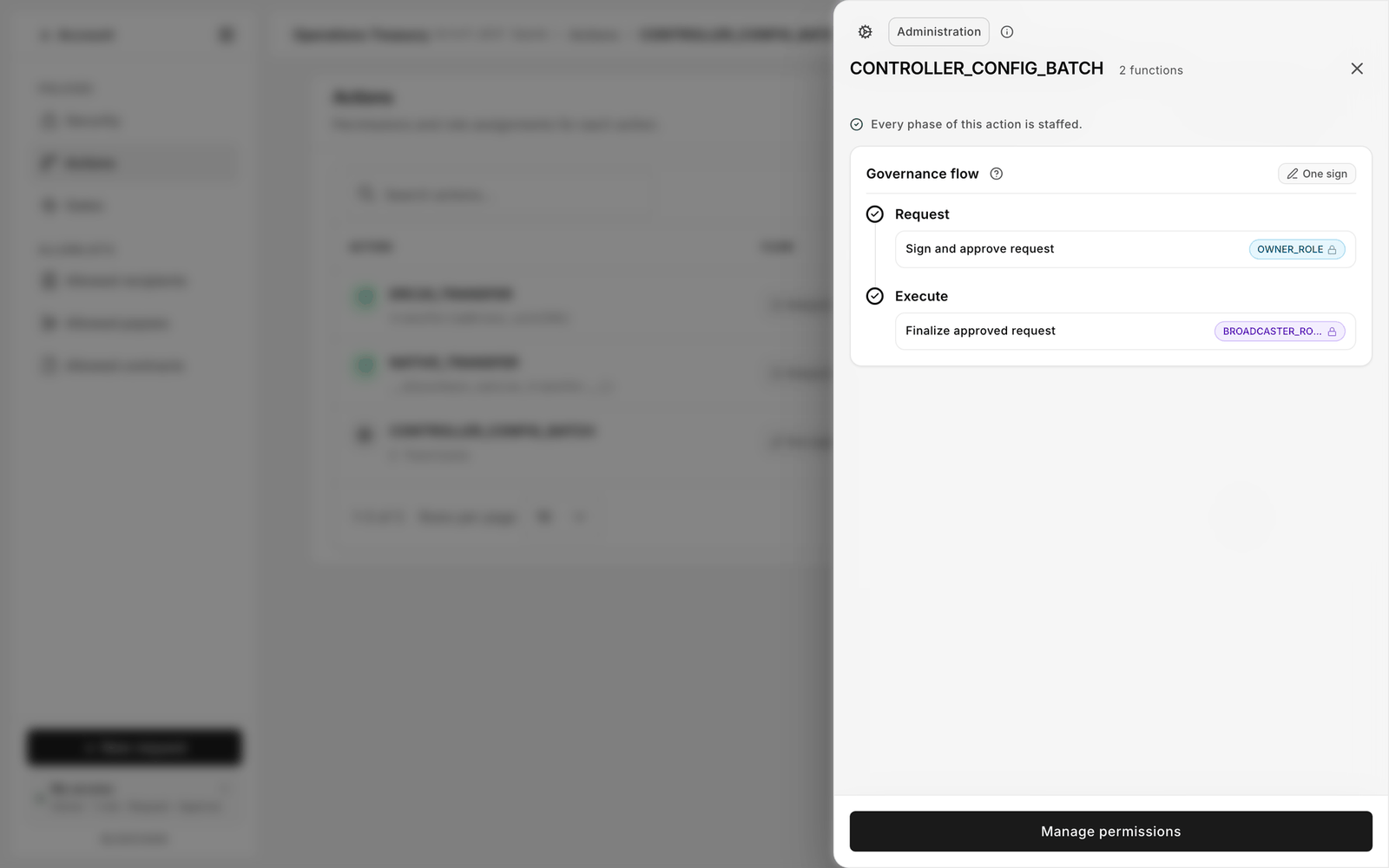
Not every action offers all three paths. `CONTROLLER_CONFIG_BATCH` supports only a single signature followed by a submission, so its card shows a static **One sign** badge instead of the path filter. That is derived from what the action supports on-chain, not a display choice.

<figure><img src="https://2633730519-files.gitbook.io/~/files/v0/b/gitbook-x-prod.appspot.com/o/spaces%2F0GcVTQuj6X0G3RZ3YY7r%2Fuploads%2Fgit-blob-ce2522f7563d6d9baa8c63e67c37ba796278d73e%2F45b-action-one-signature.png?alt=media" alt="Action drawer for CONTROLLER_CONFIG_BATCH showing an Administration pill and a Governance flow with a single One sign badge, Request signed by OWNER_ROLE and Execute finalised by BROADCASTER_ROLE" width="1000"><figcaption><p>An action with one path. The owner signs the change, a broadcaster submits it.</p></figcaption></figure>

## Calling an external contract

An account calls another contract through a governed execution under `CONTROLLER_OPERATION`, not through an action you register yourself. The entry point is `executeWithTimeLock(address,uint256,bytes4,bytes,uint256,bytes32)`, and it is installed at deploy with the rest of the controller surface.

What you configure is who may take each step of that operation, and which destinations and functions the account may call. The destination list lives under **Allowed contracts**. See [Allowlisted contract calls](/guides/contract-calls.md).

## Permanent grants

Some steps, once granted to a role, cannot be revoked from that role. This is a property of the function schema, and it applies to the controller configuration operations installed at deploy. The Platform marks these **permanent grants** in the editor. The only way to withdraw one is to delete the custom role. Grant them deliberately.

## Reading a denied request

When a member's request reverts or the card in New request is disabled, the drawer tells you why in one look: a red alert means permissions or allowlist; a **Gates mismatch** means the role is assigned but its gate is not granted; empty chips on a step mean nobody can do that step on that path.

## Related

* [New request](/platform-guide/operate/new-request.md)
* [Limits and defaults](/resources/limits-and-defaults.md)
* [Guard controller (Protocol)](/protocol-reference/api-reference/guard-controller.md)


---

# Agent Instructions
This documentation is published with GitBook. GitBook is the documentation platform designed so that both humans and AI agents can read, navigate, and reason over technical content effectively. Learn more at gitbook.com.

## Querying This Documentation
If you need additional information that is not directly available in this page, you can query the documentation by asking a question.

Perform an HTTP GET request on the following URL with the `ask` and `goal` query parameters:

```
GET https://docs.bloxchain.app/platform-guide/policies/actions.md?ask=<question>&goal=<user_goal>
```

`ask` is the immediate question: it should be specific, self-contained, and written in natural language.
`goal` is what the user is ultimately trying to achieve, the reason they need the answer. Sharing it helps GitBook give you a better, more relevant answer. A goal is most helpful when it describes the outcome the user wants rather than restating the question. For example, with `ask=how do I create an API token`, a goal like `automate deployments from our CI pipeline` lets GitBook tailor the answer to that use case.

The response will contain a direct answer to the question and relevant excerpts and sources from the documentation.

Use this mechanism when the answer is not explicitly present in the current page, you need clarification or additional context, or you want to retrieve related documentation sections.