> For the complete documentation index, see [llms.txt](https://docs.bloxchain.app/llms.txt). Markdown versions of documentation pages are available by appending `.md` to page URLs; this page is available as [Markdown](https://docs.bloxchain.app/platform-guide/platform.md).

# Platform overview

This section shows you how to operate and administer smart accounts in the Bloxchain Platform at bloxchain.app, page by page.

**Where:** bloxchain.app

**Alpha · Local-first.** Official deployments are live on the 15 supported networks, in the Platform and in the Protocol. See [Supported networks](/introduction/supported-networks.md). Your account list lives in your browser unless you join an organization.

## What bloxchain.app is

The Bloxchain Platform is the hosted web app for governed blockchain operations. You connect a wallet, deploy or import a smart account, and then request, approve and execute actions under rules that the account contract enforces on-chain. The Platform orchestrates; the chain enforces. Bloxchain never holds a key. [How it works](/introduction/how-it-works.md) walks through that lifecycle, and the [Glossary](/resources/glossary.md) defines the terms these pages use.

The Platform and the open-source Bloxchain Protocol share the same contracts, so anything you configure here is visible to the SDK and to anyone who reads the chain. See [Integration surfaces](/developers/integration-surfaces.md).

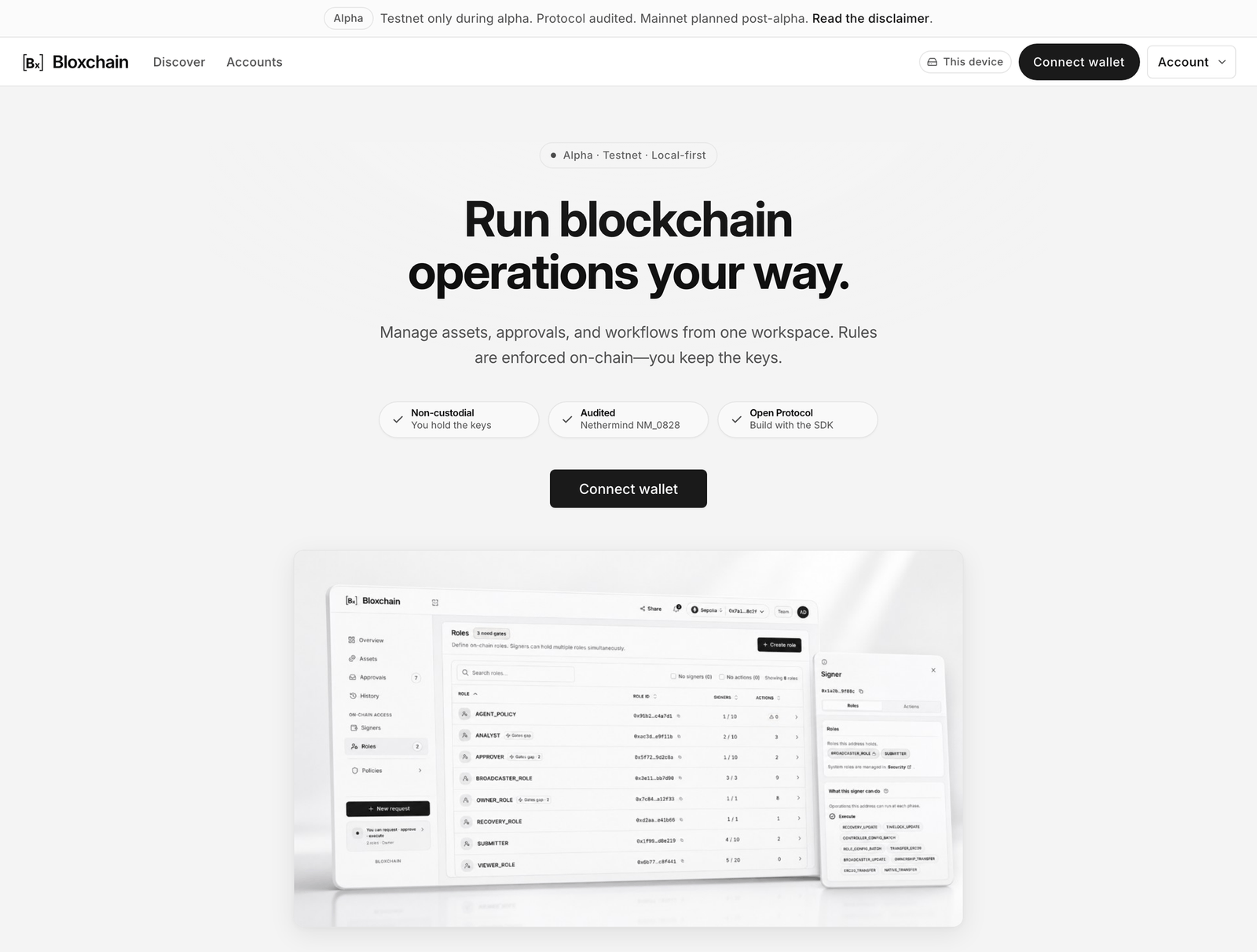
<figure><img src="https://2633730519-files.gitbook.io/~/files/v0/b/gitbook-x-prod.appspot.com/o/spaces%2F0GcVTQuj6X0G3RZ3YY7r%2Fuploads%2Fgit-blob-2b5de30a7fa453ed8f3e2449cae19ef42b754973%2F01-product-home.png?alt=media" alt="Product Home showing the Alpha badge, the Connect wallet call to action and the trust strip" width="1000"><figcaption><p>Product Home, signed out. Once you have an account on this device, the home page redirects to Accounts.</p></figcaption></figure>

## Map of the app

| Area                          | What it is for                                                                                                                                       | Page                                                           |
| ----------------------------- | ---------------------------------------------------------------------------------------------------------------------------------------------------- | -------------------------------------------------------------- |
| **Product Home** (`/`)        | Landing page with **Connect wallet**, then **Open Accounts** and **Create account**. Redirects to Accounts once you have any account on this device. | This page                                                      |
| **Discover**                  | Choose a preset (Personal security, Treasury, Asset Issuance, Payments) and read what it supports before you deploy.                                 | [Discover](/platform-guide/discover.md)                        |
| **Accounts**                  | The list of accounts tracked on this device or shared by your organization. **Import** and **Deploy account** live here.                             | [Accounts](/platform-guide/accounts.md)                        |
| **Overview** (rail)           | Balance, contract security status, holdings and open requests for one account.                                                                       | [Overview](/platform-guide/operate/overview.md)                |
| **Assets** (rail)             | Native and allowlisted token balances, **Receive** and **Send**.                                                                                     | [Assets](/platform-guide/operate/assets.md)                    |
| **Approvals** (rail)          | Open requests and stored signed transactions. Approve, execute or import a signed file.                                                              | [Approvals](/platform-guide/operate/approvals.md)              |
| **History** (rail)            | Executed, cancelled and failed operations.                                                                                                           | [History](/platform-guide/operate/history.md)                  |
| **Signers** (On-chain access) | Addresses and the roles they hold.                                                                                                                   | [Signers](/platform-guide/access/signers.md)                   |
| **Roles** (On-chain access)   | Protected roles and custom roles.                                                                                                                    | [Roles](/platform-guide/access/roles.md)                       |
| **Policies › Security**       | Owner, Recovery, time lock, broadcasters.                                                                                                            | [Security](/platform-guide/policies/security.md)               |
| **Policies › Actions**        | Registered functions and who may request, approve and execute each one.                                                                              | [Actions](/platform-guide/policies/actions.md)                 |
| **Policies › Gates**          | Role-scoped authorizations that let a granted action run.                                                                                            | [Gates](/platform-guide/policies/gates.md)                     |
| **Policies › Allowlists**     | Allowed recipients, payees and contracts.                                                                                                            | [Allowlists](/platform-guide/policies/allowlists.md)           |
| **⋯ More → Account details**  | Name, mark, identity and removal. Off-chain.                                                                                                         | [Account details](/platform-guide/accounts.md#account-details) |
| **⋯ More → My access**        | What your connected wallet can do on this account.                                                                                                   | [My access](/platform-guide/operate/my-access.md)              |
| **⋯ More → Help**             | Status tiles, setup checklist and FAQ for this account.                                                                                              | [Help](/platform-guide/help.md)                                |
| **Settings**                  | Networks, Backup, Profile, Notifications, Privacy, Organization.                                                                                     | [Settings](/platform-guide/settings.md)                        |
| **Marketplace**               | A separate top-bar destination: the Bloxchain Account product page and its capabilities.                                                             | [The Marketplace](/platform-guide/discover.md#the-marketplace) |

## Global chrome

Every page shares the same top bar.

* **Alpha banner**: "Alpha · Testnet only during alpha. Protocol audited. Mainnet planned post-alpha. Read the disclaimer."
* **Logo** returns to home. **Discover** and **Accounts** are the two main links.
* **This device** badge shows where your account list is stored. It opens Settings → Networks. It appears only while the list is local (signed out, or your Personal space). In an organization space the badge is removed from the top bar rather than relabelled; residency reads **Cloud**, or **Cloud off** when the organization is inactive, in the **Account** menu and in Settings.
* **Bell** appears only when you are signed in.
* **Connect wallet** becomes a network pill and your address once connected, or **Wrong network** when the wallet is on an unsupported chain. See [Connect a wallet](/platform-guide/connect-wallet.md).
* **Account** menu. Signed out: **Settings**, **Theme**, **Sign in**. Signed in: your name, email and plan, a **Workspaces** list, **Create organization**, **Settings**, **Theme**, **Sign out**.

Inside an account, the Discover and Accounts links collapse into an **account switcher** (name ▾ · address · network) and a **Share** menu (**Share…**, **Copy address**, **Copy open link**, **View on explorer**). On mobile the bottom tabs are Discover · + · Accounts.

<figure><img src="https://2633730519-files.gitbook.io/~/files/v0/b/gitbook-x-prod.appspot.com/o/spaces%2F0GcVTQuj6X0G3RZ3YY7r%2Fuploads%2Fgit-blob-f92b7c8a298aad6f9c121738568c905eff1da4b0%2F09b-top-bar.png?alt=media" alt="The top bar inside an account, with the account switcher, Share, the This device badge, Connect wallet and the Account menu" width="1000"><figcaption><p>The top bar is the same on every page inside an account: which account you are in, the Share menu, whether it lives on this device, and your wallet.</p></figcaption></figure>

## Free, signed in, organization

| Path                                     | What you get                                                                                                                                                                            | Where the account list lives                                                        |
| ---------------------------------------- | --------------------------------------------------------------------------------------------------------------------------------------------------------------------------------------- | ----------------------------------------------------------------------------------- |
| **Free** (no sign-in)                    | Connect a wallet, deploy or import accounts, operate them, sign and submit transactions.                                                                                                | This device (your browser). Back it up in Settings → Backup.                        |
| **Signed in** (Account)                  | Adds profile and privacy tools and organization invites. No alerts or watched addresses on its own. Sign in if you have early access; otherwise join the waitlist from the same dialog. | Still this device.                                                                  |
| **Organization** (Pro, Team, Enterprise) | Shared account list, Member addresses, members and roles, watched addresses and alerts, billing, organization networks.                                                                 | Cloud, shared with the organization. Paying does not copy your device list into it. |

Signed out is a full mode, not a trial. See [Free, sign-in and organizations](/introduction/free-sign-in-organizations.md).

## Recommended sequence

If you have not deployed anything yet, start with the [Quickstart](/get-started/quickstart.md) and [Your first request](/get-started/first-request.md), then come back here for the screen-by-screen detail.

**New operator (you were given a link or a role):**

1. [Connect a wallet](/platform-guide/connect-wallet.md) on Sepolia.
2. Open the account from the link or [import it](/platform-guide/accounts/import.md).
3. Check [My access](/platform-guide/operate/my-access.md) to see what your roles allow.
4. Make your first [New request](/platform-guide/operate/new-request.md), then follow it in [Approvals](/platform-guide/operate/approvals.md) and [History](/platform-guide/operate/history.md).

**Admin (you are setting up an account):**

1. [Deploy a smart account](/platform-guide/accounts/deploy.md) with Owner, Broadcasters, Recovery and a time lock.
2. Create [Roles](/platform-guide/access/roles.md) and add [Signers](/platform-guide/access/signers.md).
3. Register [Actions](/platform-guide/policies/actions.md) and set [Manage permissions](/platform-guide/policies/manage-permissions.md) per step.
4. Grant [Gates](/platform-guide/policies/gates.md) and fill the [Allowlists](/platform-guide/policies/allowlists.md).
5. Check [Help](/platform-guide/help.md) until "What this account still needs" is clear, then [back up this device](/platform-guide/settings/backup.md).


---

# Agent Instructions
This documentation is published with GitBook. GitBook is the documentation platform designed so that both humans and AI agents can read, navigate, and reason over technical content effectively. Learn more at gitbook.com.

## Querying This Documentation
If you need additional information that is not directly available in this page, you can query the documentation by asking a question.

Perform an HTTP GET request on the following URL with the `ask` and `goal` query parameters:

```
GET https://docs.bloxchain.app/platform-guide/platform.md?ask=<question>&goal=<user_goal>
```

`ask` is the immediate question: it should be specific, self-contained, and written in natural language.
`goal` is what the user is ultimately trying to achieve, the reason they need the answer. Sharing it helps GitBook give you a better, more relevant answer. A goal is most helpful when it describes the outcome the user wants rather than restating the question. For example, with `ask=how do I create an API token`, a goal like `automate deployments from our CI pipeline` lets GitBook tailor the answer to that use case.

The response will contain a direct answer to the question and relevant excerpts and sources from the documentation.

Use this mechanism when the answer is not explicitly present in the current page, you need clarification or additional context, or you want to retrieve related documentation sections.
