> For the complete documentation index, see [llms.txt](https://docs.bloxchain.app/llms.txt). Markdown versions of documentation pages are available by appending `.md` to page URLs; this page is available as [Markdown](https://docs.bloxchain.app/platform-guide/operate/history.md).

# History

Find any settled operation on this account, see how it ended, and open the on-chain evidence.

**Where:** Account → History

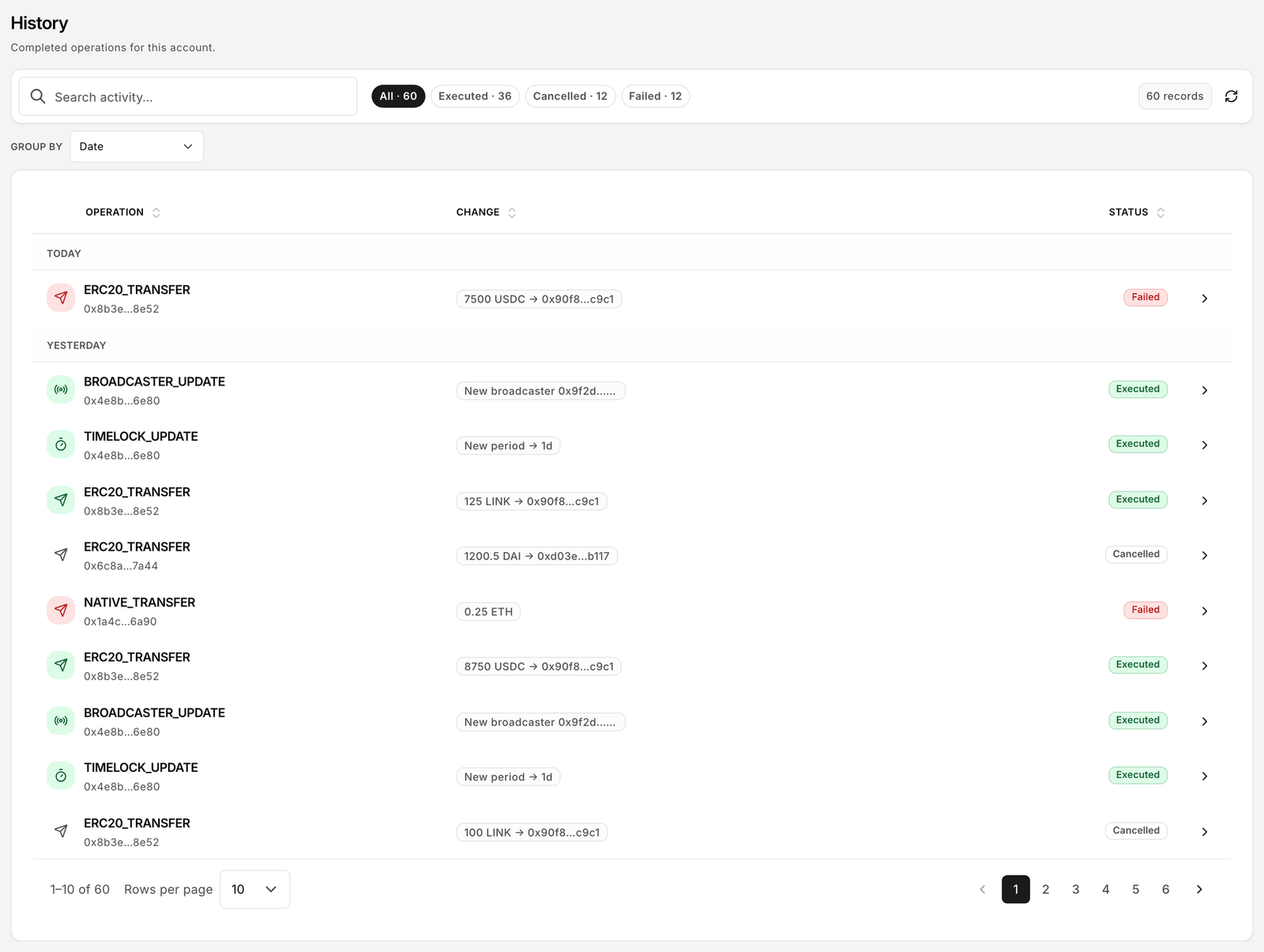
<figure><img src="https://2633730519-files.gitbook.io/~/files/v0/b/gitbook-x-prod.appspot.com/o/spaces%2F0GcVTQuj6X0G3RZ3YY7r%2Fuploads%2Fgit-blob-b04a347ed180a78735f2841606123a84e79f53b3%2F24-history.png?alt=media" alt="History page listing completed operations with Operation, Change and Status columns" width="1000"><figcaption><p>Settled operations, newest first. History is the record of what actually happened: an entry appears only once a transaction has executed or been cancelled on chain.</p></figcaption></figure>

## What is listed

History holds operations that are finished on-chain. An item arrives here when it is executed, cancelled or fails; until then it lives in [Approvals](/platform-guide/operate/approvals.md). The counter under the filters reads "N records".

| Status        | Meaning                                                                                           |
| ------------- | ------------------------------------------------------------------------------------------------- |
| **Executed**  | The operation completed and its effect (transfer, mint, configuration change) is on-chain.        |
| **Cancelled** | An approver cancelled the request, or a signed cancellation was submitted. No effect on balances. |
| **Failed**    | The execution transaction reverted. Gas was spent; the operation did not happen.                  |

## Filters and grouping

* Outcome filters: **All** · **Executed** · **Cancelled** · **Failed**.
* **Group by**: **None**, **Date**, **Result**, **Operation** or **Requester**. Grouping by **Requester** is a quick way to review one signer's activity; **Operation** groups all transfers, all role changes and so on.
* **Search activity** matches operation names, addresses and transaction hashes.

## Columns

| Column        | Meaning                                                |
| ------------- | ------------------------------------------------------ |
| **Operation** | Action name, requester and when it settled             |
| **Change**    | Decoded effect, for example the amount and asset moved |
| **Status**    | Executed, Cancelled or Failed                          |

## Open a record

Click a row to open the **Transaction history detail**. It has the same three views as an open request:

* **Summary**: what happened, who requested, who approved, when.
* **Details**: raw parameters, function selector, target address, execution path used.
* **Activity**: the timeline from request to settlement, with the transaction hash of each step and a link to the block explorer.

The transaction hash is the evidence. Anyone can verify it on the explorer without the Platform.

## Where the data comes from

History is read from the chain (events and stored transaction records), not from a Bloxchain database. It is therefore complete even if you open the account in a fresh browser, and it does not depend on signing in. Records are read over the Platform's own HTTPS endpoint for the network, not through your wallet's RPC, so a slow endpoint can delay new rows by a few seconds. Use the refresh control if a row you expect is missing.

## Related

* [Approvals](/platform-guide/operate/approvals.md)
* [Overview](/platform-guide/operate/overview.md)
* [Supported networks](/introduction/supported-networks.md)
* [Troubleshooting](/resources/troubleshooting.md)


---

# Agent Instructions
This documentation is published with GitBook. GitBook is the documentation platform designed so that both humans and AI agents can read, navigate, and reason over technical content effectively. Learn more at gitbook.com.

## Querying This Documentation
If you need additional information that is not directly available in this page, you can query the documentation by asking a question.

Perform an HTTP GET request on the following URL with the `ask` and `goal` query parameters:

```
GET https://docs.bloxchain.app/platform-guide/operate/history.md?ask=<question>&goal=<user_goal>
```

`ask` is the immediate question: it should be specific, self-contained, and written in natural language.
`goal` is what the user is ultimately trying to achieve, the reason they need the answer. Sharing it helps GitBook give you a better, more relevant answer. A goal is most helpful when it describes the outcome the user wants rather than restating the question. For example, with `ask=how do I create an API token`, a goal like `automate deployments from our CI pipeline` lets GitBook tailor the answer to that use case.

The response will contain a direct answer to the question and relevant excerpts and sources from the documentation.

Use this mechanism when the answer is not explicitly present in the current page, you need clarification or additional context, or you want to retrieve related documentation sections.
