> For the complete documentation index, see [llms.txt](https://docs.bloxchain.app/llms.txt). Markdown versions of documentation pages are available by appending `.md` to page URLs; this page is available as [Markdown](https://docs.bloxchain.app/platform-guide/operate/assets.md).

# Assets

See what the account holds, receive funds with a QR code, and start a transfer.

**Where:** Account → Assets

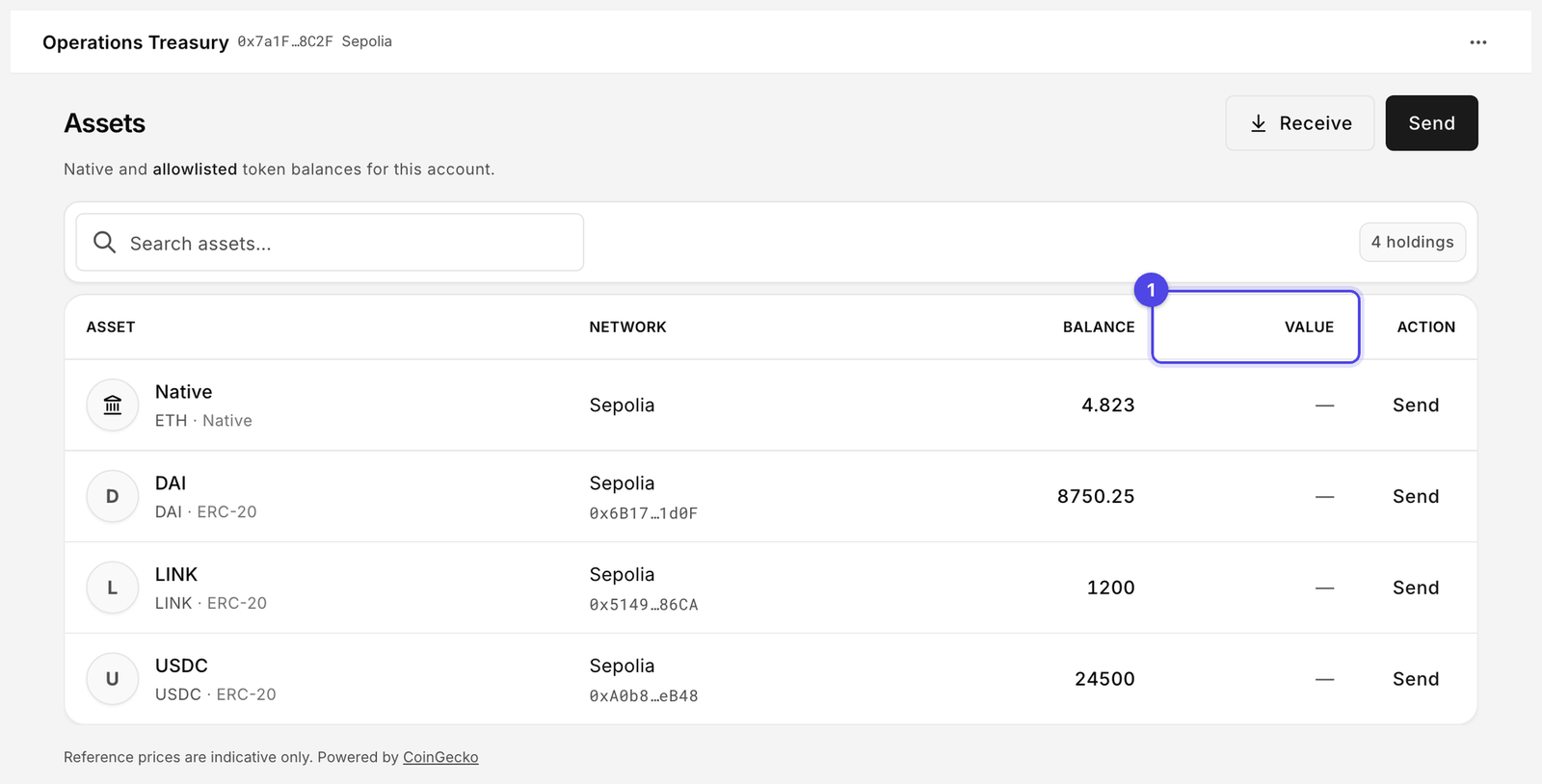
<figure><img src="https://2633730519-files.gitbook.io/~/files/v0/b/gitbook-x-prod.appspot.com/o/spaces%2F0GcVTQuj6X0G3RZ3YY7r%2Fuploads%2Fgit-blob-3517c452d05a2757347e25f652065845dbfda239%2F21-assets.png?alt=media" alt="Assets page listing four holdings with balances, Receive and Send buttons, and a Value column showing a dash on every row" width="1000"><figcaption><p>Assets on Sepolia. Balances are read from the chain and are real. Value (1) reads "—" on every row because reference prices resolve only on Ethereum and Arbitrum One.</p></figcaption></figure>

## What the table shows

| Column      | Meaning                                                                                                       |
| ----------- | ------------------------------------------------------------------------------------------------------------- |
| **Asset**   | Symbol and name. The native coin of the network comes first.                                                  |
| **Network** | The chain the account lives on. An account holds assets on one network only.                                  |
| **Balance** | On-chain balance, read over the Platform's own HTTPS endpoint for the network, not through your wallet's RPC. |
| **Value**   | Reference price in fiat. See below.                                                                           |
| **Action**  | **Send** opens New request with this asset selected.                                                          |

### Native versus ERC-20

The native coin (ETH on Sepolia) always appears. ERC-20 tokens appear only when the token contract is on the account's **Allowed contracts** list. That is deliberate: the account can only interact with tokens the owner has allowlisted, so there is nothing useful to show for other tokens. If a token you expect is missing, ask the owner to add it under [Allowlists](/platform-guide/policies/allowlists.md).

### Reference prices

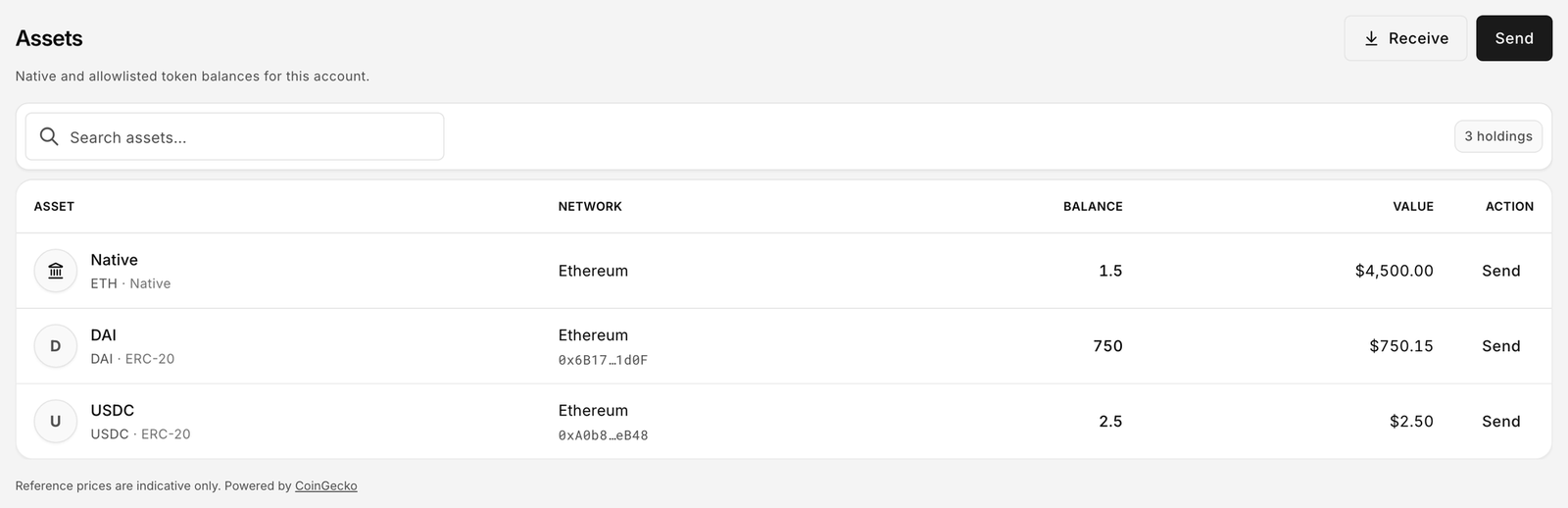
The **Value** column is powered by CoinGecko and is indicative only. Prices resolve on Ethereum and Arbitrum One only. Every other network, Sepolia included, shows "—": the price map is fail-closed, so a chain that is not one of those two is never quoted. The footer reads "Reference prices are indicative only. Powered by CoinGecko".

<figure><img src="https://2633730519-files.gitbook.io/~/files/v0/b/gitbook-x-prod.appspot.com/o/spaces%2F0GcVTQuj6X0G3RZ3YY7r%2Fuploads%2Fgit-blob-baa03d84d23d35b0d369fc6f1ac5599d76254779%2F21b-assets-quoted.png?alt=media" alt="Assets table on a chain where prices resolve, with the Value column showing a fiat amount for each token" width="1000"><figcaption><p>The same table on Ethereum or Arbitrum One, where prices resolve. On Sepolia every Value cell reads "—".</p></figcaption></figure>

Token logos are not shown. Every asset uses a letter badge, or a landmark icon for the native asset.

## Receive assets

1. Click **Receive** (on Assets or on the Overview balance card).
2. The **Receive assets** drawer opens with a QR code and the account address. "Scan with a wallet app to deposit to this account."
3. Use **Copy address** or scan the code from the sending wallet.

<figure><img src="https://2633730519-files.gitbook.io/~/files/v0/b/gitbook-x-prod.appspot.com/o/spaces%2F0GcVTQuj6X0G3RZ3YY7r%2Fuploads%2Fgit-blob-622bdb9dd491e244a135df52a7465306e1d58af5%2F48-receive-assets.png?alt=media" alt="Receive assets drawer with QR code, copy address button and a network warning" width="1000"><figcaption><p>Receiving needs no role and no connected wallet. The warning matters: the account exists on one chain, and funds sent to the same address on another chain are not recoverable.</p></figcaption></figure>

{% hint style="warning" %}
The drawer warns: "Only send supported assets on Sepolia. Tokens sent on the wrong network may be lost permanently." The warning names the account's network; "This network" appears only when the network label cannot be resolved. A Bloxchain account exists on one chain. Funds sent to the same address on a different chain are not recoverable through the Platform.
{% endhint %}

Receiving needs no role and no wallet. Anyone can fund the account.

## Send

**Send** opens [New request](/platform-guide/operate/new-request.md) at the Transfer step with the asset preselected. The recipient must already be on the account's allowlist (**Allowed recipients** for native transfers). Whether the request goes on-chain immediately (**Wallet**) or is signed for later submission (**Sign**) depends on the paths the owner enabled for the Transfer action and on your role.

## Troubleshooting

| Symptom               | Fix                                                                                                                                                                                                     |
| --------------------- | ------------------------------------------------------------------------------------------------------------------------------------------------------------------------------------------------------- |
| Token balance missing | The token is not on **Allowed contracts**. Ask the owner.                                                                                                                                               |
| Value shows "—"       | Expected on Sepolia. Prices resolve on Ethereum and Arbitrum One only.                                                                                                                                  |
| Balance looks stale   | Use the refresh control, or check the footer for "Cannot reach this network right now". On a custom network, check the RPC URL saved under [Settings → Networks](/platform-guide/settings/networks.md). |
| **Send** disabled     | Your wallet holds no role that may request a transfer. See [My access](/platform-guide/operate/my-access.md).                                                                                           |

## Related

* [New request](/platform-guide/operate/new-request.md)
* [Overview](/platform-guide/operate/overview.md)
* [Allowlists](/platform-guide/policies/allowlists.md)
* [Supported networks](/introduction/supported-networks.md)


---

# Agent Instructions
This documentation is published with GitBook. GitBook is the documentation platform designed so that both humans and AI agents can read, navigate, and reason over technical content effectively. Learn more at gitbook.com.

## Querying This Documentation
If you need additional information that is not directly available in this page, you can query the documentation by asking a question.

Perform an HTTP GET request on the following URL with the `ask` and `goal` query parameters:

```
GET https://docs.bloxchain.app/platform-guide/operate/assets.md?ask=<question>&goal=<user_goal>
```

`ask` is the immediate question: it should be specific, self-contained, and written in natural language.
`goal` is what the user is ultimately trying to achieve, the reason they need the answer. Sharing it helps GitBook give you a better, more relevant answer. A goal is most helpful when it describes the outcome the user wants rather than restating the question. For example, with `ask=how do I create an API token`, a goal like `automate deployments from our CI pipeline` lets GitBook tailor the answer to that use case.

The response will contain a direct answer to the question and relevant excerpts and sources from the documentation.

Use this mechanism when the answer is not explicitly present in the current page, you need clarification or additional context, or you want to retrieve related documentation sections.