> For the complete documentation index, see [llms.txt](https://docs.bloxchain.app/llms.txt). Markdown versions of documentation pages are available by appending `.md` to page URLs; this page is available as [Markdown](https://docs.bloxchain.app/platform-guide/help.md).
# Help and setup checks
The Help page shows the status of one account and lists what it still needs before granted actions will run.
**Where:** inside an account → ⋯ More → **Help**
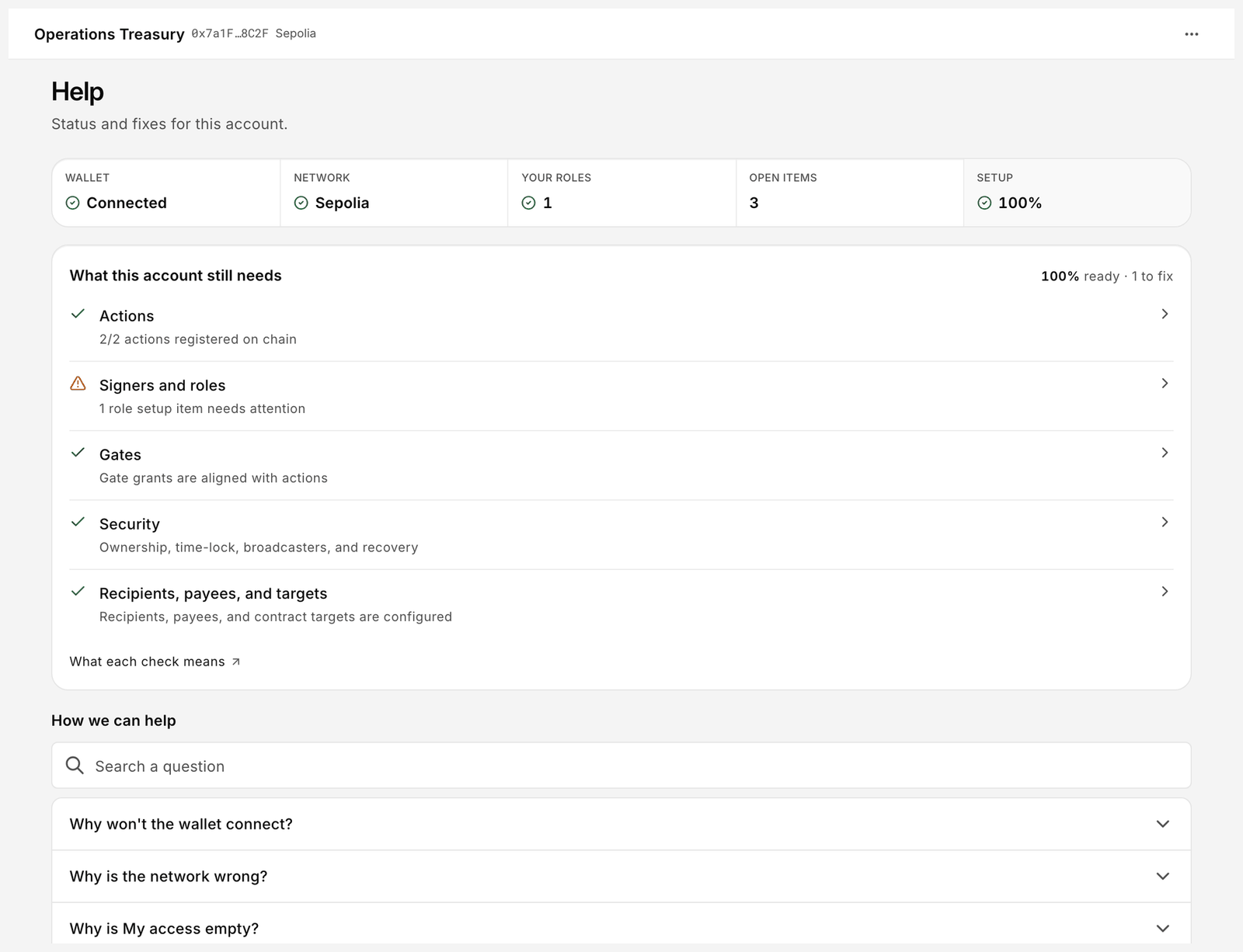
Help for an account that still has configuration gaps.
The heading reads "Status and fixes for this account."
## Status tiles
| Tile | What it shows |
| -------------- | -------------------------------------------------------------------------------------------------------------------------------------------------------------------------------------------------- |
| **Wallet** | Connected or not connected. |
| **Network** | The network name, and whether your wallet is on this account's chain. With no wallet connected it reads "—". "Unknown" appears only when a wallet is connected but the network cannot be resolved. |
| **Your roles** | How many roles your connected address holds on this account. |
| **Open items** | Open requests and stored signed transactions in Approvals. |
| **Setup** | Percentage of setup checks that pass. A warning shows when gaps remain. |
Below the tiles a banner such as "3 configuration gaps can make a granted action revert." links to **See what's missing**.
## What this account still needs
Each row is a check. A tick means the check passes; a warning means something is missing. Click a row to jump to the page that fixes it.
| Check | Passes when | What to do if it fails |
| ----------------------------------- | -------------------------------------------------------------------------------------------------------------------------------------------------------------------------------------------- | ----------------------------------------------------------------------------------------------------------------------------------------------------- |
| **Actions** | Every action you intend to use is registered on-chain. The row reads "N actions registered on chain" when nothing is outstanding, and "N actions still need registration" when something is. | Register the function under [Actions](/platform-guide/policies/actions.md). |
| **Signers and roles** | Every role has at least one signer and roles hold permissions. "No roles with permission" means roles exist but none may perform a step. | Add signers under [Signers](/platform-guide/access/signers.md); assign steps in [Manage permissions](/platform-guide/policies/manage-permissions.md). |
| **Gates** | Gate grants match action grants. Gaps list the function and roles, for example `transfer(address,uint256)` for `TREASURY_APPROVER`. | Grant the gate under [Gates](/platform-guide/policies/gates.md). |
| **Security** | Always passes. The row reads "Ownership, time-lock, broadcasters, and recovery" and is a link into Security, not a check that can fail. | Nothing. Review the roles and the time lock yourself under [Security](/platform-guide/policies/security.md); the checklist will not flag them. |
| **Recipients, payees, and targets** | Allowlists are configured for the actions that need them. | Add entries under [Allowlists](/platform-guide/policies/allowlists.md). |
**What each check means** links to the docs. An action whose permissions or allowlist are missing shows **Flow incomplete** on Actions and is denied by default.
## How we can help (FAQ)
Use **Search a question** or open a question directly. The questions on this screen are the common ones: a wallet that will not connect, a wrong network, an empty **My access**, a request that reverted and an item stuck in Approvals. Each one is answered in full, with the fix, on [Troubleshooting](/resources/troubleshooting.md).
## Related
* [Overview](/platform-guide/operate/overview.md)
* [My access](/platform-guide/operate/my-access.md)
---
# Agent Instructions
This documentation is published with GitBook. GitBook is the documentation platform designed so that both humans and AI agents can read, navigate, and reason over technical content effectively. Learn more at gitbook.com.
## Querying This Documentation
If you need additional information that is not directly available in this page, you can query the documentation by asking a question.
Perform an HTTP GET request on the following URL with the `ask` and `goal` query parameters:
```
GET https://docs.bloxchain.app/platform-guide/help.md?ask=&goal=
```
`ask` is the immediate question: it should be specific, self-contained, and written in natural language.
`goal` is what the user is ultimately trying to achieve, the reason they need the answer. Sharing it helps GitBook give you a better, more relevant answer. A goal is most helpful when it describes the outcome the user wants rather than restating the question. For example, with `ask=how do I create an API token`, a goal like `automate deployments from our CI pipeline` lets GitBook tailor the answer to that use case.
The response will contain a direct answer to the question and relevant excerpts and sources from the documentation.
Use this mechanism when the answer is not explicitly present in the current page, you need clarification or additional context, or you want to retrieve related documentation sections.