> For the complete documentation index, see [llms.txt](https://docs.bloxchain.app/llms.txt). Markdown versions of documentation pages are available by appending `.md` to page URLs; this page is available as [Markdown](https://docs.bloxchain.app/platform-guide/discover.md).
# Discover
Discover helps you pick a preset that matches the job you want a smart account to do, and read what it supports before you deploy.
**Where:** top bar → **Discover** · **You need:** nothing to browse; a wallet on Sepolia to deploy
Discover asks "What do you want to accomplish?"
## What Discover is for
Discover answers one question: what do you want to accomplish? You choose a preset, deploy a smart account, and then operate it from Accounts. The page lists curated first-party presets only. It is not a marketplace of arbitrary contracts.
## Job groups and presets
Use the filters **All**, **Personal Security** and **Team Operations**, or search presets by name.
| Group | Preset | Tagline | Button |
| ----------------- | --------------------- | ------------------------------------------------------------------------------- | ------------------------------------------------------------------------------------------------------------------- |
| Personal Security | **Personal security** | "Cancel a transfer you did not mean, while it is still waiting to settle." | **Set up Personal Security** |
| Team Operations | **Treasury** | "Who may request, wait, and approve — before anyone can clear a payment alone." | **Start Treasury Operations** |
| Team Operations | **Asset Issuance** | "Mint, pause, and admin changes follow your rules for the life of the asset." | **Start Asset Issuance** |
| Team Operations | **Payments** | "Recurring and vendor payments under the same approval rules." | None. The tile carries a **Coming later** status pill and renders no button, and it does not open a details drawer. |
## View details
Click **View details** on a card to open the preset drawer.
The preset drawer for Personal security.
* **Supports** chips: Cancel while waiting, Allowlisted transfers, Ownership & recovery, Configurable roles.
* **Technical** rows: ABI (**Copy**, **Download**, **View**), Supported networks (Sepolia (testnet)), Deploy factory, Account template, Explorer (**View source**), ERC-165 interfaces.
The Deploy factory and Account template are the official factory (BasicFactory) and template (BasicAccount) listed in [Limits and defaults](/resources/limits-and-defaults.md#networks-and-official-addresses).
## What everything here is built on
Below the presets, the page states the audit foundation. See [Audit status](/security/audit-status.md) for the scope and what it does not cover.
## Before you deploy (FAQ)
| Question | Short answer |
| ---------------------------- | ----------------------------------------------------------------------------------------------------------- |
| What do I need to start? | A browser wallet on Sepolia and a little test ETH for gas. |
| Do I have to sign in? | No. Signed out is a full mode, not a trial. |
| What does deploying give me? | A governed smart account you own, deployed in one transaction. |
| Who controls what I deploy? | You do. Non-custodial by architecture. |
| Which networks can I use? | Official deployments are live on the 15 supported networks, in the Platform and in the Protocol. |
| Can I use my own tools? | Yes. The account is a standard contract; the SDK and any explorer can read it. |
| What if my team shares this? | Share the account link. Teammates act with their own wallets and roles. An organization adds a shared list. |
| Is this audited? | The Protocol core is audited; the scope and its limits are on [Audit status](/security/audit-status.md). |
## What happens when you choose a preset today
Be aware of how presets work in the current alpha:
1. The preset button opens the same **Deploy Smart Account** dialog you reach from Accounts. See [Deploy a smart account](/platform-guide/accounts/deploy.md).
2. Every preset deploys the same governed account. The preset does not pre-configure roles, actions or allowlists.
3. The new account opens in the **Vault** state: a finished, locked account with no spending capability yet. See [what a new account already has](/platform-guide/policies/actions.md#what-a-new-account-already-has).
4. You add capabilities afterwards by configuring [Roles](/platform-guide/access/roles.md), [Actions](/platform-guide/policies/actions.md), [Gates](/platform-guide/policies/gates.md) and [Allowlists](/platform-guide/policies/allowlists.md). Applying capabilities from the Marketplace arrives in a later release.
{% hint style="info" %}
Treat the preset as a guide to what you will configure, not as a one-click setup. The [guides](/guides/guides.md) walk through each job step by step.
{% endhint %}
## The Marketplace
**Marketplace** is a separate destination in the top bar, at `bloxchain.app/marketplace`. Where Discover starts from the job you want to do, the Marketplace starts from the product: the account contract and the capabilities you can add to it. The page reads "Official products you can deploy and govern… Curated first-party only." It is not a store for third-party contracts.
The Marketplace lists curated first-party products only.
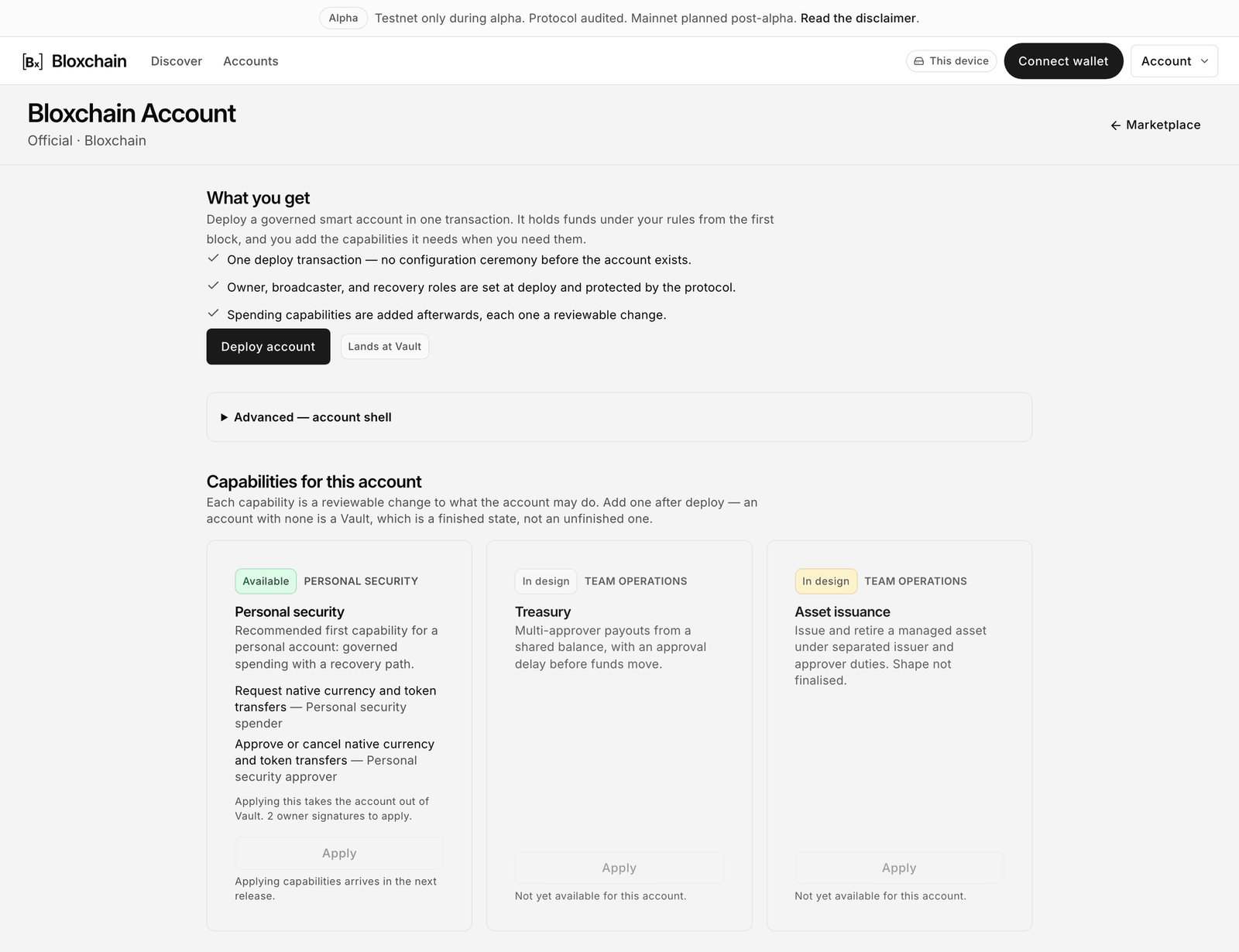
One product is listed today, the **Bloxchain Account**: "A governed account you own. Deploy it in one transaction, then add the capabilities the job needs." Its product page carries **What you get** (ownership with recovery, time-locked requests, and roles you define), **Deploy account**, an **Advanced** account shell section, and **Capabilities for this account**.
The Bloxchain Account product page.
**Deploy account** goes to the same dialog, with the same outcome described above; the note beside it reads "Lands at Vault". The **Advanced** section is where the two account shells are explained: **Base**, and **Web3**, which adds EIP-1271 so external apps can verify signatures from the account and needs a time lock of at least 1 day.
| Capability | Status | Apply |
| ----------------- | --------- | ------------------------------------------------------------- |
| Personal security | Available | Not yet: "Applying capabilities arrives in the next release." |
| Treasury | In design | Disabled |
| Asset issuance | In design | Disabled |
The **Apply** buttons are disabled in this release, so the Marketplace adds nothing you cannot already do from Discover and Accounts, which is why it is covered here rather than on a page of its own. To give an account a capability today, configure it by hand: roles, actions, gates and allowlists. The [guides](/guides/guides.md) show the settings for each job.
## Related
* [Personal security guide](/guides/personal-security.md)
* [Team treasury guide](/guides/team-treasury.md)
* [Asset issuance guide](/guides/asset-issuance.md)
* [Roadmap](/resources/roadmap.md)
---
# Agent Instructions
This documentation is published with GitBook. GitBook is the documentation platform designed so that both humans and AI agents can read, navigate, and reason over technical content effectively. Learn more at gitbook.com.
## Querying This Documentation
If you need additional information that is not directly available in this page, you can query the documentation by asking a question.
Perform an HTTP GET request on the following URL with the `ask` and `goal` query parameters:
```
GET https://docs.bloxchain.app/platform-guide/discover.md?ask=&goal=
```
`ask` is the immediate question: it should be specific, self-contained, and written in natural language.
`goal` is what the user is ultimately trying to achieve, the reason they need the answer. Sharing it helps GitBook give you a better, more relevant answer. A goal is most helpful when it describes the outcome the user wants rather than restating the question. For example, with `ask=how do I create an API token`, a goal like `automate deployments from our CI pipeline` lets GitBook tailor the answer to that use case.
The response will contain a direct answer to the question and relevant excerpts and sources from the documentation.
Use this mechanism when the answer is not explicitly present in the current page, you need clarification or additional context, or you want to retrieve related documentation sections.