> For the complete documentation index, see [llms.txt](https://docs.bloxchain.app/llms.txt). Markdown versions of documentation pages are available by appending `.md` to page URLs; this page is available as [Markdown](https://docs.bloxchain.app/platform-guide/access/signers.md).

# Signers

Add an address to the account and give it one or more roles, or change the roles an existing signer holds.

**Where:** Account → ON-CHAIN ACCESS → **Signers** · **You need:** owner wallet connected; the role must exist and have free slots

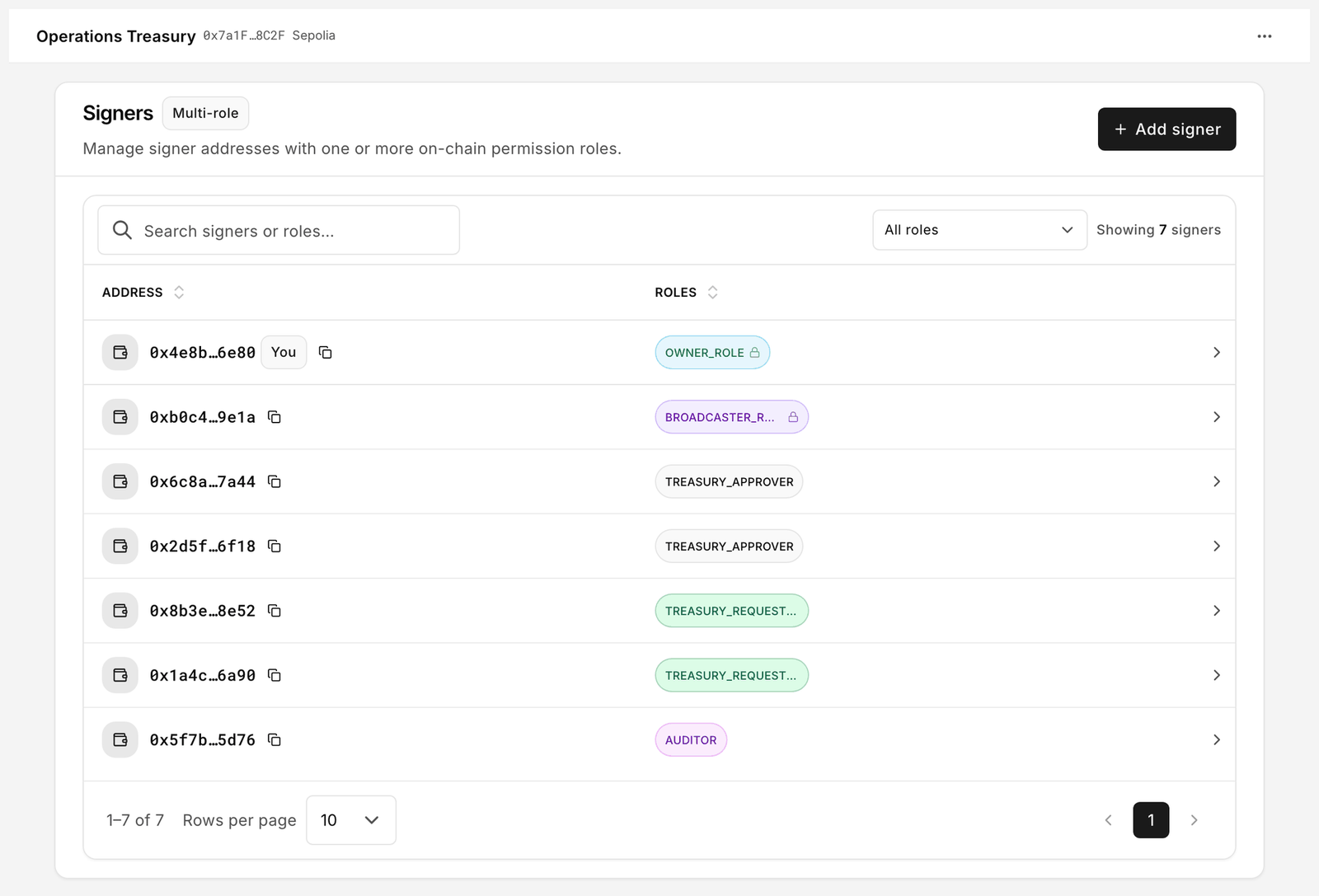
<figure><img src="https://2633730519-files.gitbook.io/~/files/v0/b/gitbook-x-prod.appspot.com/o/spaces%2F0GcVTQuj6X0G3RZ3YY7r%2Fuploads%2Fgit-blob-78686a2021e34f13284245bb8dab7121945f0e91%2F28-signers.png?alt=media" alt="Signers page with Add signer button and a table of addresses and their role chips" width="1000"><figcaption><p>Every address that holds a role, with the roles it holds. An address missing from this table can read the account but cannot act on it.</p></figcaption></figure>

## The page

The **Multi-role** pill reminds you that one address may hold several roles. The table has two columns:

| Column      | Meaning                                                                                |
| ----------- | -------------------------------------------------------------------------------------- |
| **Address** | The signer's address, with a **You** badge on your connected wallet and a copy control |
| **Roles**   | One chip per role. Protected roles carry a lock icon.                                  |

**Search signers or roles** filters by either. The **All roles** dropdown narrows the list to one role.

## Add a signer

1. Click **Add signer**.
2. Enter the wallet **address** (0x…).
3. Tick one or more **roles**. Only custom roles are offered; protected roles are managed in Security.
4. Confirm. The change is added to a pending batch (see below).

A role that is at its **Max wallets** limit cannot take another signer. Raise the limit or free a slot first; the count is visible on [Roles](/platform-guide/access/roles.md) as **Signers n / max**.

## The signer drawer

<figure><img src="https://2633730519-files.gitbook.io/~/files/v0/b/gitbook-x-prod.appspot.com/o/spaces%2F0GcVTQuj6X0G3RZ3YY7r%2Fuploads%2Fgit-blob-6cab8a328427ffb75c5a5b85463e477012120fdd%2F47-signer-details.png?alt=media" alt="Signer drawer with Roles and Actions segments and a Manage signer roles button" width="1000"><figcaption><p>One signer, opened. Roles are the hats this address wears; Actions is what those hats add up to. Changing either is a governed request, not a local setting.</p></figcaption></figure>

Click a row to open it.

* **Roles** lists the roles this address holds.
* **Actions** lists every action step this address may perform, derived from its roles. It is the admin's view of what the signer sees on [My access](/platform-guide/operate/my-access.md).
* **Manage signer roles** lets you add or remove custom roles for this address in one edit.

For protected roles the drawer says so on both tabs: "Wallets that hold this system role. Assignment is managed in Security." on members, and "On-chain access for this system role. Members are managed in Security." on permissions. To change the owner, recovery address or broadcasters, go to [Security](/platform-guide/policies/security.md).

## How changes are applied

Role membership lives on-chain, so nothing is saved until it is executed:

1. Your edits collect into a batch. You can keep editing across several signers.
2. **Sign**: the owner wallet signs the batch as one meta-transaction. No gas at this point.
3. **Execute**: a wallet that may submit (a **Broadcaster**, or the optional Bloxchain broadcaster when signed in) sends it on-chain and pays gas.

Until Execute confirms, the Signers page still shows the old state. The pending batch appears in [Approvals](/platform-guide/operate/approvals.md) like any other signed transaction.

## Removing a signer

Open the drawer, **Manage signer roles**, untick every role, then sign and execute. An address with no roles disappears from the list. The address itself is not "banned"; it simply has no rights.

## Good practice

* Give each person one address per role where you can; it keeps History readable.
* Keep the owner wallet out of day-to-day custom roles. Use it to approve and to administer.
* Broadcasters need only the **Broadcaster** role. They submit; they do not decide.

## Related

* [On-chain access overview](/platform-guide/access.md)
* [Roles and permissions guide](/guides/roles-and-permissions.md)


---

# Agent Instructions
This documentation is published with GitBook. GitBook is the documentation platform designed so that both humans and AI agents can read, navigate, and reason over technical content effectively. Learn more at gitbook.com.

## Querying This Documentation
If you need additional information that is not directly available in this page, you can query the documentation by asking a question.

Perform an HTTP GET request on the following URL with the `ask` and `goal` query parameters:

```
GET https://docs.bloxchain.app/platform-guide/access/signers.md?ask=<question>&goal=<user_goal>
```

`ask` is the immediate question: it should be specific, self-contained, and written in natural language.
`goal` is what the user is ultimately trying to achieve, the reason they need the answer. Sharing it helps GitBook give you a better, more relevant answer. A goal is most helpful when it describes the outcome the user wants rather than restating the question. For example, with `ask=how do I create an API token`, a goal like `automate deployments from our CI pipeline` lets GitBook tailor the answer to that use case.

The response will contain a direct answer to the question and relevant excerpts and sources from the documentation.

Use this mechanism when the answer is not explicitly present in the current page, you need clarification or additional context, or you want to retrieve related documentation sections.
