> For the complete documentation index, see [llms.txt](https://docs.bloxchain.app/llms.txt). Markdown versions of documentation pages are available by appending `.md` to page URLs; this page is available as [Markdown](https://docs.bloxchain.app/platform-guide/access/roles.md).

# Roles

Create the named roles your workflow needs, control how many wallets each can hold, and see at a glance which roles are missing signers, permissions or gates.

**Where:** Account → ON-CHAIN ACCESS → **Roles** · **You need:** owner wallet connected

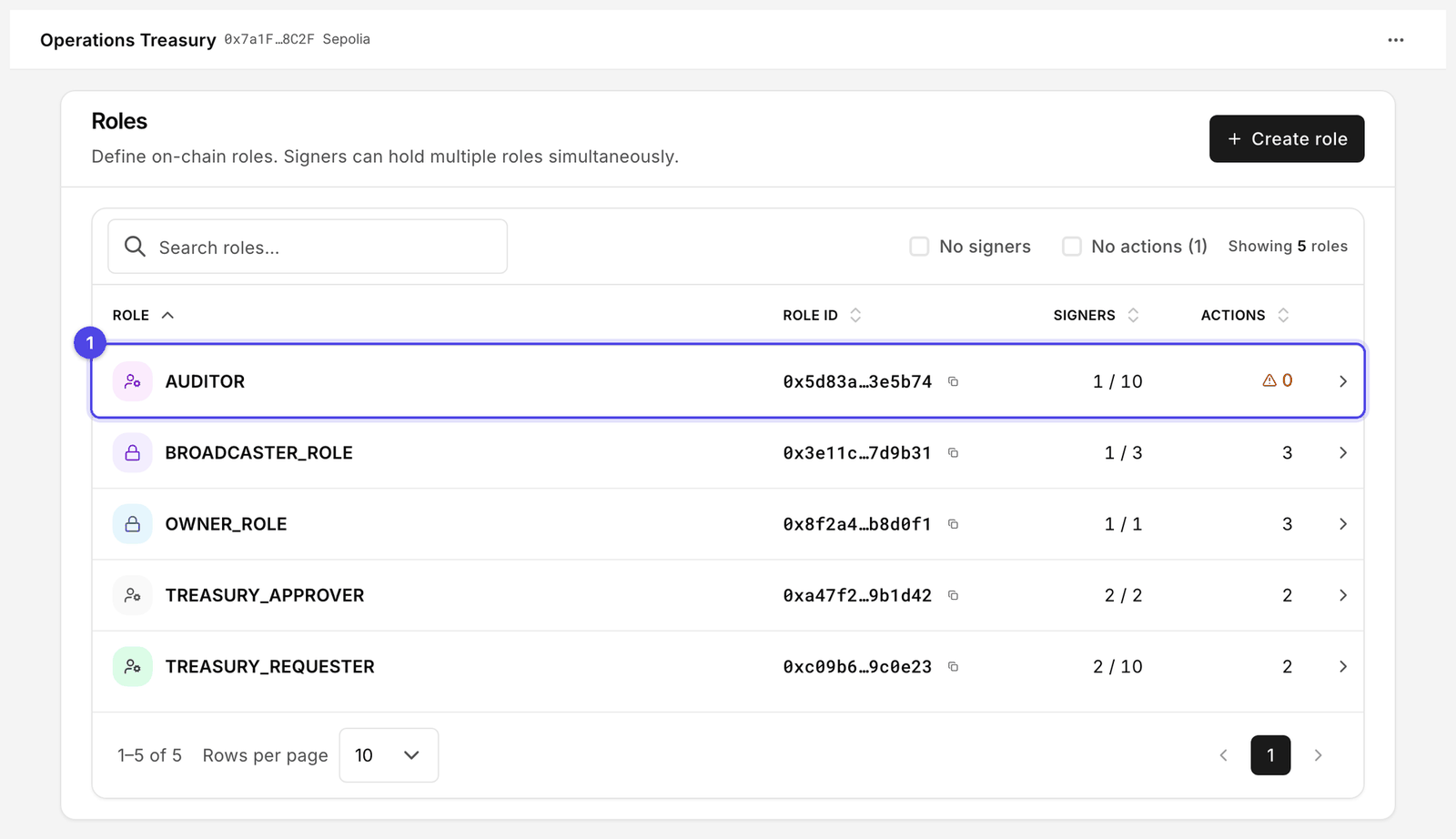
<figure><img src="https://2633730519-files.gitbook.io/~/files/v0/b/gitbook-x-prod.appspot.com/o/spaces%2F0GcVTQuj6X0G3RZ3YY7r%2Fuploads%2Fgit-blob-a743cceda917e2f79e7d3260f19cec652a3b57c7%2F29-roles.png?alt=media" alt="Roles page with Create role button and a table of five roles showing Role, Role ID, Signers and Actions columns, with AUDITOR flagged as having no actions" width="1000"><figcaption><p>Five roles on a configured account. The padlock marks the two protected roles fixed at deploy. AUDITOR (1) carries a warning because it holds no actions, and the Signers column shows how close each role is to its wallet limit.</p></figcaption></figure>

## Protected and custom roles

Every account has three protected roles: **Owner**, **Broadcaster** and **Recovery**. They are created at deploy, cannot be renamed or removed, and their members are edited in [Security](/platform-guide/policies/security.md). Their drawer reads "On-chain access for this system role. Members are managed in Security."

Custom roles are yours: Operator, Approver, Treasurer, whatever your process needs. You choose the name, the wallet limit, the members and the permissions.

## Create a role

1. Click **Create role**.
2. Enter a **Role name**. It is stored on-chain and shown everywhere in the Platform; keep it short and unambiguous.
3. Set **Max wallets**, the most addresses that may hold this role at once. Pick the smallest number that fits; you can raise it later.
4. Confirm. The role is added to a pending batch that you then **Sign** and **Execute** (see [Signers](/platform-guide/access/signers.md#how-changes-are-applied)).

A new role has no signers, no permissions and no gates. It does nothing until you configure it.

## The table

| Column      | Meaning                                                                                                        |
| ----------- | -------------------------------------------------------------------------------------------------------------- |
| **Role**    | Name, with a **Gates gap** link when the role has permissions whose gate is not granted. The link opens Gates. |
| **Role ID** | The on-chain hash that identifies the role, with a copy control. Developers use it with the SDK.               |
| **Signers** | **n / max**: current members over the wallet limit                                                             |
| **Actions** | How many actions this role has at least one permission on                                                      |

The header pill counts roles that "need gates". Two checkboxes filter the list:

* **No signers**: roles with permissions but nobody holding them. Add members on Signers.
* **No actions**: roles with members but no permissions. Assign steps under Manage permissions.

## The role drawer

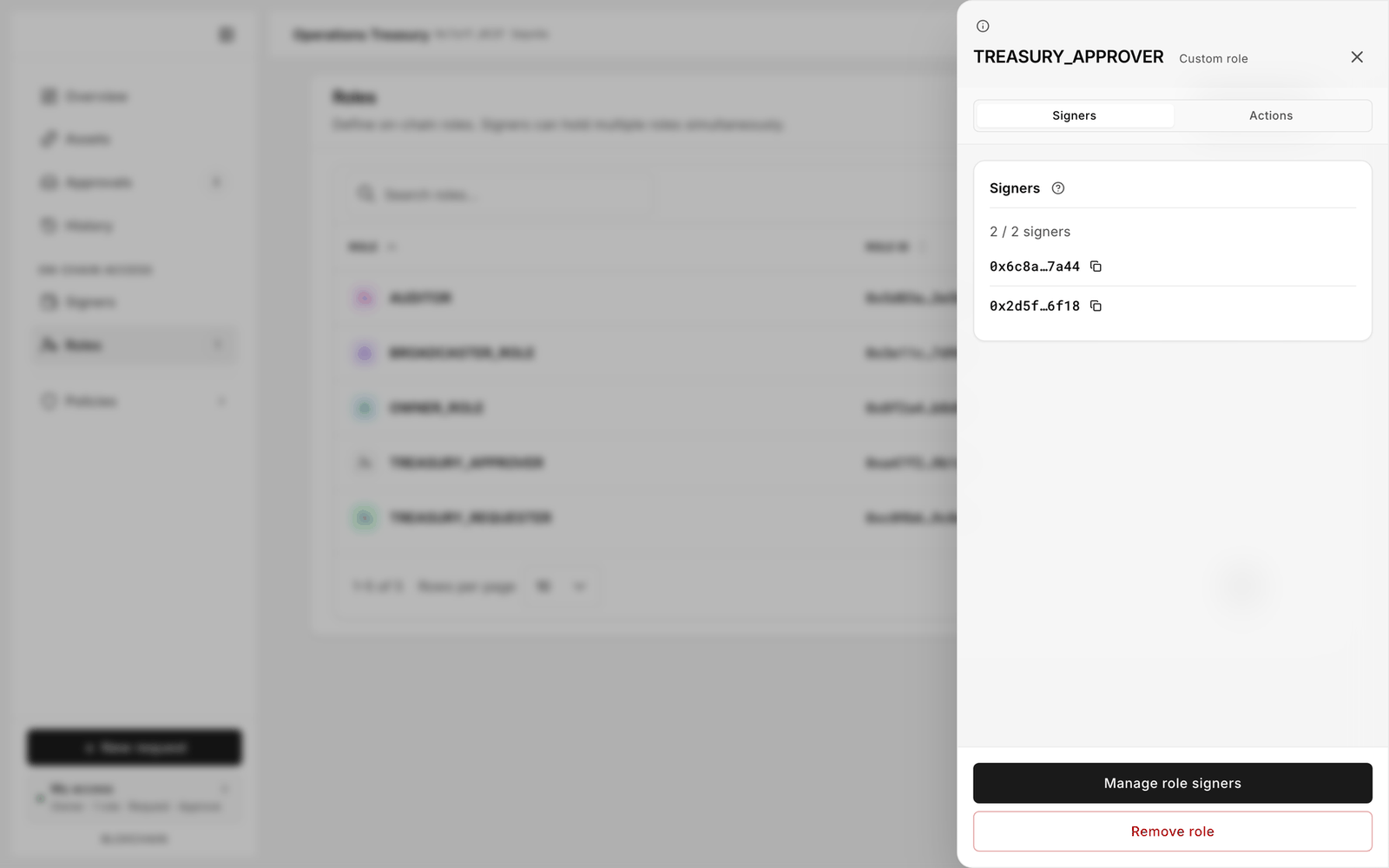
<figure><img src="https://2633730519-files.gitbook.io/~/files/v0/b/gitbook-x-prod.appspot.com/o/spaces%2F0GcVTQuj6X0G3RZ3YY7r%2Fuploads%2Fgit-blob-d63172d1d90f688daefbc6fd470af4933bb08688%2F30-role-details.png?alt=media" alt="Role drawer for a custom role named Operator with Signers and Actions segments and buttons to manage signers, manage permissions and remove the role" width="1000"><figcaption><p>A custom role, opened. Signers is who holds it; Actions is what they may do with it. Remove role is available here because the role is custom: the two protected roles cannot be removed.</p></figcaption></figure>

Click a row.

* **Signers** lists the members. **Manage role signers** adds or removes addresses.
* **Actions** lists the steps this role may perform, per action and path. **Manage role permissions** opens the same editor as Actions → [Manage permissions](/platform-guide/policies/manage-permissions.md), scoped to this role.
* **Remove role** deletes the custom role. It also removes all its members and, because gates are bound to roles, clears every gate the role held. This is the only way to clear a gate.

## Permanent grants

Some actions cannot have a permission revoked once granted; the Platform labels these **permanent grants**. Removing the role is the only way to withdraw them. Before you grant a permanent step to a role, be sure the role's membership rules are what you want.

## Deleting a role

1. Remove or reassign its signers so nobody loses access unexpectedly.
2. Open the drawer and click **Remove role**.
3. Sign and execute the batch.

Pending requests raised under that role are not cancelled by removing it; approvers should clear them first.

## Related

* [Gates](/platform-guide/policies/gates.md)
* [On-chain access overview](/platform-guide/access.md)
* [Design roles and permissions](/guides/roles-and-permissions.md)


---

# Agent Instructions
This documentation is published with GitBook. GitBook is the documentation platform designed so that both humans and AI agents can read, navigate, and reason over technical content effectively. Learn more at gitbook.com.

## Querying This Documentation
If you need additional information that is not directly available in this page, you can query the documentation by asking a question.

Perform an HTTP GET request on the following URL with the `ask` and `goal` query parameters:

```
GET https://docs.bloxchain.app/platform-guide/access/roles.md?ask=<question>&goal=<user_goal>
```

`ask` is the immediate question: it should be specific, self-contained, and written in natural language.
`goal` is what the user is ultimately trying to achieve, the reason they need the answer. Sharing it helps GitBook give you a better, more relevant answer. A goal is most helpful when it describes the outcome the user wants rather than restating the question. For example, with `ask=how do I create an API token`, a goal like `automate deployments from our CI pipeline` lets GitBook tailor the answer to that use case.

The response will contain a direct answer to the question and relevant excerpts and sources from the documentation.

Use this mechanism when the answer is not explicitly present in the current page, you need clarification or additional context, or you want to retrieve related documentation sections.