> For the complete documentation index, see [llms.txt](https://docs.bloxchain.app/llms.txt). Markdown versions of documentation pages are available by appending `.md` to page URLs; this page is available as [Markdown](https://docs.bloxchain.app/introduction/how-it-works.md).

# How governed operations work

Every change to a Bloxchain smart account follows one governed lifecycle: a request is posted, it waits, an approver reviews it, the contract executes it, and the result is recorded on-chain. Signing is not the final decision. Rules apply from request through settlement.

## The governed lifecycle

| Step                 | What happens                                                                                                      | Where you see it                                                          |
| -------------------- | ----------------------------------------------------------------------------------------------------------------- | ------------------------------------------------------------------------- |
| **Request**          | A signer whose role may request an action posts the request. Nothing moves yet.                                   | **New request**, then the request appears in **Approvals**                |
| **Wait**             | For a delayed request, the account's time lock runs. While it runs the request can be cancelled but not approved. | **Approvals**, **State** column shows **Blocked** with the remaining time |
| **Review & approve** | An approver checks the decoded request and approves or cancels it.                                                | **Approve request** dialog                                                |
| **Execute**          | The contract checks permissions and allowlists again, then runs the action.                                       | Status **Executing**, then **Executed**                                   |
| **Record**           | The outcome (executed, cancelled or failed) is written on-chain and listed for the life of the account.           | **History**                                                               |

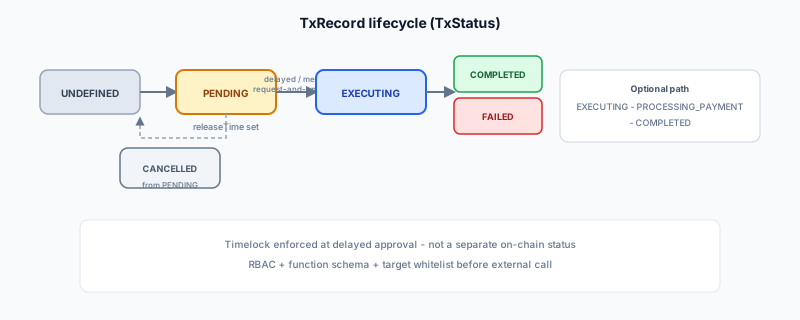
<figure><img src="https://2633730519-files.gitbook.io/~/files/v0/b/gitbook-x-prod.appspot.com/o/spaces%2F0GcVTQuj6X0G3RZ3YY7r%2Fuploads%2Fgit-blob-7b075c8ceabb0e82f5e5dd6fc484f4887338c1e3%2Ftx-lifecycle.svg?alt=media" alt="Diagram of a transaction record moving from request through pending, executing and completed, with cancel and fail branches"><figcaption><p>The on-chain record behind every request. Each status change is a contract state transition.</p></figcaption></figure>

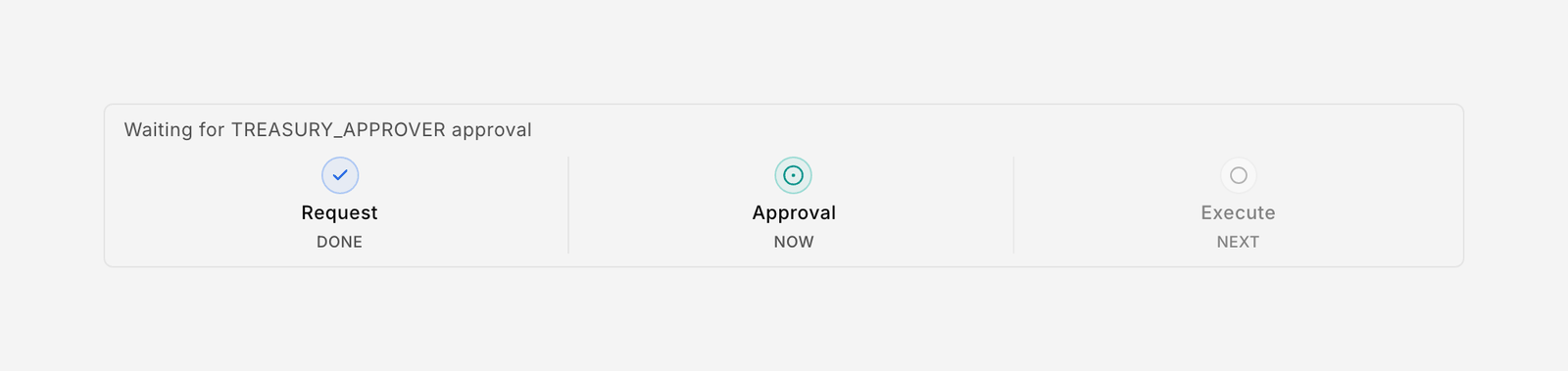
<figure><img src="https://2633730519-files.gitbook.io/~/files/v0/b/gitbook-x-prod.appspot.com/o/spaces%2F0GcVTQuj6X0G3RZ3YY7r%2Fuploads%2Fgit-blob-ff483b1b44475ecc3fdf0796df3e74c2fe3bd3bb%2F43-lifecycle.png?alt=media" alt="Lifecycle timeline component showing Request, Approval and Execute stages" width="1000"><figcaption><p>The same lifecycle as the Platform shows it inside a request.</p></figcaption></figure>

## Three execution paths

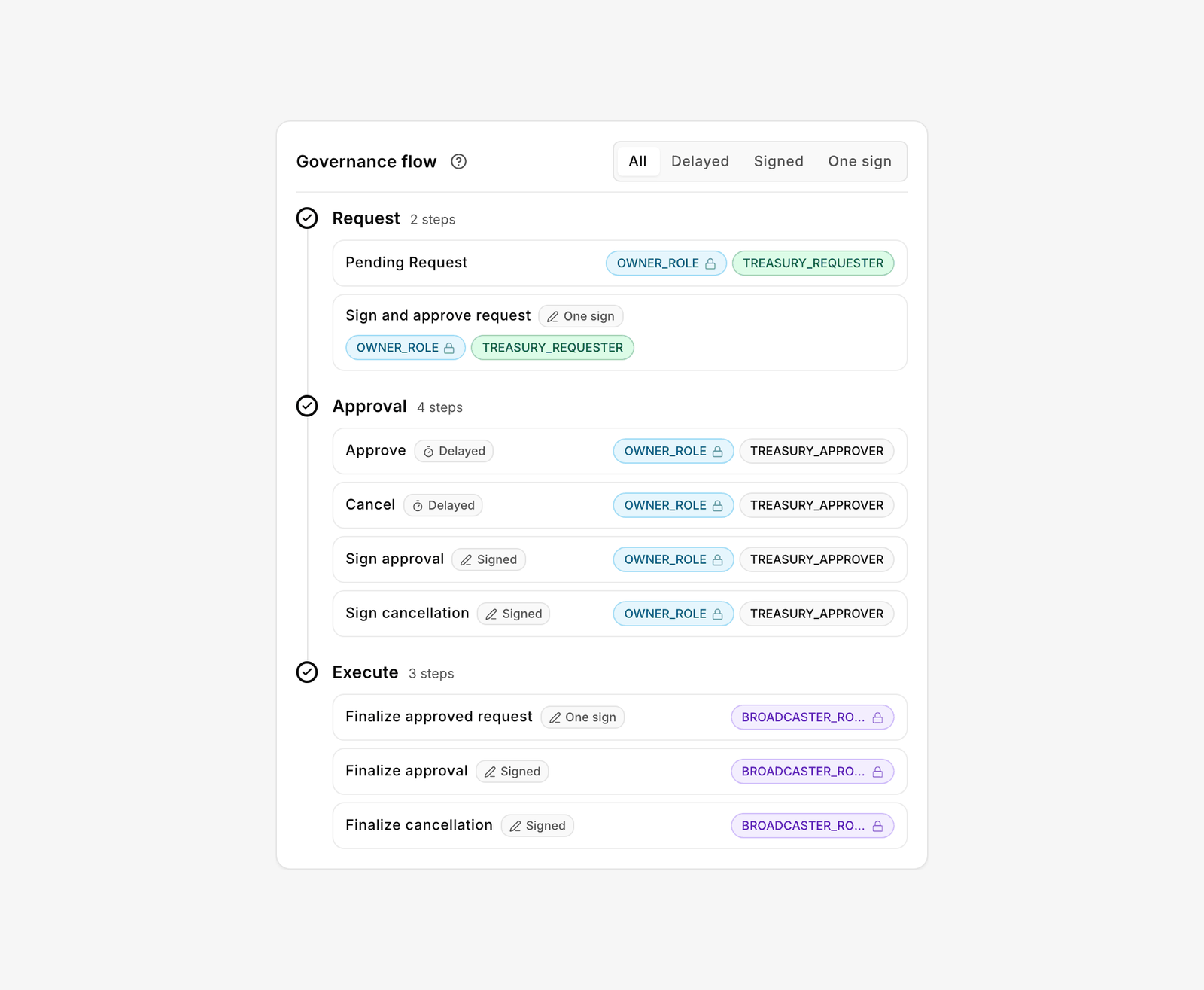
An action may enable up to three ways of moving through the lifecycle. Which paths exist, and who may take each step, is set per action under **Policies → Actions**.

| Path                | Tab label | What happens                                                                                                                                | Typical use                                                              |
| ------------------- | --------- | ------------------------------------------------------------------------------------------------------------------------------------------- | ------------------------------------------------------------------------ |
| **Delayed release** | Delayed   | The request is posted on-chain with your wallet. The time lock runs. An approver approves (or cancels) on-chain, and the action executes.   | Large transfers, ownership changes, anything you want a chance to cancel |
| **Signed approval** | Signed    | The request is posted on-chain. The approver signs an approval or cancellation off-chain. A broadcaster submits it and the action executes. | Approvers who should not pay gas or who approve from another device      |
| **One signature**   | One sign  | The requester signs request and approval in one signature. A broadcaster submits and executes. No wait.                                     | Routine, pre-authorised operations                                       |

In the compose screen this collapses to a two-way toggle. **Wallet** posts the request on-chain (the delayed path). **Sign** produces a signed meta-transaction that you, a permitted role or a broadcaster submits before it expires (the default expiry is shown, for example **Meta-tx expires in 1h**). A meta-transaction is a signed message that someone else can submit on your behalf; the contract verifies the signature, not the submitter. If you are signed in, the optional **Bloxchain broadcaster** checkbox submits it for you where that relay is available.

The time lock is enforced on the delayed path only. An approval that arrives as a signed meta-transaction is not held by the time lock; the signer's role permission and the allowlists still apply.

## Who does what

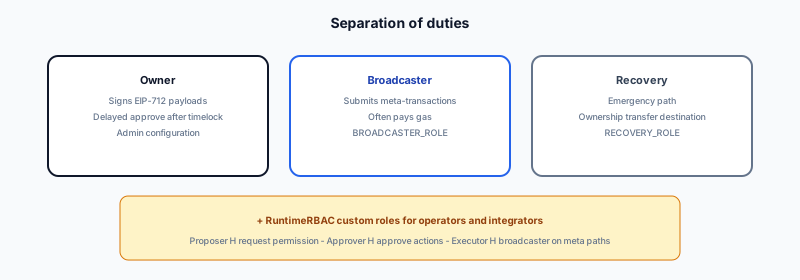
<figure><img src="https://2633730519-files.gitbook.io/~/files/v0/b/gitbook-x-prod.appspot.com/o/spaces%2F0GcVTQuj6X0G3RZ3YY7r%2Fuploads%2Fgit-blob-78b5f5d5237dc41134861952c7c6d91ac7fcb246%2Froles-separation.svg?alt=media" alt="Diagram showing Owner, Broadcaster and Recovery as separate addresses with separate duties"><figcaption><p>Separation of duties: three protected roles, three addresses.</p></figcaption></figure>

| Role            | Set                                                                                              | What it may do                                                                            |
| --------------- | ------------------------------------------------------------------------------------------------ | ----------------------------------------------------------------------------------------- |
| **Owner**       | At deploy; changeable through a time-locked transfer                                             | Controls the account, approves delayed requests, configures roles, actions and allowlists |
| **Broadcaster** | One address at deploy; up to three in total, the rest added afterwards under Policies → Security | Submits signed meta-transactions and pays the gas for them                                |
| **Recovery**    | At deploy                                                                                        | Can take ownership in an emergency (a time-locked ownership transfer)                     |

These are protocol security roles. Use a different address for each. Beyond them, the owner creates **custom roles** (a name and a maximum number of wallets) and adds **signers**, the addresses that hold one or more roles. A signer's roles decide which steps of which actions that address may perform. Check your own from **My access** inside an account.

## Policies

**Actions** are registered functions the account can perform. The Actions page lists each one by its on-chain operation name in upper case, with the function signature underneath: `NATIVE_TRANSFER` (`__bloxchain_native_transfer__()`), `ERC20_TRANSFER` (`transfer(address,uint256)`), and administration operations such as `CONTROLLER_CONFIG_BATCH` (`executeGuardConfigBatch((uint8,bytes)[])`). A new account has these registered at deploy; you add your own functions, such as `mint(address,uint256)`, with **Add action**.

Each action carries **permissions** per step across three phases: **Request**, **Approval** and **Execute**. For every execution path you assign which role may perform each step. The editor is **Manage permissions**.

<figure><img src="https://2633730519-files.gitbook.io/~/files/v0/b/gitbook-x-prod.appspot.com/o/spaces%2F0GcVTQuj6X0G3RZ3YY7r%2Fuploads%2Fgit-blob-39bdd93f0a1fd11bcd6245ca22d31974e016856e%2F45-action-governance-flow.png?alt=media" alt="Governance flow card for an action showing the roles assigned to the Request, Approval and Execute steps, with a path filter" width="1000"><figcaption><p>The governance flow of one action: which role may take each step on each path.</p></figcaption></figure>

**Gates** are role-scoped on-chain authorizations that let a granted action run. A role needs both the permission on the action and the gate. Gates are permanent for that role; deleting a custom role clears its gates, and system-role gates stay on.

**Allowlists** restrict destinations: **Recipients** for native transfers, **Payees** for attached payments, and **Allowed contracts** (with the functions they may be called with) for contract calls. An empty list allows nothing.

The **time lock** is the minimum wait before a delayed request can be approved. It must be greater than zero and applies to every delayed request on the account, including ownership transfer.

## Two labels worth knowing

**Flow incomplete** appears on an action whose permissions or allowlist are not configured. The account denies that action by default until they are. The action drawer lists what is missing under **Related setup**.

**Vault** is a freshly deployed account with no spending capability. It has an owner, a recovery address, broadcasters and a time lock, and it can receive assets. The transfer actions are registered, but no role is permitted to use them and every allowlist is empty, so nothing can move. It is a finished, locked state, not an error.

## Statuses you see

The Platform shows friendly labels. Underneath, the contract stores one of a few statuses.

| You see                                                    | On-chain status   | Meaning                                                                |
| ---------------------------------------------------------- | ----------------- | ---------------------------------------------------------------------- |
| **New**, **Awaiting Approval**, **Awaiting Your Approval** | PENDING           | Request posted; time lock running or waiting for an approver           |
| **Ready to Execute**, **Ready to Submit Cancellation**     | PENDING           | Time lock complete, or a signed cancellation is ready                  |
| **Approved**, **Submitting**                               | PENDING           | A signed approval exists on this device but has not been submitted yet |
| **Executing**, **Pending Confirmation**                    | EXECUTING         | Approval submitted; the action is running                              |
| **Executed**, **Confirmed**                                | COMPLETED         | Done and recorded                                                      |
| **Cancelled**                                              | CANCELLED         | Cancelled before execution                                             |
| **Failed**                                                 | FAILED            | The action ran and reverted; the failure is recorded                   |
| **Expired**                                                | PENDING (request) | A signed payload passed its expiry. Sign again or cancel the request   |

In **Approvals** the **State** column summarises this as **Blocked** (time lock running), **Ready**, **Cancel** with time left, or **Expired**. **History** filters settled items by **Executed**, **Cancelled** and **Failed**.

## Related

* [Your first governed request](/get-started/first-request.md)
* [Actions](/platform-guide/policies/actions.md) and [Manage permissions](/platform-guide/policies/manage-permissions.md)
* [Glossary](/resources/glossary.md)


---

# Agent Instructions
This documentation is published with GitBook. GitBook is the documentation platform designed so that both humans and AI agents can read, navigate, and reason over technical content effectively. Learn more at gitbook.com.

## Querying This Documentation
If you need additional information that is not directly available in this page, you can query the documentation by asking a question.

Perform an HTTP GET request on the following URL with the `ask` and `goal` query parameters:

```
GET https://docs.bloxchain.app/introduction/how-it-works.md?ask=<question>&goal=<user_goal>
```

`ask` is the immediate question: it should be specific, self-contained, and written in natural language.
`goal` is what the user is ultimately trying to achieve, the reason they need the answer. Sharing it helps GitBook give you a better, more relevant answer. A goal is most helpful when it describes the outcome the user wants rather than restating the question. For example, with `ask=how do I create an API token`, a goal like `automate deployments from our CI pipeline` lets GitBook tailor the answer to that use case.

The response will contain a direct answer to the question and relevant excerpts and sources from the documentation.

Use this mechanism when the answer is not explicitly present in the current page, you need clarification or additional context, or you want to retrieve related documentation sections.