> For the complete documentation index, see [llms.txt](https://docs.bloxchain.app/llms.txt). Markdown versions of documentation pages are available by appending `.md` to page URLs; this page is available as [Markdown](https://docs.bloxchain.app/introduction/free-sign-in-organizations.md).

# Free, sign-in, and organizations

You can use the Bloxchain Platform fully without an account. Signing in gives you an identity: a profile, privacy tools and organization invites. Hosted services, including alerts and a shared cloud workspace, come with a paid organization. This page explains what each level gives you and where your data lives.

## Free: everything on this device

Open bloxchain.app, connect a wallet, and you have the whole operating surface:

* Deploy or import smart accounts.
* Fund them, create requests, approve, sign and submit transactions.
* Configure roles, signers, actions, gates and allowlists.
* Add custom networks.
* Export and import signed files for cross-device approvals.

Your inventory (the account list and any custom networks) is stored in the browser only. The **This device** badge in the top bar tells you so. Bloxchain keeps no copy. To move it to another browser, or to survive clearing site data, export a backup from **Settings → Backup**.

{% hint style="warning" %}
The exported backup file is the only copy of your account list. Your on-chain accounts are unaffected if you lose it, but you would need to import them again by address.
{% endhint %}

Signed out is a full mode, not a trial.

<figure><img src="https://2633730519-files.gitbook.io/~/files/v0/b/gitbook-x-prod.appspot.com/o/spaces%2F0GcVTQuj6X0G3RZ3YY7r%2Fuploads%2Fgit-blob-d5e94a66282ca82e628f7d68474daa3890799b45%2F16-account-menu.png?alt=media" alt="Account menu when signed out, showing Settings, Theme and Sign in" width="1000"><figcaption><p>The Account menu signed out. Settings and Theme work as normal; Sign in is the only item that needs an account, and everything else on the Platform is already available.</p></figcaption></figure>

## What signing in adds

Sign in if you have early access. Otherwise join the waitlist from the same dialog, which offers **Join waitlist**. The Free path needs no account and is open to everyone.

A signed-in account is an identity on top of the Free path:

* **Profile and security** settings, and a **Privacy** page with personal data export.
* **Organization invites**, so a team can bring you into its workspace.
* A way to **create an organization** and choose its plan.

Signing in on its own does not add alerts or watched addresses. Those belong to an organization on Pro (see below).

Signing in does not upload your account list. It stays on this device, and paying for an organization does not copy it there either. The Accounts page says so in its footer: alerts, shared networks and a team workspace come with an organization on Pro, and your local list stays on this device.

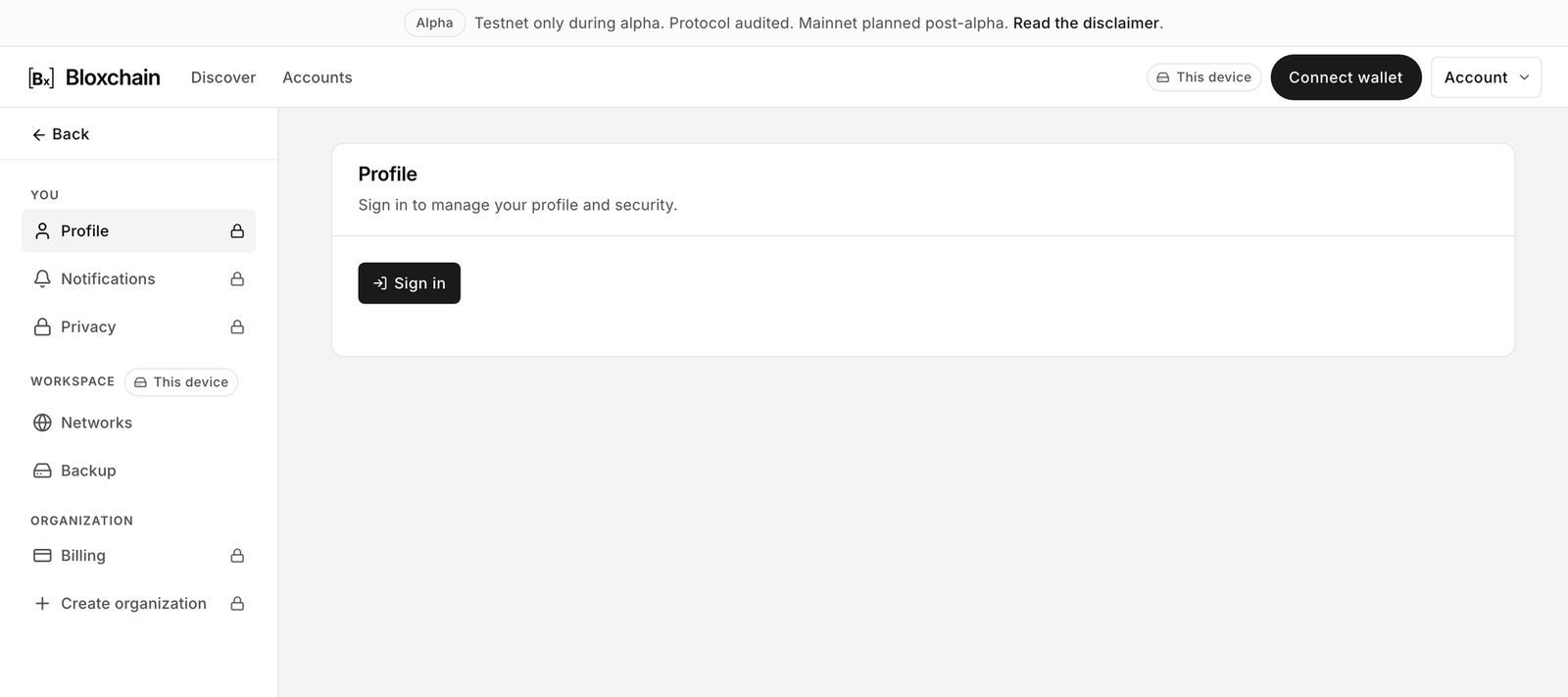
<figure><img src="https://2633730519-files.gitbook.io/~/files/v0/b/gitbook-x-prod.appspot.com/o/spaces%2F0GcVTQuj6X0G3RZ3YY7r%2Fuploads%2Fgit-blob-25746ff5ade357e27c9ad6e86aaf11468968917b%2F15-settings-profile-signed-out.png?alt=media" alt="Settings Profile page signed out, showing a lock and a Sign in button" width="1000"><figcaption><p>Signed out, the You and Organization settings are locked. Workspace settings (Networks, Backup) stay available.</p></figcaption></figure>

## Organizations

An organization is a paid, shared cloud workspace for a team. Plans are **Pro**, **Team** and **Enterprise**. Pricing is shown at checkout or on request, and Enterprise is contact us. An organization gives you:

* A **shared account list** that every member sees, with the **Cloud** residency badge.
* **Member addresses**: an organization address book used for access control and audit. It is non-custodial; Bloxchain never holds a key.
* **Members and roles** within the organization.
* **Organization networks**, separate from the ones stored on your device.
* **Watched addresses and alerts**: the organization follows Bloxchain accounts on Ethereum and Arbitrum One mainnet, and every member sees the same list. The number of watched addresses and alerts per month is capped per organization. Each member chooses whether they are notified, per organization.
* **Billing and invoices**.

Create one from the Account menu (**Create organization**) or **Settings → Organization**. You pick a plan, the organization is created, and you complete checkout. Until checkout completes the organization shows **Checkout required** and its workspace is inactive with the **Cloud off** badge. An inactive organization is never the same as Free: its shared list is simply unavailable until a plan is active.

There is no Personal plan. Your personal space is always the Free path on this device, whether or not you are signed in. If you want alerts for yourself alone, create an organization with just you in it.

## The plans

| Plan                  | What it unlocks                                                                                                                                                                                                    |
| --------------------- | ------------------------------------------------------------------------------------------------------------------------------------------------------------------------------------------------------------------ |
| **Free**              | The whole operating surface with no account: connect a wallet, deploy or import accounts, operate them, configure policy, sign and submit. Open to everyone.                                                       |
| **Account** (sign-in) | An identity, not a hosted service: profile and security, privacy export, organization invites. No alerts or watched addresses. Sign in if you have early access; otherwise join the waitlist from the same dialog. |
| **Pro**               | An organization with a shared account list, Member addresses, members and roles, organization networks, watched addresses and alerts, billing and invoices.                                                        |
| **Team**              | The Pro organization workspace for a larger group.                                                                                                                                                                 |
| **Enterprise**        | Contact us.                                                                                                                                                                                                        |

Pricing is shown at checkout or on request. An organization that has not completed checkout is **Checkout required** and shows no accounts.

## Residency badges

| Badge           | Meaning                                                                              |
| --------------- | ------------------------------------------------------------------------------------ |
| **This device** | The inventory is stored in this browser only. Back it up from **Settings → Backup**. |
| **Cloud**       | The inventory belongs to an active organization and is shared with its members.      |
| **Cloud off**   | The organization exists but is inactive (checkout not completed or plan lapsed).     |

## Capability matrix

| Capability                                   | Free           | Signed in       | Organization                       |
| -------------------------------------------- | -------------- | --------------- | ---------------------------------- |
| Connect wallet, deploy and import accounts   | Yes            | Yes             | Yes                                |
| Operate accounts (request, approve, execute) | Yes            | Yes             | Yes                                |
| Configure roles, policies and allowlists     | Yes            | Yes             | Yes                                |
| Custom networks                              | On this device | On this device  | Plus shared organization networks  |
| Backup and restore (JSON)                    | Yes            | Yes             | Yes                                |
| Signed files for cross-device approval       | Yes            | Yes             | Yes                                |
| In-app and email notifications               | No             | No              | Yes (per member, per organization) |
| Watched addresses and alerts                 | No             | No              | Yes (capped per organization)      |
| Bloxchain broadcaster (optional relay)       | No             | Where available | Where available                    |
| Shared account list (Cloud)                  | No             | No              | Yes                                |
| Member addresses, members and roles          | No             | No              | Yes                                |
| Billing and invoices                         | No             | No              | Yes                                |

## Related

* [Backup](/platform-guide/settings/backup.md)
* [Profile, notifications and privacy](/platform-guide/settings/profile-notifications-privacy.md)
* [Organizations and billing](/platform-guide/settings/organizations-and-billing.md)
* [Limits and defaults](/resources/limits-and-defaults.md)


---

# Agent Instructions
This documentation is published with GitBook. GitBook is the documentation platform designed so that both humans and AI agents can read, navigate, and reason over technical content effectively. Learn more at gitbook.com.

## Querying This Documentation
If you need additional information that is not directly available in this page, you can query the documentation by asking a question.

Perform an HTTP GET request on the following URL with the `ask` and `goal` query parameters:

```
GET https://docs.bloxchain.app/introduction/free-sign-in-organizations.md?ask=<question>&goal=<user_goal>
```

`ask` is the immediate question: it should be specific, self-contained, and written in natural language.
`goal` is what the user is ultimately trying to achieve, the reason they need the answer. Sharing it helps GitBook give you a better, more relevant answer. A goal is most helpful when it describes the outcome the user wants rather than restating the question. For example, with `ask=how do I create an API token`, a goal like `automate deployments from our CI pipeline` lets GitBook tailor the answer to that use case.

The response will contain a direct answer to the question and relevant excerpts and sources from the documentation.

Use this mechanism when the answer is not explicitly present in the current page, you need clarification or additional context, or you want to retrieve related documentation sections.