> For the complete documentation index, see [llms.txt](https://docs.bloxchain.app/llms.txt). Markdown versions of documentation pages are available by appending `.md` to page URLs; this page is available as [Markdown](https://docs.bloxchain.app/guides/team-treasury.md).

# Team treasury

Set up a smart account where one team member requests a payout, a different member approves it, and a broadcaster submits signed approvals.

**Where:** Discover → Treasury, then Policies and On-chain access · **You need:** three or four wallets on Sepolia, test ETH, optionally a test ERC-20

## Goal

Nobody can clear a payment alone. A requester proposes a transfer, an approver reviews it, and the on-chain policy refuses anything that skips a step or goes to an address that is not on the list.

## Who is involved

| Duty                                           | Role in the Platform               | Example       |
| ---------------------------------------------- | ---------------------------------- | ------------- |
| Configures the account, approves as a fallback | **Owner** (protected role)         | `0x3B9d…A41e` |
| Starts payout requests                         | `TREASURY_REQUESTER` (custom role) | `0x8C4e…21bB` |
| Approves or cancels requests                   | `TREASURY_APPROVER` (custom role)  | `0xD27a…f9E3` |
| Submits signed approvals and pays gas          | **Broadcaster** (protected role)   | `0x5E60…c7D1` |
| Emergency fallback                             | **Recovery** (protected role)      | `0xF01c…9aB4` |

Time: about 45 minutes on Sepolia.

## Before you start

* Read [Designing roles and permissions](/guides/roles-and-permissions.md) once. It explains why requester, approver and broadcaster are separate wallets.
* If real people will hold these roles, read [Organization governance](/guides/organization-governance.md) too. It maps each duty to a job title and covers onboarding, offboarding and review.
* Fund the owner wallet and the broadcaster wallet with Sepolia test ETH. Both pay gas.
* Collect the payout addresses you will allowlist (for example two vendor addresses).
* You do not need an account for any of this. Sign in if you have early access; otherwise join the waitlist from the same dialog. A paid organization adds a shared account list, and on Pro, watched addresses and alerts. Neither changes the on-chain policy below.

## Phase 1: Deploy and set the Security baseline

1. On **Discover**, choose **Treasury** and select **Start Treasury Operations**.
2. In **Deploy Smart Account**, name the account (for example `Operations Treasury`) and select **Continue**.
3. On **Protocol Security**, set **Owner** (your admin wallet), one or more **Broadcaster addresses**, **Recovery**, and a **Time-lock** (for a treasury, `1` `Days` is a sensible start; `1` `Hours` is fine for the test). Select **Deploy Smart Account** and confirm.
4. Inside the account, open **Policies** → **Security** and confirm the four settings. Use **Add broadcaster** if you need a second one later.

The account lands as a **Vault** ([what that means](/platform-guide/policies/actions.md#what-a-new-account-already-has)). Every preset deploys the same governed account today; the treasury behaviour comes from what you configure next.

## Phase 2: Confirm the actions

1. Open **Policies** → **Actions**.
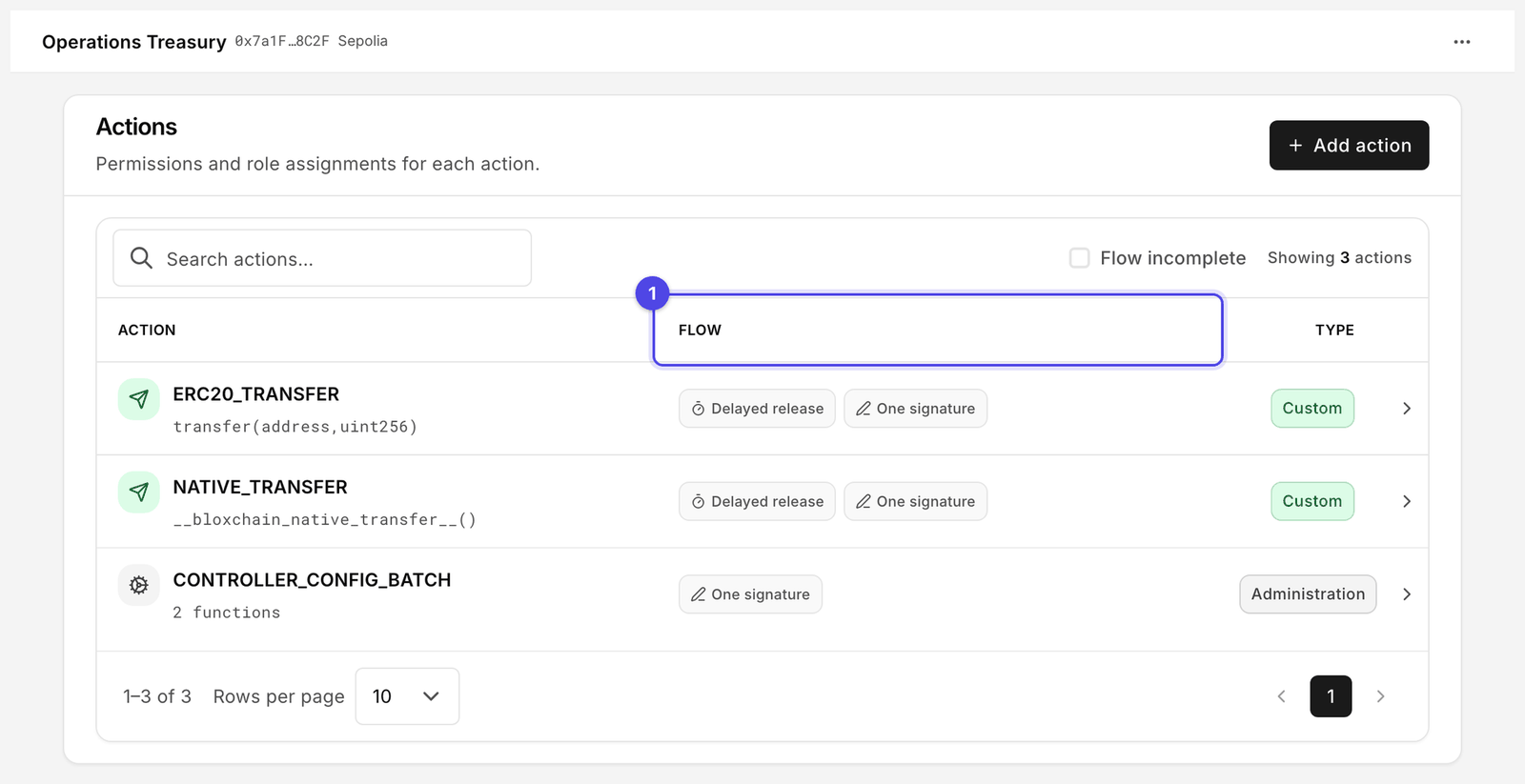
2. Confirm `NATIVE_TRANSFER` (`__bloxchain_native_transfer__()`) is listed. Every account registers it at deploy, so there is nothing to add.
3. For token payouts, confirm `ERC20_TRANSFER` (`transfer(address,uint256)`) is listed. It is registered at deploy too.
4. Both rows read **Flow incomplete**. Nothing is wrong: the functions are registered, but no role may use them and no destination is allowed. **Add action** is for your own functions, such as `mint(address,uint256)`, and is not needed for payouts.

<figure><img src="https://2633730519-files.gitbook.io/~/files/v0/b/gitbook-x-prod.appspot.com/o/spaces%2F0GcVTQuj6X0G3RZ3YY7r%2Fuploads%2Fgit-blob-d36592a4c483b4a8e038d6a04f52e4607a8d862e%2F32-actions.png?alt=media" alt="Policies Actions page listing ERC20_TRANSFER, NATIVE_TRANSFER and CONTROLLER_CONFIG_BATCH with their signatures, Flow status and Type" width="1000"><figcaption><p>Both transfer operations are registered at deploy. Flow (1) is where you check them: it reads incomplete until permissions, gates and allowlists exist, and lists the paths once they do.</p></figcaption></figure>

## Phase 3: Create roles and add signers

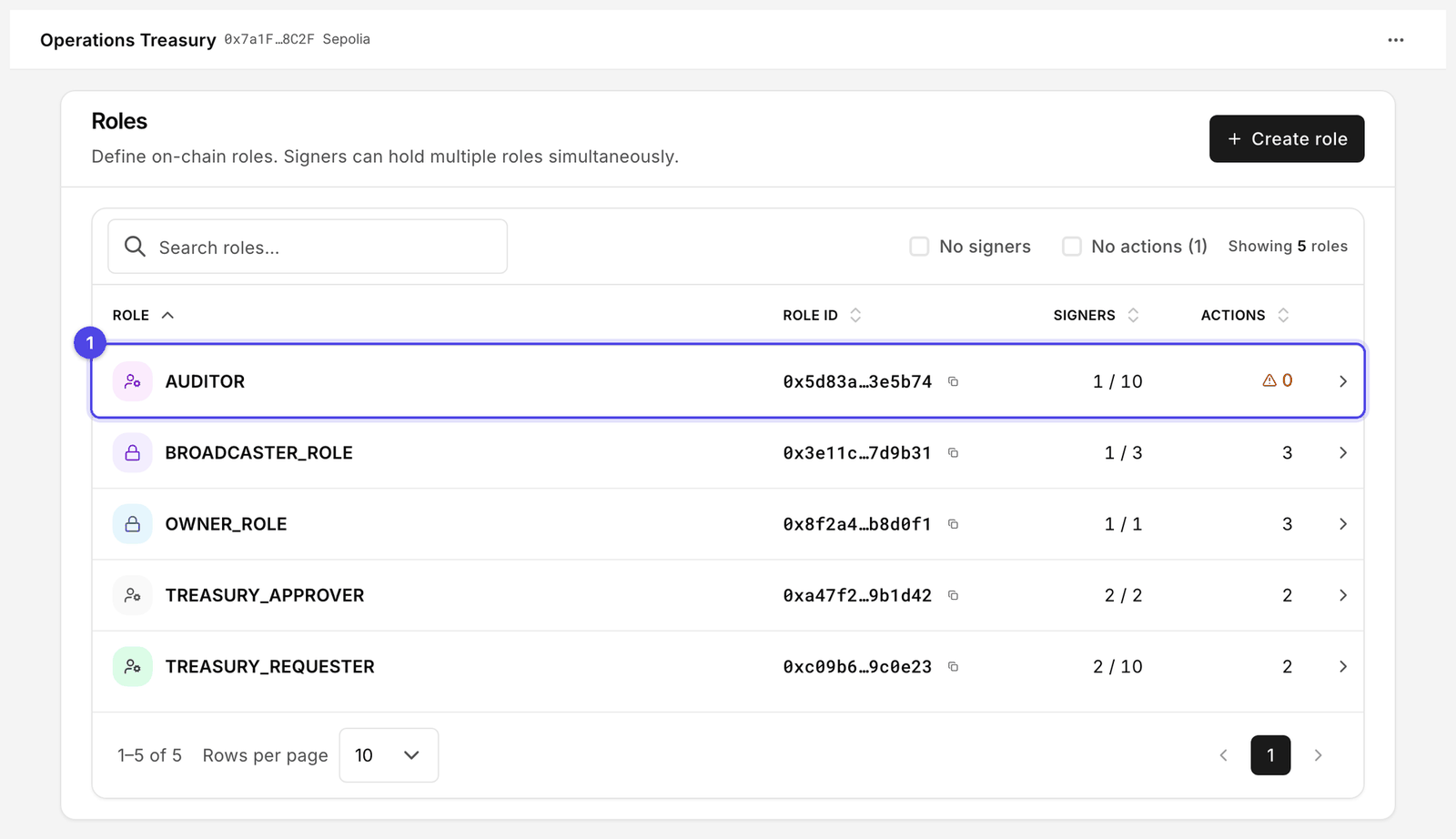
1. Open **On-chain access** → **Roles** and select **Create role**.
2. Create `TREASURY_REQUESTER` with **Max wallets** `3`, then `TREASURY_APPROVER` with **Max wallets** `2`. Set the maximum a little above the number of people you have today.
3. Open each role, select **Manage role signers**, and add the wallet addresses. Sign the batch.

<figure><img src="https://2633730519-files.gitbook.io/~/files/v0/b/gitbook-x-prod.appspot.com/o/spaces%2F0GcVTQuj6X0G3RZ3YY7r%2Fuploads%2Fgit-blob-a743cceda917e2f79e7d3260f19cec652a3b57c7%2F29-roles.png?alt=media" alt="Roles page with custom roles, their signer counts and actions" width="1000"><figcaption><p>Roles shows how many signers each role holds against its limit, and how many actions it may perform. AUDITOR (1) has none.</p></figcaption></figure>

You can also work from the other direction: **Signers** → **Add signer** → pick roles for one address.

## Phase 4: Manage permissions per path

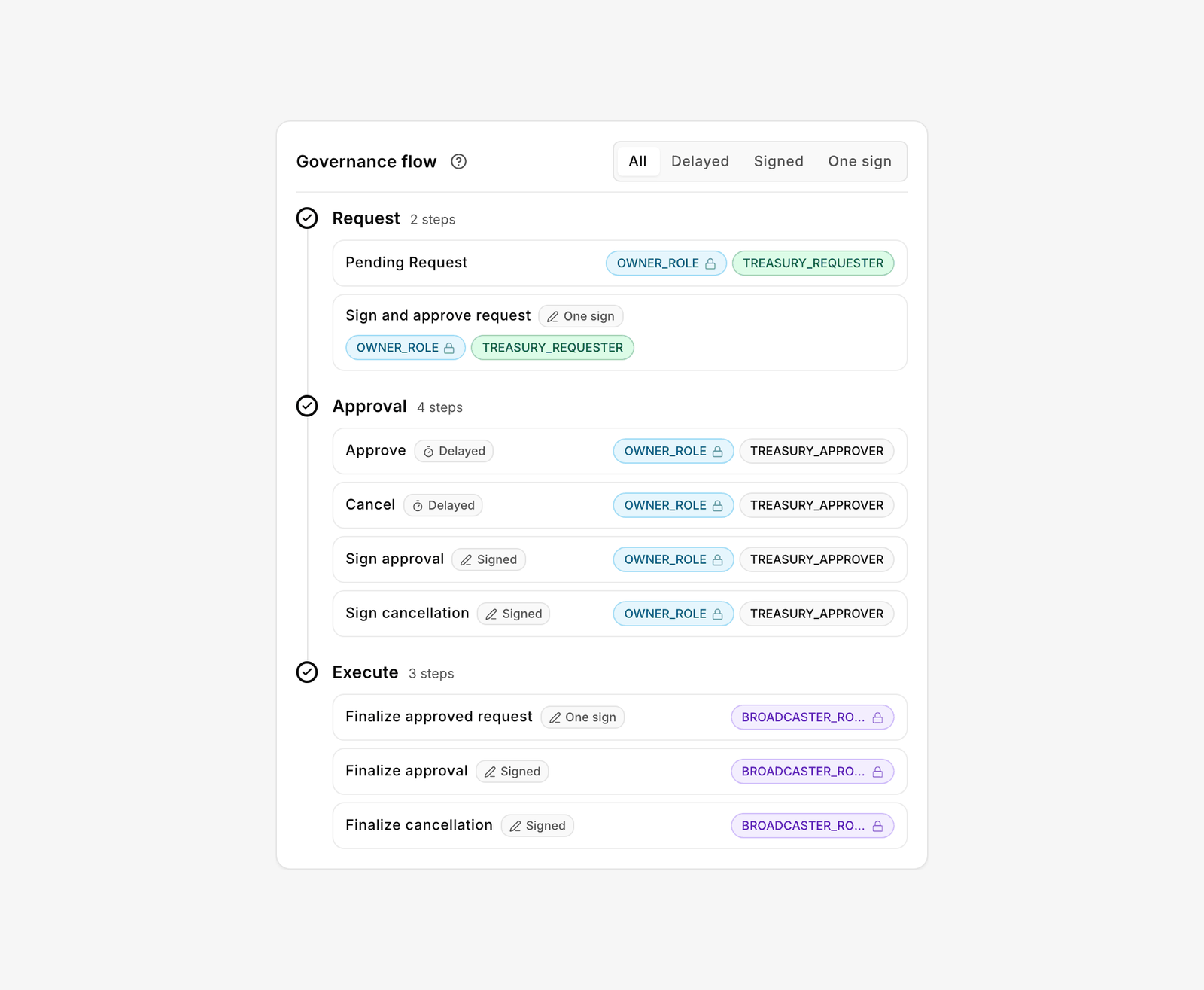
Open **Policies** → **Actions**, select `NATIVE_TRANSFER`, then **Manage permissions**. The editor has one tab per execution path. Fill in the two you want and leave the third empty.

| Tab                 | Request step         | Approval steps                                                 | Execute step                                  |
| ------------------- | -------------------- | -------------------------------------------------------------- | --------------------------------------------- |
| **Delayed release** | `TREASURY_REQUESTER` | `TREASURY_APPROVER` (Approve and Cancel)                       | performed by the approver's on-chain approval |
| **Signed approval** | `TREASURY_REQUESTER` | `TREASURY_APPROVER` (signs approval or cancellation off-chain) | **Broadcaster**                               |
| **One signature**   | leave empty          | leave empty                                                    | leave empty                                   |

1. On **Delayed release**, at **Request** select **Assign role** → `TREASURY_REQUESTER`. At the **Approval** steps assign `TREASURY_APPROVER`. **Owner** stays as a fallback.
2. On **Signed approval**, assign `TREASURY_REQUESTER` to **Request**, `TREASURY_APPROVER` to the **Approval** steps, and **Broadcaster** to **Execute**.
3. Review the **Governance flow** card, then sign.
4. Repeat for `ERC20_TRANSFER`.

<figure><img src="https://2633730519-files.gitbook.io/~/files/v0/b/gitbook-x-prod.appspot.com/o/spaces%2F0GcVTQuj6X0G3RZ3YY7r%2Fuploads%2Fgit-blob-39bdd93f0a1fd11bcd6245ca22d31974e016856e%2F45-action-governance-flow.png?alt=media" alt="Governance flow card showing Request, Approval and Execute steps with role chips and a path filter" width="1000"><figcaption><p>The Governance flow card shows which role can perform each step on each path.</p></figcaption></figure>

Leaving **One signature** empty means no single wallet can request and approve in one go.

## Phase 5: Grant gates

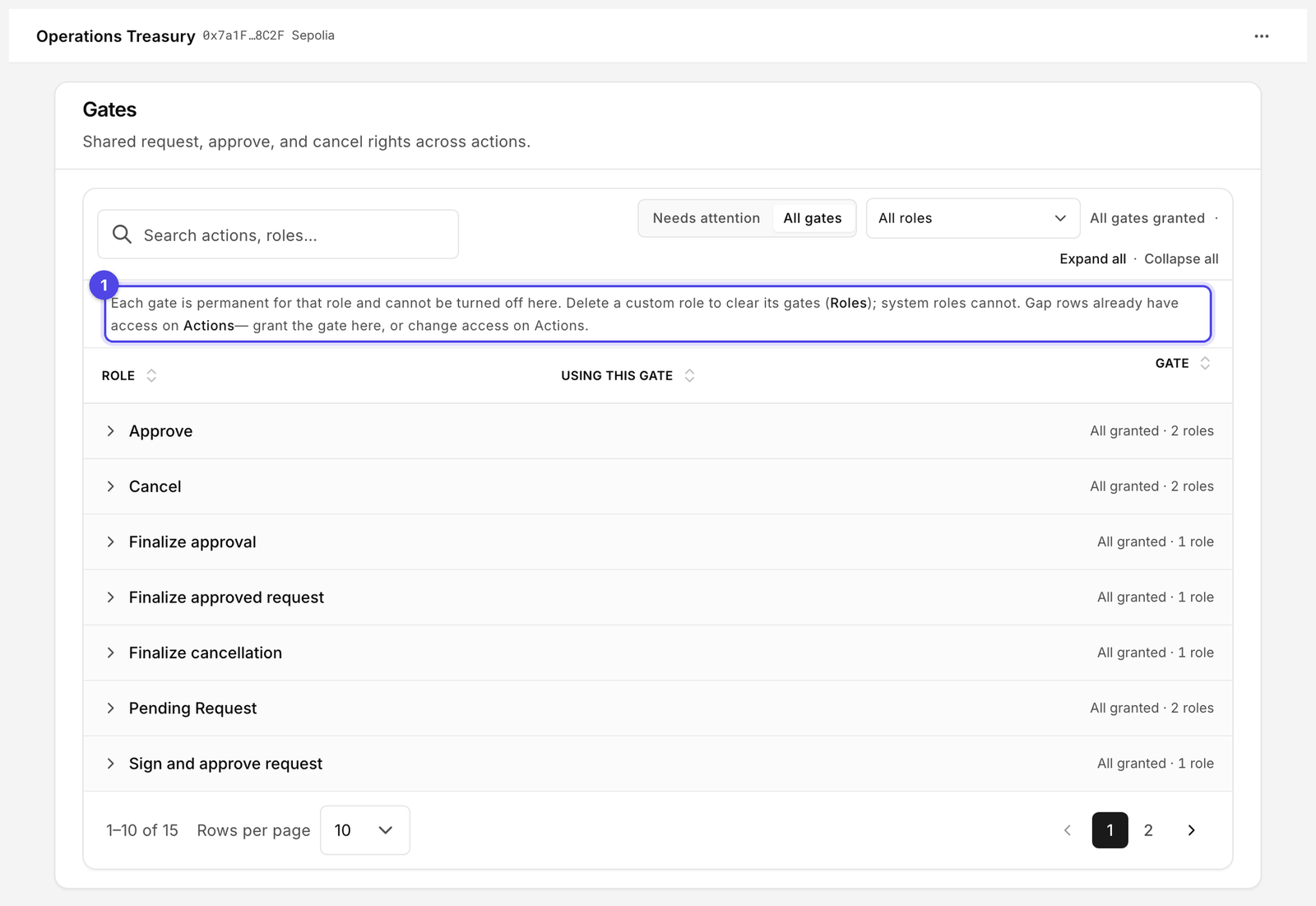
1. Open **Policies** → **Gates**. The **Needs attention** view lists every role that has access on Actions but no gate yet.
2. Select **Edit**, turn on the gates for `TREASURY_REQUESTER` and `TREASURY_APPROVER`, then confirm in **Update gates** and sign.
3. The header should read **All gates granted**, and the **Actions** page should no longer show **Gates mismatch**.

<figure><img src="https://2633730519-files.gitbook.io/~/files/v0/b/gitbook-x-prod.appspot.com/o/spaces%2F0GcVTQuj6X0G3RZ3YY7r%2Fuploads%2Fgit-blob-58311c93ea6a5e63514753e14172b42510bed965%2F34-gates.png?alt=media" alt="Gates page with roles, the actions using each gate, and Granted or Not granted status" width="1000"><figcaption><p>The page says it plainly (1): a gate is permanent for that role. Plan gates with the role, not per request.</p></figcaption></figure>

## Phase 6: Allowlist payout recipients

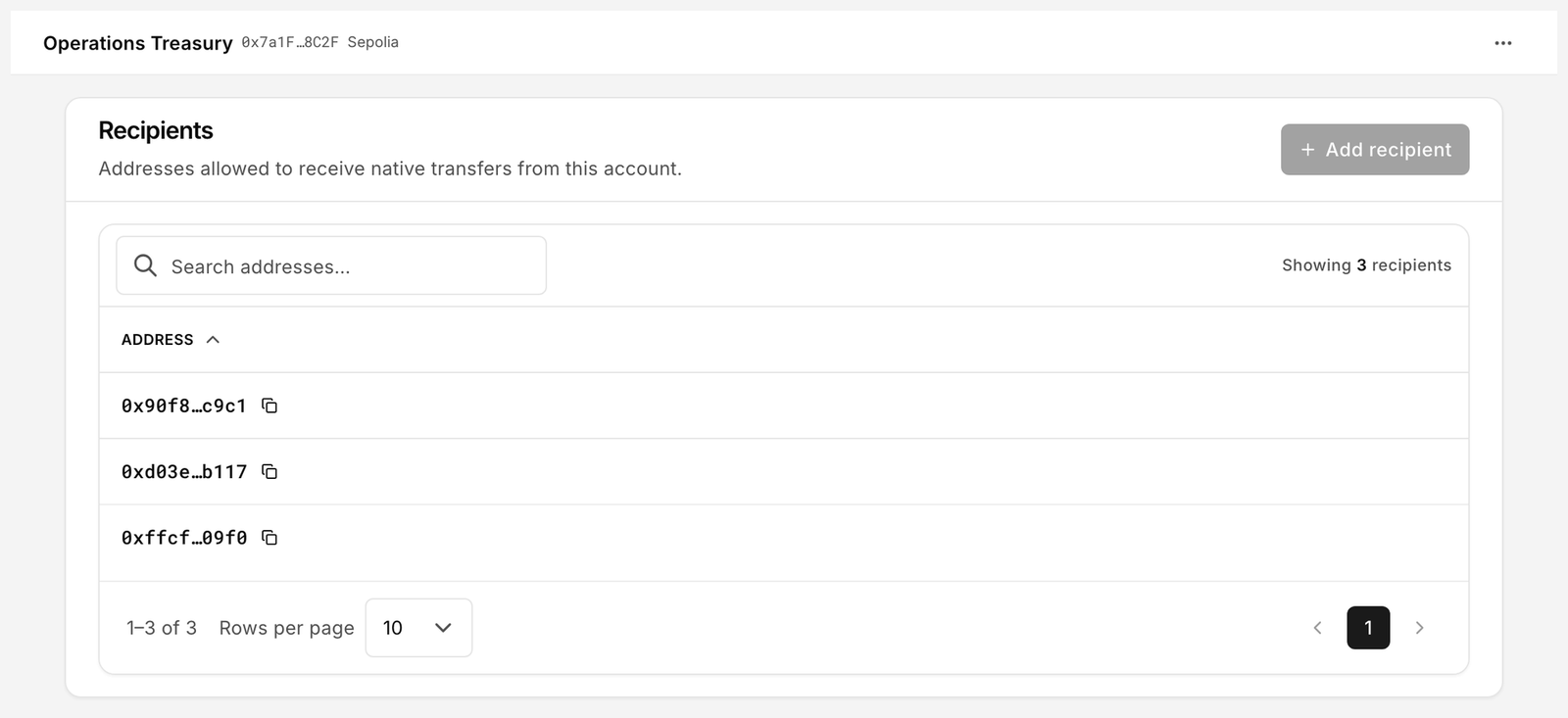
1. Open **Policies** → **Allowed recipients** and select **Add recipient**. Add each payout address. Sign the batch.
2. For ERC-20 payouts, open **Allowed contracts** and add the token contract as a destination with `transfer(address,uint256)` as its assigned function.

<figure><img src="https://2633730519-files.gitbook.io/~/files/v0/b/gitbook-x-prod.appspot.com/o/spaces%2F0GcVTQuj6X0G3RZ3YY7r%2Fuploads%2Fgit-blob-04598799dab91f3ebff8fb8d7e5c6961d436b829%2F35-allowed-recipients.png?alt=media" alt="Recipients allowlist page listing addresses allowed to receive native transfers" width="1000"><figcaption><p>Only these addresses appear in the Recipient picker when someone creates a request.</p></figcaption></figure>

## Phase 7: Test with three wallets

1. Fund the account: **Assets** → **Receive**, send a small amount of Sepolia ETH.
2. **Requester** (`0x8C4e…21bB`): select **New request** → **Transfer**, choose the native asset, a small amount and an allowlisted recipient. Try both methods:
   * **Wallet** → **Submit request**: the request is posted on-chain and waits for the time lock.
   * **Sign** → **Sign request**: the request is posted and can be approved by signature.
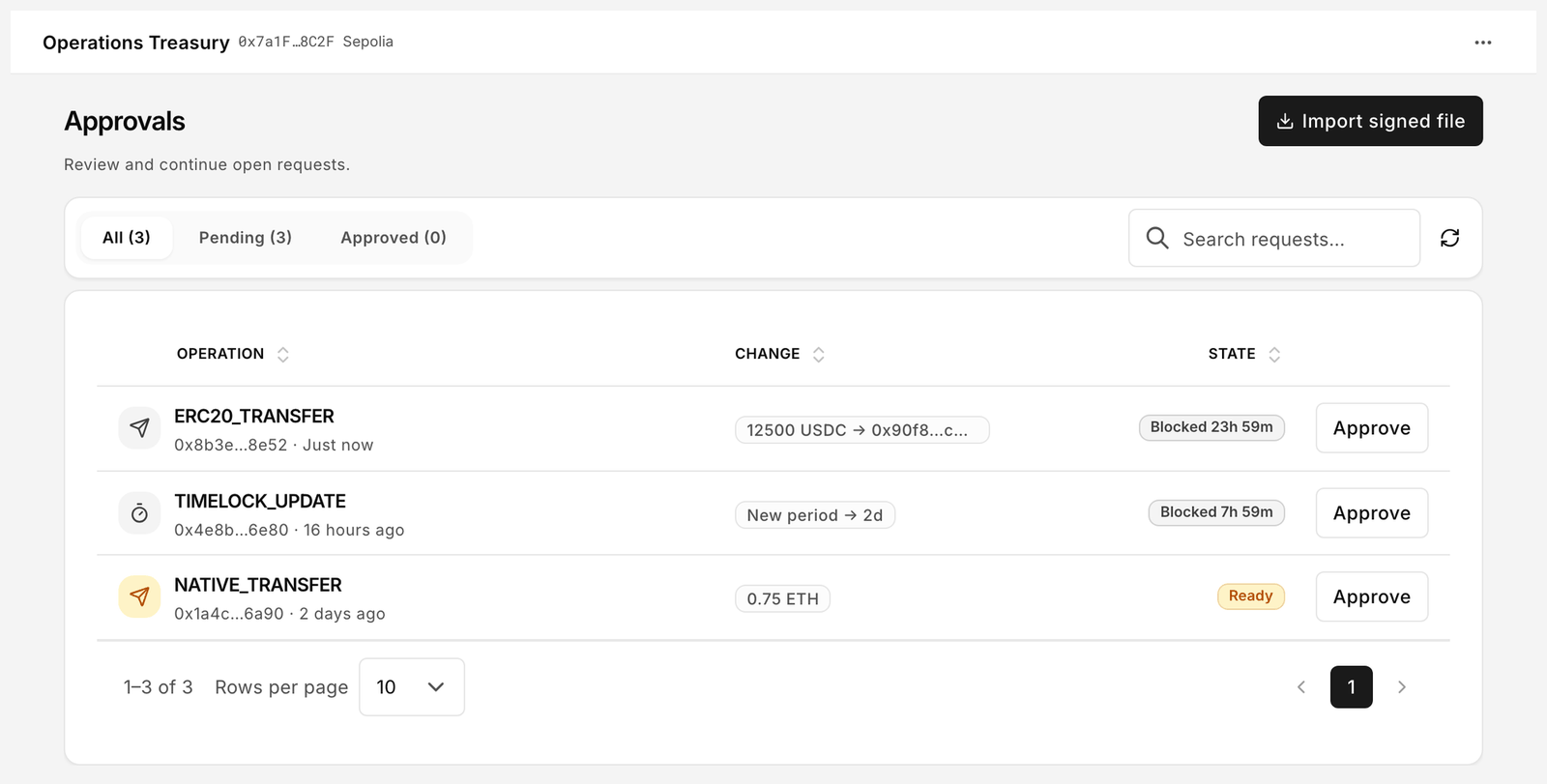
3. **Approver** (`0xD27a…f9E3`): open **Approvals**. For the delayed request, wait until **State** reads **Ready**, open it and select **Approve**. For the signed path, open the request, switch the toggle to **Sign** and sign the approval. It moves to the **Approved** tab.
4. **Broadcaster** (`0x5E60…c7D1`): on the **Approved** tab, open the signed transaction and select **Execute**.
5. Check **History**: both requests show **Executed**. Check **My access** with each wallet; it should list only the phases you intended.

<figure><img src="https://2633730519-files.gitbook.io/~/files/v0/b/gitbook-x-prod.appspot.com/o/spaces%2F0GcVTQuj6X0G3RZ3YY7r%2Fuploads%2Fgit-blob-f07c2af3d8a8cdf1c7c2bb346e43108126df891f%2F22-approvals.png?alt=media" alt="Approvals page with a pending Transfer awaiting approval" width="1000"><figcaption><p>The Approvals queue is where the approver works.</p></figcaption></figure>

6. Negative test: with the requester wallet, try a request to an address that is not allowlisted. It does not appear in the picker, so the request cannot be built.

## Operating rhythm

* **Approvals** is the daily queue. Approvers work the **Pending** tab; broadcasters work the **Approved** tab. There are no status filter chips on this page, so use the tabs and the search box. Delete signed items whose deadline passed without submission.
* **History** is the ledger. Group by **Requester** or **Result** for a monthly review, and filter **Cancelled** and **Failed** to see what was stopped.
* When a person leaves, remove their address from the role in **Roles**. When a duty changes, edit **Manage permissions**, not the person. [Organization governance](/guides/organization-governance.md) has the full onboarding and offboarding checklist, including rotating the **Broadcaster** and clearing gates.
* If the team runs on a paid organization, add each signer under **Settings → Organization → Member addresses** so names appear beside addresses in shared views. Plans are named in [Organizations and billing](/platform-guide/settings/organizations-and-billing.md); pricing is shown at checkout or on request.

## Checklist

* [ ] Requester, approver and broadcaster are three different wallets
* [ ] `NATIVE_TRANSFER` (and `ERC20_TRANSFER`, if used) showing ready, not **Flow incomplete**
* [ ] Delayed release and Signed approval configured; One signature empty
* [ ] All gates granted
* [ ] Every payout address allowlisted; token contract allowlisted for ERC-20
* [ ] One delayed and one signed request executed end to end
* [ ] Backup exported from **Settings** → **Backup**

## Related

* [Manage permissions](/platform-guide/policies/manage-permissions.md)
* [Gates](/platform-guide/policies/gates.md)
* [Allowlists](/platform-guide/policies/allowlists.md)
* [Approvals](/platform-guide/operate/approvals.md)


---

# Agent Instructions
This documentation is published with GitBook. GitBook is the documentation platform designed so that both humans and AI agents can read, navigate, and reason over technical content effectively. Learn more at gitbook.com.

## Querying This Documentation
If you need additional information that is not directly available in this page, you can query the documentation by asking a question.

Perform an HTTP GET request on the following URL with the `ask` and `goal` query parameters:

```
GET https://docs.bloxchain.app/guides/team-treasury.md?ask=<question>&goal=<user_goal>
```

`ask` is the immediate question: it should be specific, self-contained, and written in natural language.
`goal` is what the user is ultimately trying to achieve, the reason they need the answer. Sharing it helps GitBook give you a better, more relevant answer. A goal is most helpful when it describes the outcome the user wants rather than restating the question. For example, with `ask=how do I create an API token`, a goal like `automate deployments from our CI pipeline` lets GitBook tailor the answer to that use case.

The response will contain a direct answer to the question and relevant excerpts and sources from the documentation.

Use this mechanism when the answer is not explicitly present in the current page, you need clarification or additional context, or you want to retrieve related documentation sections.