For the complete documentation index, see llms.txt. This page is also available as Markdown.

Design roles and permissions

Design a role model for a smart account that stays safe as people join, leave and change duties.

Where: On-chain access → Roles and Signers; Policies → Actions, Gates, Allowlists · You need: nothing to read; a deployed account to apply it

Principles

Least privilege. A role gets exactly the steps its holders need and nothing else. A requester does not need approval rights; an approver does not need to request.

Separate requester, approver and broadcaster. Three duties, three roles, three wallets. This is what makes "nobody can clear a payment alone" true on-chain rather than by convention.

Owner is the fallback, not the operator. The Owner configures policy and can approve delayed requests when the approver is unavailable. Do not use the owner wallet for daily requests. Keep it on a cold wallet, or under shared custody so no one person can act alone.

Name roles by duty, not by person. TREASURY_APPROVER survives staff changes; Dana's wallet does not. When someone leaves, remove their address from the role in Roles. The role and its gates stay.

Configure the path, then the people. Decide which execution paths an action should allow (Delayed release, Signed approval, One signature), assign roles per step, then grant gates. Leave One signature empty unless a single trusted automation genuinely needs it.

Keep an off-chain record. The chain stores role names, grants and addresses; it does not store who holds an address or why. Keep a record of role → people → actions outside the chain and update it whenever you change Signers or Manage permissions. On a paid plan, organization Member addresses does the same job inside the Platform.

A worked example

A team treasury with three custom roles and the protected roles.

Role
Who should hold this in a team
Signers
Action and step
Path
Gate
Allowlist that applies

TREASURY_REQUESTER

Payments analyst, everyday wallet

0x8C4e…21bB, 0x1D3f…70Ca

NATIVE_TRANSFER → Request; ERC20_TRANSFER → Request

Delayed release, Signed approval

Granted

Recipients (native); Allowed contracts (token)

TREASURY_APPROVER

Head of finance or a second approver, hardware wallet

0xD27a…f9E3

NATIVE_TRANSFER → Approve, Cancel; ERC20_TRANSFER → Approve, Cancel

Delayed release (on-chain), Signed approval (off-chain signature)

Granted

same as above (approval cannot widen the target)

Broadcaster

Operations engineer or a service the team runs, hot wallet funded with gas

0x5E60…c7D1

NATIVE_TRANSFER → Execute; ERC20_TRANSFER → Execute

Signed approval

system role

none needed; the broadcaster only submits

Owner

Finance lead or founder, cold wallet or shared custody

0x3B9d…A41e

Fallback approve and cancel; all Administration actions

Delayed release

system role

configures all lists

Recovery

Board member or external custodian, offline and separate from the owner

0xF01c…9aB4

Take ownership in an emergency

not an action step

system role

none

AUDITOR

Internal audit or compliance, any wallet

the reviewer's address

none

not an action step

none

none

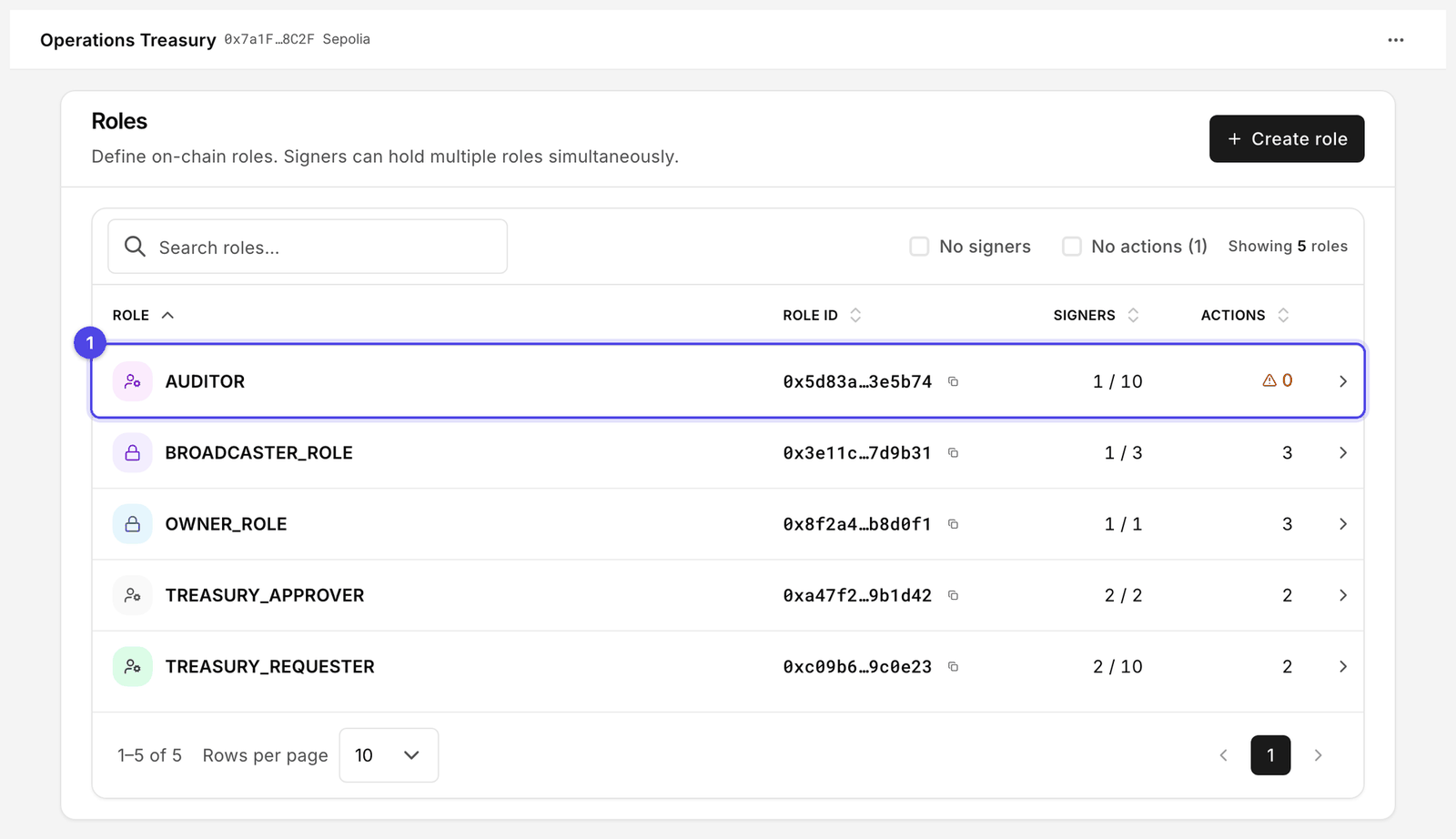
Roles page listing custom roles with signer counts, actions and gate status
Roles is the place to check that every role has signers and actions. AUDITOR (1) has none.
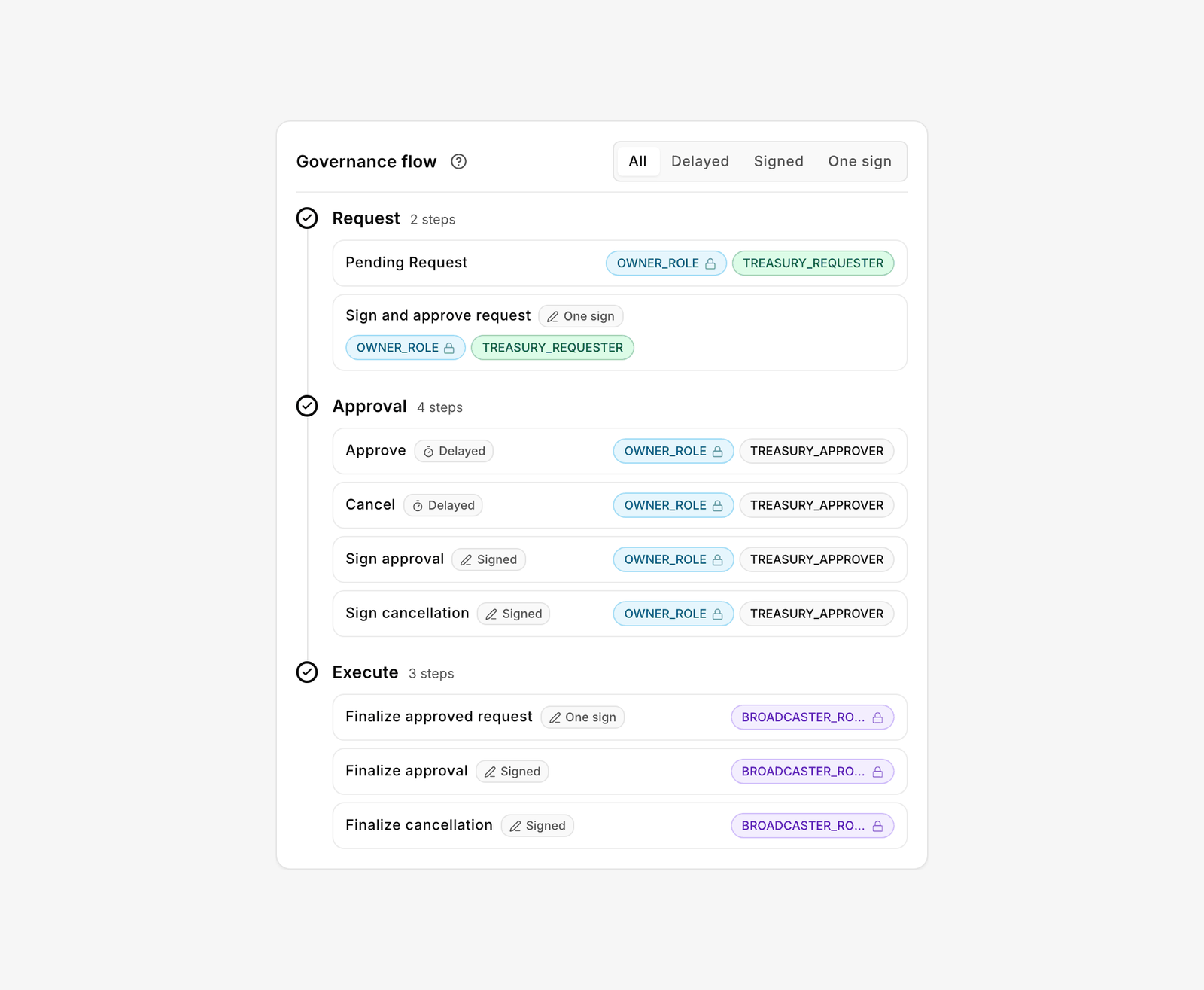
Governance flow card for an action, showing role chips on Request, Approval and Execute steps
Read the Governance flow card left to right: who requests, who approves, who executes.
Read the table once per action. If a step has no role, the action cannot complete on that path.

AUDITOR is the odd row: it holds no permissions at all, because reading an account needs no role. Create it so the reviewer's address is recorded in Signers and the review routine has a named owner. For the same reason it shows under the No actions filter on Roles, and that is correct.

For the people side of this model, who holds each wallet, how you add and remove members, and what the audit trail proves, see Organization governance.

Common mistakes

Symptom
Cause
Fix

Action shows Flow incomplete

A step on an enabled path has no role, or the allowlist is empty

Open Manage permissions and fill the gap, then add recipients, payees or contracts

Action shows Gates mismatch

A role has access on Actions but no gate

Policies → Gates → Needs attention → Edit → grant → Update gates

A role still has access after you removed its permission

Gates are permanent for the role

Remove the custom role in Roles if it must lose everything; otherwise remove its permission on Actions and accept the gate stays on

A permission cannot be revoked

The function schema is non-revocable, so the grant is a permanent grant. The controller configuration operations installed at deploy work this way.

Treat non-revocable operations as one-way doors; review before granting. Protocol detail: Runtime RBAC

"Max wallets" reached when adding a signer

Max wallets set too low

Set the limit a little above today's headcount when you create the role

My access is empty for a member

Wallet not assigned to any role

Signers → Add signer, or Roles → Manage role signers

Request card says Not configured

For a transfer, the operation is registered but has no permissions or allowlist yet. For Mint, Burn or a custom card, the function is not registered.

Policies → Actions: Manage permissions and the allowlists, or Add action for your own function

Requester and approver are the same person

Roles were assigned to one wallet

Split the addresses; a single wallet in both roles defeats the model

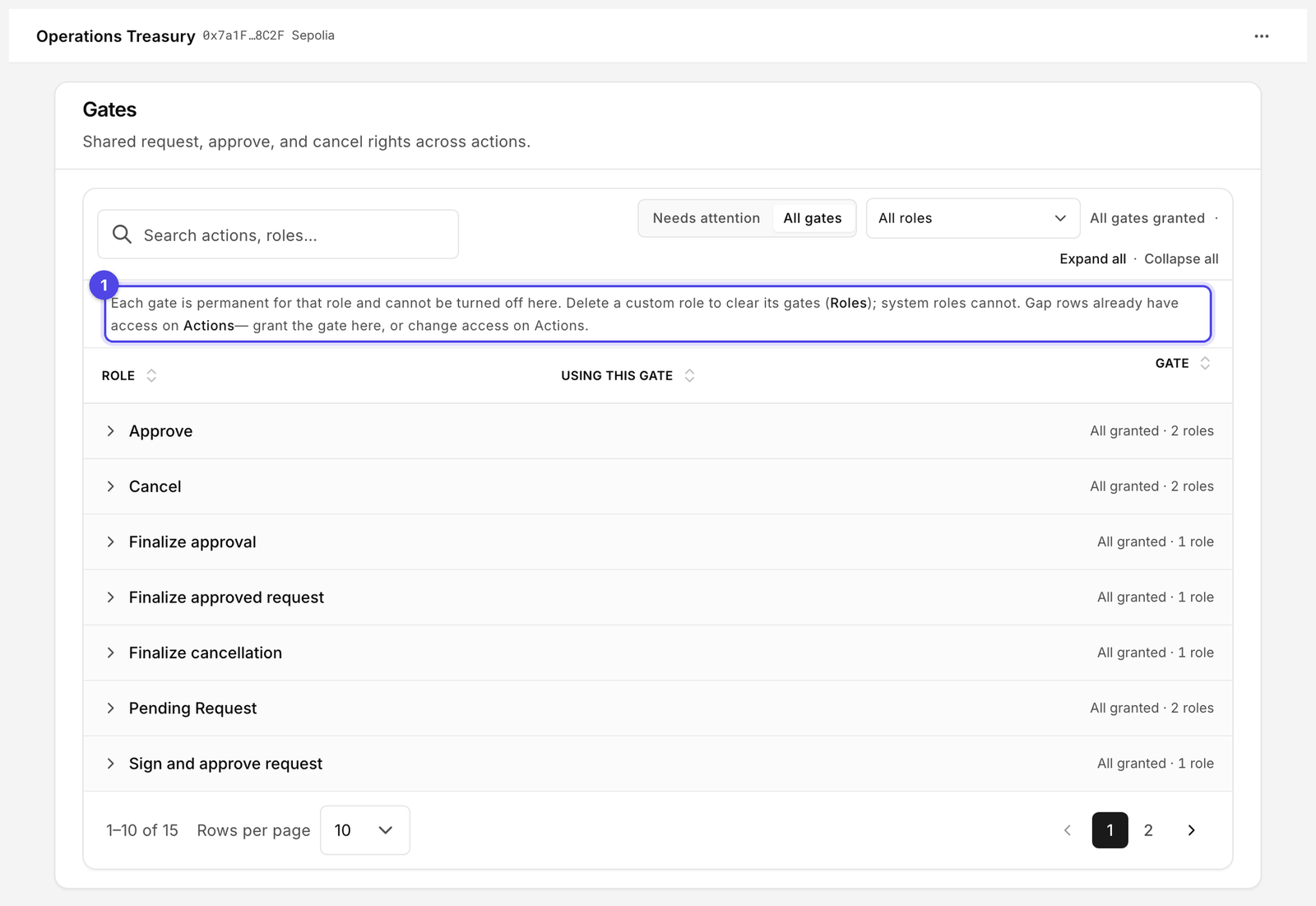
Gates page with Needs attention and All gates views, and Granted or Not granted status per role
Gates are role-level, and the notice (1) is the one to read: granting is a one-way door for that role.
Review routine

Do this monthly, and whenever someone joins or leaves. Organization governance turns the same list into a quarterly routine with a named owner.

  1. Roles: tick No signers to find roles nobody holds (remove or fill them), then No actions to find roles with signers but no duty (a stale grant waiting to be misused).

  2. Signers: search for each departed address. Open the row and check its Roles and Actions segments.

  3. Actions: every row should read ready. Any Flow incomplete or Gates mismatch is either work in progress or a gap.

  4. Gates → All gates: confirm that each granted gate belongs to a role you still want. Because gates are permanent, this is where you decide whether a role should be deleted.

  5. Allowlists: remove recipients, payees and contracts you no longer pay or call.

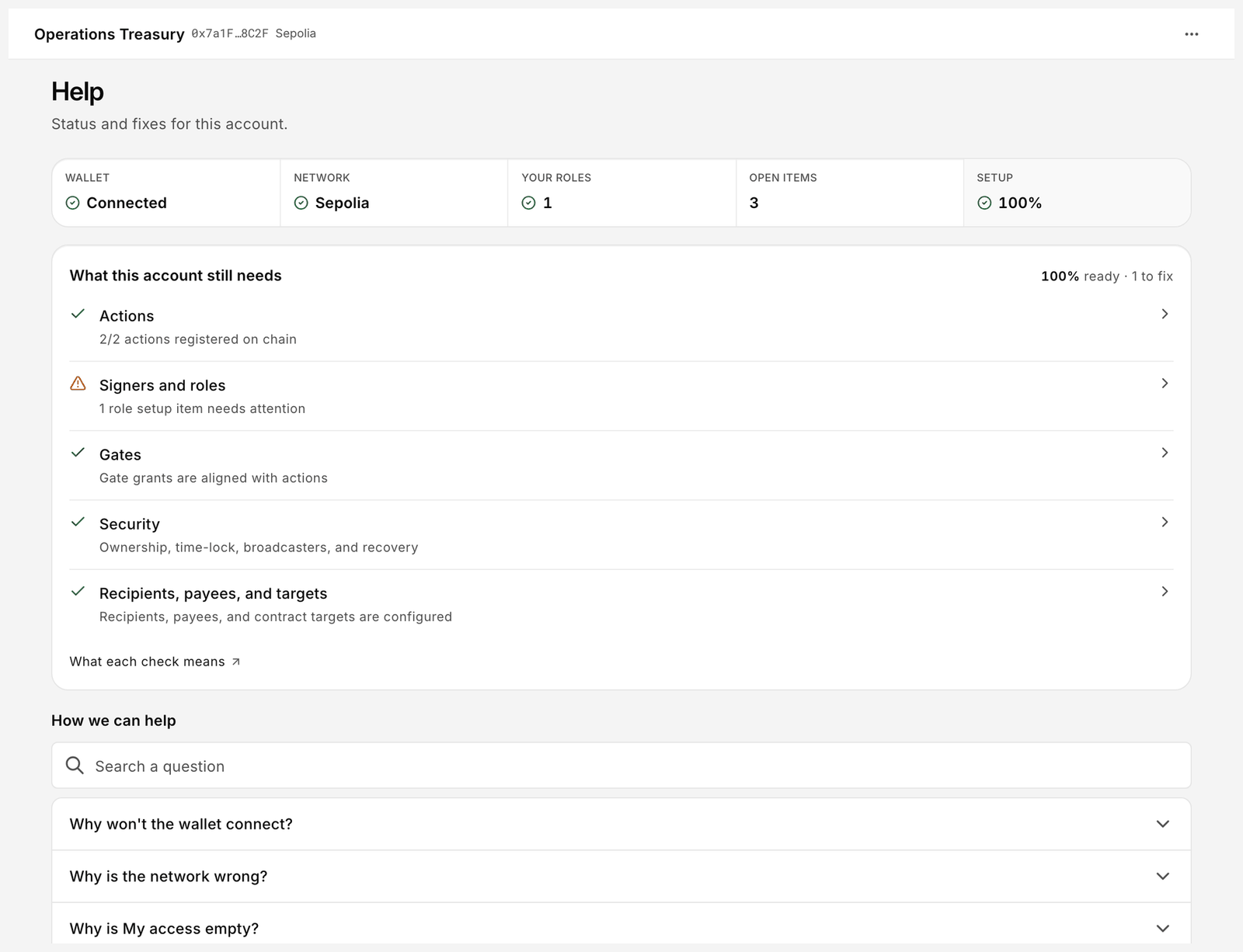
  6. Help: the What this account still needs checklist and the Setup % tile summarise the gaps in one place.

Help page with Wallet, Network, Your roles, Open items and Setup tiles, and the setup checklist
Help gives a one-screen health check of the account's configuration.
  1. History: group by Requester and look for requests from wallets you did not expect.

Checklist

Last updated

Was this helpful?