> For the complete documentation index, see [llms.txt](https://docs.bloxchain.app/llms.txt). Markdown versions of documentation pages are available by appending `.md` to page URLs; this page is available as [Markdown](https://docs.bloxchain.app/guides/organization-governance.md).

# Organization governance

Run one smart account across a team: who holds which role, how people join and leave, and what you can prove afterwards.

**Where:** On-chain access, Policies, History, and Settings → Organization · **You need:** a deployed account on Sepolia and one wallet per person

## Why separation of duties is the point

A written policy that says "two people sign off on every payment" holds only as long as everyone follows it. A Bloxchain smart account makes the same rule a property of the contract.

Permissions are assigned per step of an action: **Request**, **Approval**, **Execute**. A role that may only request cannot approve, whatever the person holding it intends and whatever software is running on their machine. A compromised laptop therefore produces, at worst, a request that somebody else still has to review. A rushed approval still waits out the **time lock** before it can complete, and an approver can cancel during that window.

Two consequences are worth stating plainly to a team used to hosted tools. The Bloxchain Platform orchestrates and the chain enforces, so nothing in the app lets a wallet skip a step. And nobody can widen their own access: changing roles, permissions, gates or allowlists is itself a governed action that the owner signs.

## A role map for real people

Six duties cover most teams. Give each one a different wallet, held by a different person.

| Job title                                       | Role                          | What they can actually do                                                                                      | Which wallet                                                         |
| ----------------------------------------------- | ----------------------------- | -------------------------------------------------------------------------------------------------------------- | -------------------------------------------------------------------- |
| Finance lead or founder                         | **Owner** (protected)         | Configure roles, permissions, gates, allowlists and security. Approve or cancel delayed requests as a fallback | Cold wallet, or shared custody so no one person can act alone        |
| Payments analyst                                | `TREASURY_REQUESTER` (custom) | Create payout requests to allowlisted recipients. Cannot approve, cannot execute                               | Everyday wallet on the operator's machine                            |
| Head of finance, or a second approver           | `TREASURY_APPROVER` (custom)  | Approve or cancel a request, on-chain or by signature. Cannot start one                                        | Hardware wallet                                                      |
| Operations engineer, or a service the team runs | **Broadcaster** (protected)   | Submit signed approvals on-chain and pay the gas. Decides nothing                                              | Hot operational wallet kept funded with gas; up to three per account |
| Internal audit or compliance                    | `AUDITOR` (custom)            | Named accountability for the review routine. Holds no action permissions                                       | Any wallet; it never signs an operation                              |
| Board member, or an external custodian          | **Recovery** (protected)      | Take ownership in an emergency                                                                                 | Offline, and a different person or custody from the owner            |

Three notes matter more than the table:

* **Owner is not an operator.** Use it to configure policy and as a fallback approver, never for daily requests. An owner key that one person controls alone is the single point the rest of this design removes, so prefer shared custody.
* **Recovery must be genuinely separate.** If recovery sits on the same machine as the owner key, one theft takes the account.
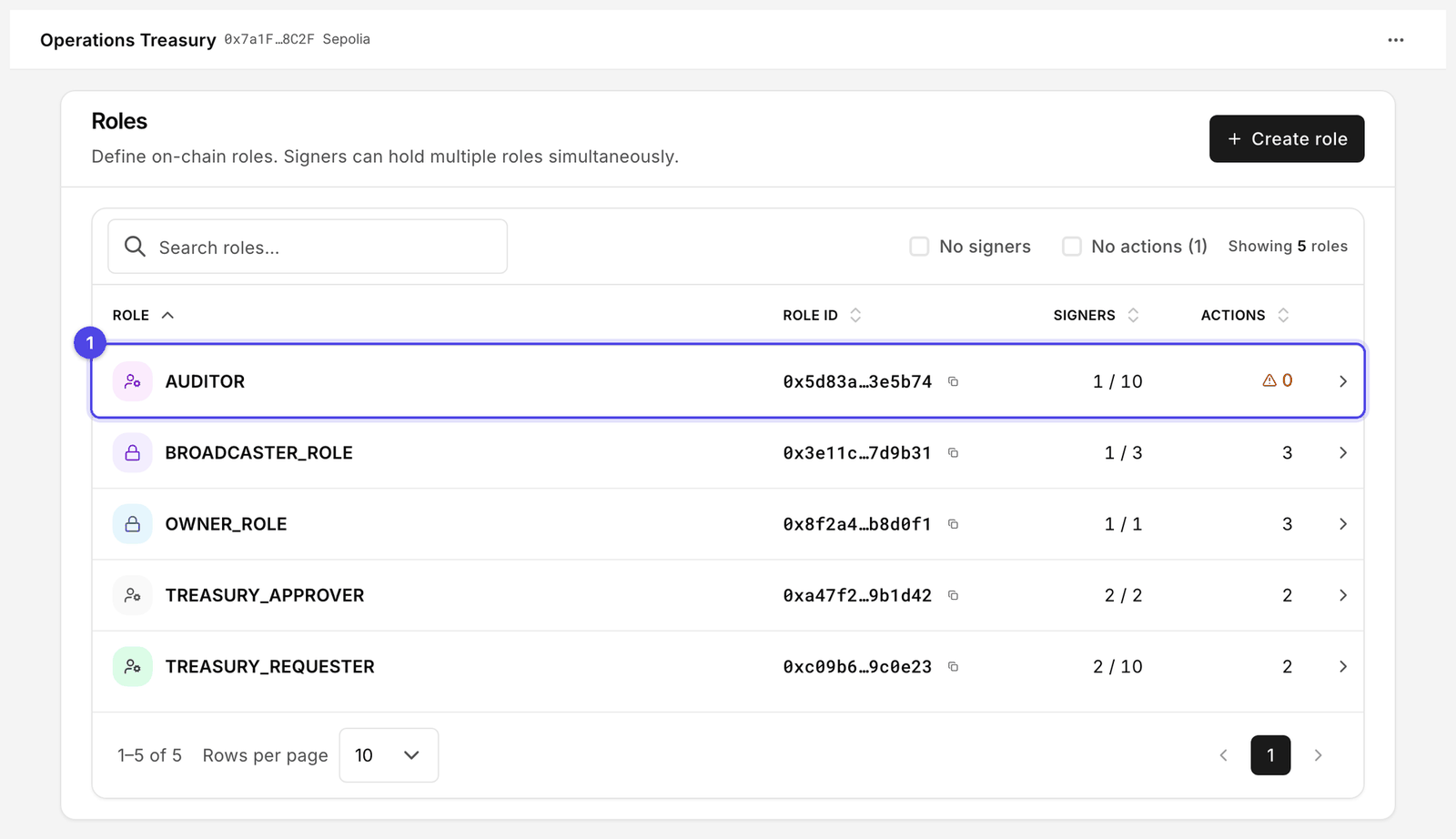
* **`AUDITOR` carries no on-chain power, and that is the point.** Reading an account needs no role: anyone with the account link can open it read-only. Create the role so the reviewer's address is recorded in **Signers** and the review has a named owner. Expect it under the **No actions** filter on **Roles**; here that is correct, not a gap.

<figure><img src="https://2633730519-files.gitbook.io/~/files/v0/b/gitbook-x-prod.appspot.com/o/spaces%2F0GcVTQuj6X0G3RZ3YY7r%2Fuploads%2Fgit-blob-a743cceda917e2f79e7d3260f19cec652a3b57c7%2F29-roles.png?alt=media" alt="Roles page for the Operations Treasury account, listing roles with role IDs, signer counts, action counts and gate warnings" width="1000"><figcaption><p>Roles is where a team checks that every role has signers and actions. AUDITOR (1) holds none, which the Actions column flags with a warning and the No actions filter counts.</p></figcaption></figure>

## Onboard a member

1. Collect the address the person will use and have them confirm it from their own wallet. Never accept an address pasted into chat without a second channel.
2. If the role does not exist yet, open **On-chain access** → **Roles** → **Create role**. Set **Max wallets** a little above today's headcount.
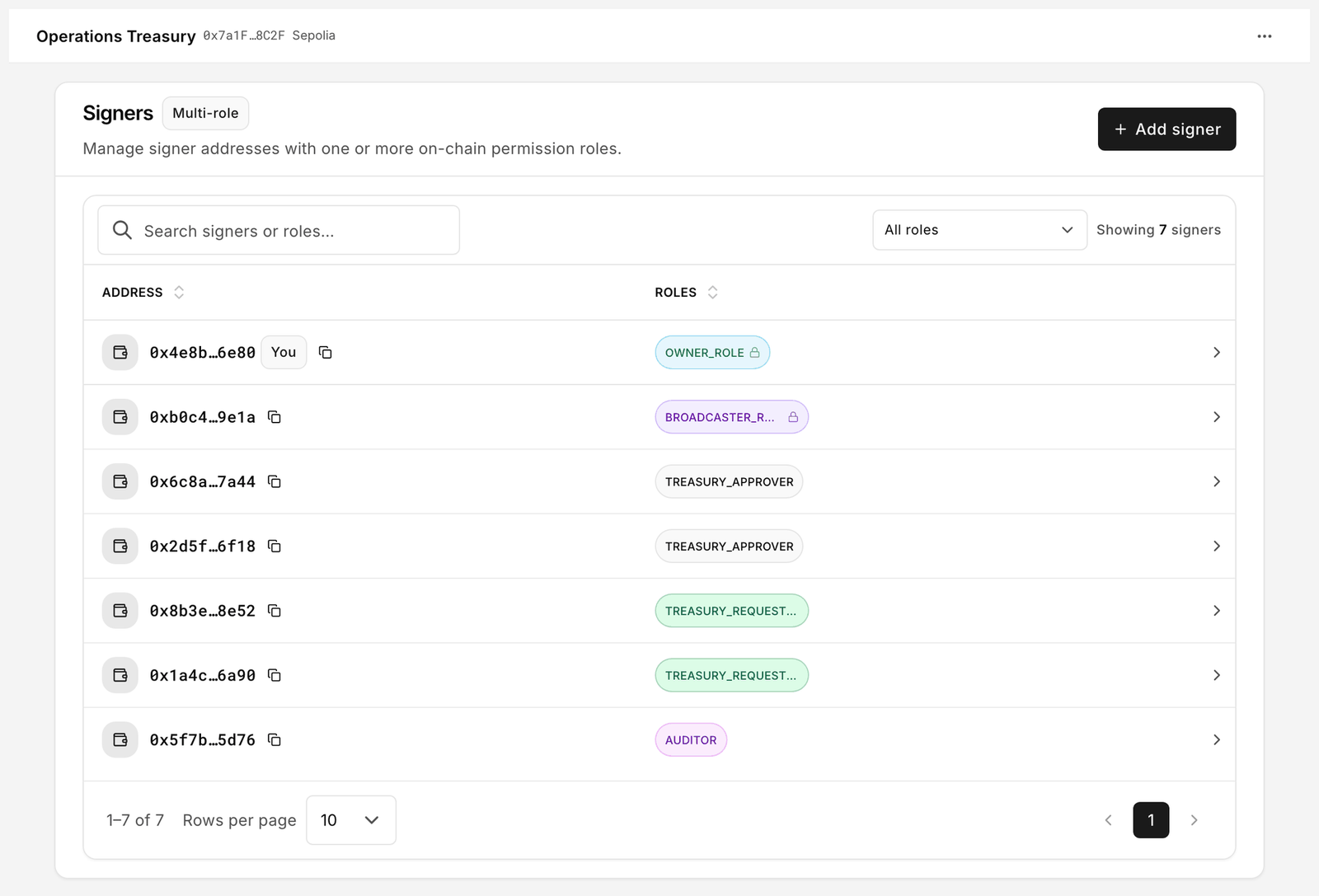
3. Open **On-chain access** → **Signers**, select **Add signer**, enter the address and pick the roles it should hold. Sign the batch and execute it. Nothing takes effect until it is on-chain.
4. If you use an organization, add the same address under **Settings → Organization → Member addresses** with a **Label** naming the person. This grants nothing on-chain; it lets everyone recognise the address in shared views.
5. Ask the new member to connect their wallet and open **My access**. It should list their roles and only the phases you intended. "This wallet is not assigned to any role yet." means the batch has not executed.
6. Record the date, address, role and reason in your own register. The chain holds the evidence; your register holds the why.

<figure><img src="https://2633730519-files.gitbook.io/~/files/v0/b/gitbook-x-prod.appspot.com/o/spaces%2F0GcVTQuj6X0G3RZ3YY7r%2Fuploads%2Fgit-blob-78686a2021e34f13284245bb8dab7121945f0e91%2F28-signers.png?alt=media" alt="Signers page listing an address with a You badge and the roles it holds" width="1000"><figcaption><p>Signers lists every address with the roles it holds. The You badge marks the connected wallet.</p></figcaption></figure>

## Offboard a member

Disabling someone in your identity provider does nothing to a smart account. Do this on-chain, in order.

1. **Roles**: open each role the person held, select **Manage role signers** and remove the address. Sign the batch and execute it.
2. **Signers**: search for the address and confirm no roles remain.
3. Check what survives. A gate belongs to the role, not the person, so removing the person is usually enough. If the role itself must lose its rights, remember that gates are permanent: deleting the custom role in **Roles** is the way to clear its gates, and system roles keep theirs. Grants on non-revocable actions are **permanent grants** and outlive the person too.
4. If they held **Broadcaster**, rotate it: **Policies** → **Security** → **Manage broadcasters**, add the replacement, then remove the old address and recover any leftover gas.
5. If they were the **Owner** or **Recovery**, use **Transfer ownership** (time-locked, so plan for the wait) or **Update recovery**.
6. **Approvals**: review every open request they created and cancel anything you cannot vouch for. Items on the **Approved** tab are signed payloads, valid until they expire or are used.
7. Remove their **Member addresses** entry so the label stops appearing in shared views.

{% hint style="warning" %}
Treat a signed file like a signed check. Anyone who holds a copy and can submit may broadcast it until it expires or is used, so cancel the underlying request rather than assuming the file is gone.
{% endhint %}

## The quarterly review

Book an hour and do it with the person holding `AUDITOR`.

1. **Roles**, tick **No signers**: roles nobody holds. Fill them or remove them.
2. **Roles**, tick **No actions**: roles with signers but no duty. Each is a standing grant waiting to be misused. `AUDITOR` is the expected exception.
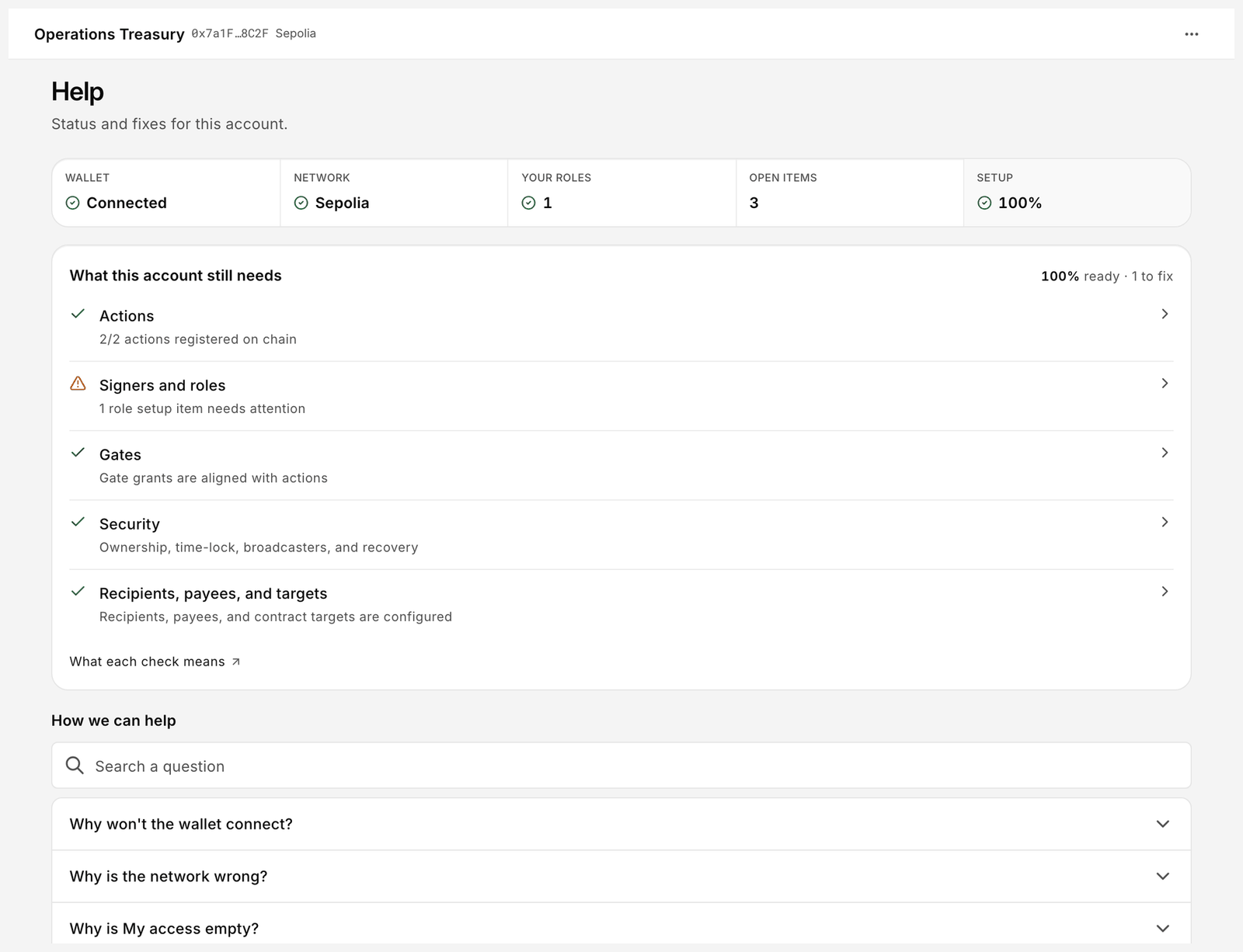
3. **Help**: read the **What this account still needs** checklist and the **Setup** tile. Every warning there is either work in progress or a gap nobody owns.
4. **History**: group by **Requester**, then by **Result**, and read the quarter end to end. Filter **Cancelled** and **Failed** to see what the policy stopped, and save the transaction references your auditors rely on.
5. **Allowlists**: confirm **Recipients**, **Payees** and **Allowed contracts** still match reality. Remove destinations you no longer pay or call.
6. **Policies** → **Security**: confirm **Owner**, **Recovery**, **Time-lock** and **Broadcasters** are the addresses you expect, and that each broadcaster still holds gas.
7. Rehearse recovery on testnet. Deploy a throwaway account on Sepolia with the same role map and walk the recovery path with the people who would really do it.

<figure><img src="https://2633730519-files.gitbook.io/~/files/v0/b/gitbook-x-prod.appspot.com/o/spaces%2F0GcVTQuj6X0G3RZ3YY7r%2Fuploads%2Fgit-blob-9a72a33574d9b6a56de203084f673341ef9bd7a6%2F38-help.png?alt=media" alt="Help page with Wallet, Network, Your roles, Open items and Setup tiles above the What this account still needs checklist" width="1000"><figcaption><p>Help is a one-screen health check: tiles at the top, then the outstanding setup items.</p></figcaption></figure>

## What the audit trail proves

| Evidence                | Where it lives                                                   | What it shows                                                                                                                                         |
| ----------------------- | ---------------------------------------------------------------- | ----------------------------------------------------------------------------------------------------------------------------------------------------- |
| Settled operations      | **History**                                                      | Each completed operation with **Operation**, **Change** and **Status** (Executed, Cancelled, Failed), grouped by Date, Result, Operation or Requester |
| The life of one request | The **Activity** view inside a request in **Approvals**          | Who requested it, who approved or cancelled it, and when each step happened                                                                           |
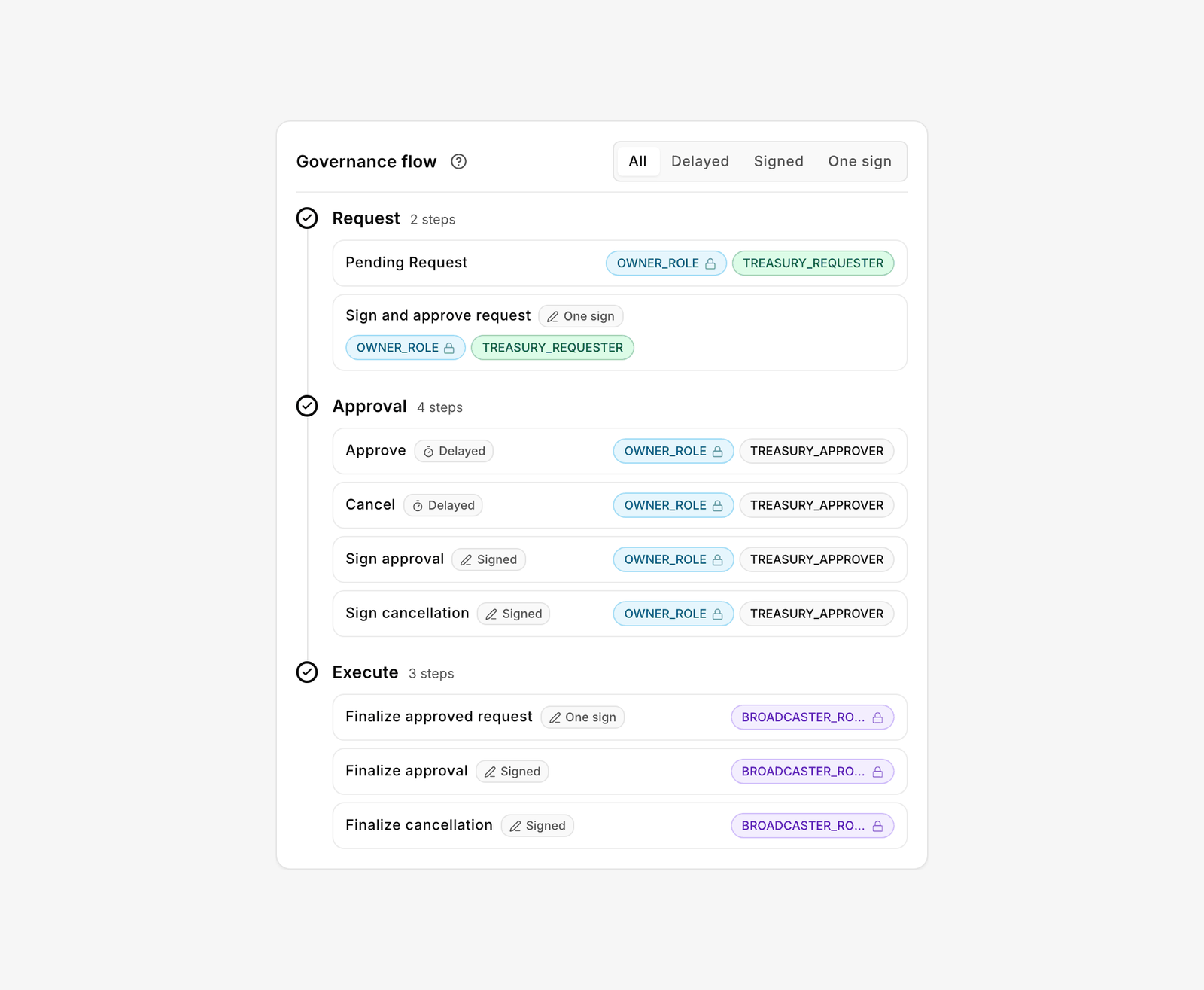
| Who may do what today   | **Roles**, **Signers**, and an action's **Governance flow** card | The policy as it stands, role by role and step by step                                                                                                |
| The permanent record    | The chain                                                        | Requests, approvals, cancellations, executions and configuration changes are all transactions. Open them from **Share** → **View on explorer**        |
| Names and labels        | The Platform, plus **Member addresses** in an organization       | Account names, member labels and colours. Convenience only, never stored on-chain                                                                     |

The chain proves what happened; the app makes it readable. If the two ever disagree, the chain is right.

<figure><img src="https://2633730519-files.gitbook.io/~/files/v0/b/gitbook-x-prod.appspot.com/o/spaces%2F0GcVTQuj6X0G3RZ3YY7r%2Fuploads%2Fgit-blob-39bdd93f0a1fd11bcd6245ca22d31974e016856e%2F45-action-governance-flow.png?alt=media" alt="Governance flow card for an action, showing role chips on the Request, Approval and Execute steps with a path filter" width="1000"><figcaption><p>The Governance flow card answers the review question directly: who requests, who approves, who executes.</p></figcaption></figure>

## What an organization plan adds

Sign in if you have early access. Otherwise join the waitlist from the same dialog. The **Free** path needs no account, and a team can run everything above on it.

A paid organization adds collaboration on top: a shared account list with **Cloud** residency, **Member addresses** as the shared address book "used for access control and audit", members and organization roles for administration and billing, organization networks, and invoices in one place.

It changes nothing about enforcement. The on-chain policy is identical on every plan, Bloxchain never holds a key, and an organization membership grants nothing on-chain: only a role on the account does.

## If something goes wrong

A lost owner key, a compromised signer and a request stuck in **Approvals** all have defined paths. Read [Recovery and incidents](/platform-guide/recovery.md) before you need it, and make sure the person holding **Recovery** has read it too.

## Related

* [Team treasury](/guides/team-treasury.md)
* [Designing roles and permissions](/guides/roles-and-permissions.md)
* [On-chain access](/platform-guide/access.md)
* [Organizations and billing](/platform-guide/settings/organizations-and-billing.md)


---

# Agent Instructions
This documentation is published with GitBook. GitBook is the documentation platform designed so that both humans and AI agents can read, navigate, and reason over technical content effectively. Learn more at gitbook.com.

## Querying This Documentation
If you need additional information that is not directly available in this page, you can query the documentation by asking a question.

Perform an HTTP GET request on the following URL with the `ask` and `goal` query parameters:

```
GET https://docs.bloxchain.app/guides/organization-governance.md?ask=<question>&goal=<user_goal>
```

`ask` is the immediate question: it should be specific, self-contained, and written in natural language.
`goal` is what the user is ultimately trying to achieve, the reason they need the answer. Sharing it helps GitBook give you a better, more relevant answer. A goal is most helpful when it describes the outcome the user wants rather than restating the question. For example, with `ask=how do I create an API token`, a goal like `automate deployments from our CI pipeline` lets GitBook tailor the answer to that use case.

The response will contain a direct answer to the question and relevant excerpts and sources from the documentation.

Use this mechanism when the answer is not explicitly present in the current page, you need clarification or additional context, or you want to retrieve related documentation sections.