> For the complete documentation index, see [llms.txt](https://docs.bloxchain.app/llms.txt). Markdown versions of documentation pages are available by appending `.md` to page URLs; this page is available as [Markdown](https://docs.bloxchain.app/guides/asset-issuance.md).

# Asset issuance

Put the mint and burn functions of an ERC-20 your team controls behind request and approval, so supply only changes after review.

**Where:** Discover → Asset Issuance, then Policies and On-chain access · **You need:** a test ERC-20 on Sepolia whose minter is the smart account, three wallets, test ETH

## Goal

The smart account holds the token's mint and burn authority. A `Minter Requester` proposes a supply change, a `Compliance Approver` reviews it, and the policy blocks calls to any contract or function that is not allowlisted.

{% hint style="info" %}
The token contract itself is outside Bloxchain. You deploy and own it with your own tooling. Bloxchain governs who may call it and how, not what the token does.
{% endhint %}

## Who is involved

| Duty                                 | Role                                  | Example           |
| ------------------------------------ | ------------------------------------- | ----------------- |
| Configures policy, fallback approver | **Owner**                             | `0x3B9d…A41e`     |
| Requests mints and burns             | `Minter Requester`                    | `0x8C4e…21bB`     |
| Approves supply changes              | `Compliance Approver`                 | `0xD27a…f9E3`     |
| Submits signed approvals             | **Broadcaster**                       | `0x5E60…c7D1`     |
| The contract being called            | Your token, for example `0x9bE2…4D07` | outside Bloxchain |

Time: about 60 minutes on Sepolia, including the token setup.

## Before you start

* Deploy the smart account first (Phase 1) so you know its address.
* Deploy or reuse a test ERC-20 on Sepolia that exposes `mint(address,uint256)` and `burn(address,uint256)`. Set its minter (or owner, depending on the token) to the smart account address. If your token uses different signatures, copy them exactly from its ABI (Application Binary Interface).
* Fund the owner and broadcaster wallets with test ETH.

## Phase 1: Deploy the account

1. On **Discover**, choose **Asset Issuance** and select **Start Asset Issuance**.
2. Name the account (for example `Token Issuer`), select **Continue**, set **Owner**, **Broadcaster addresses**, **Recovery** and a **Time-lock** (`1` `Days` recommended for supply changes), then **Deploy Smart Account**.
3. Copy the account address from **Overview** and make it the minter of your token using the token's own admin function.

Like every preset today, the account lands as a **Vault** ([what that means](/platform-guide/policies/actions.md#what-a-new-account-already-has)). The issuance capability is what you add next.

## Phase 2: Add the mint and burn actions

1. Open **Policies** → **Actions** and select **Add action**.
2. Register **Mint** with the signature `mint(address,uint256)`.
3. Select **Add action** again and register **Burn** with `burn(address,uint256)`.
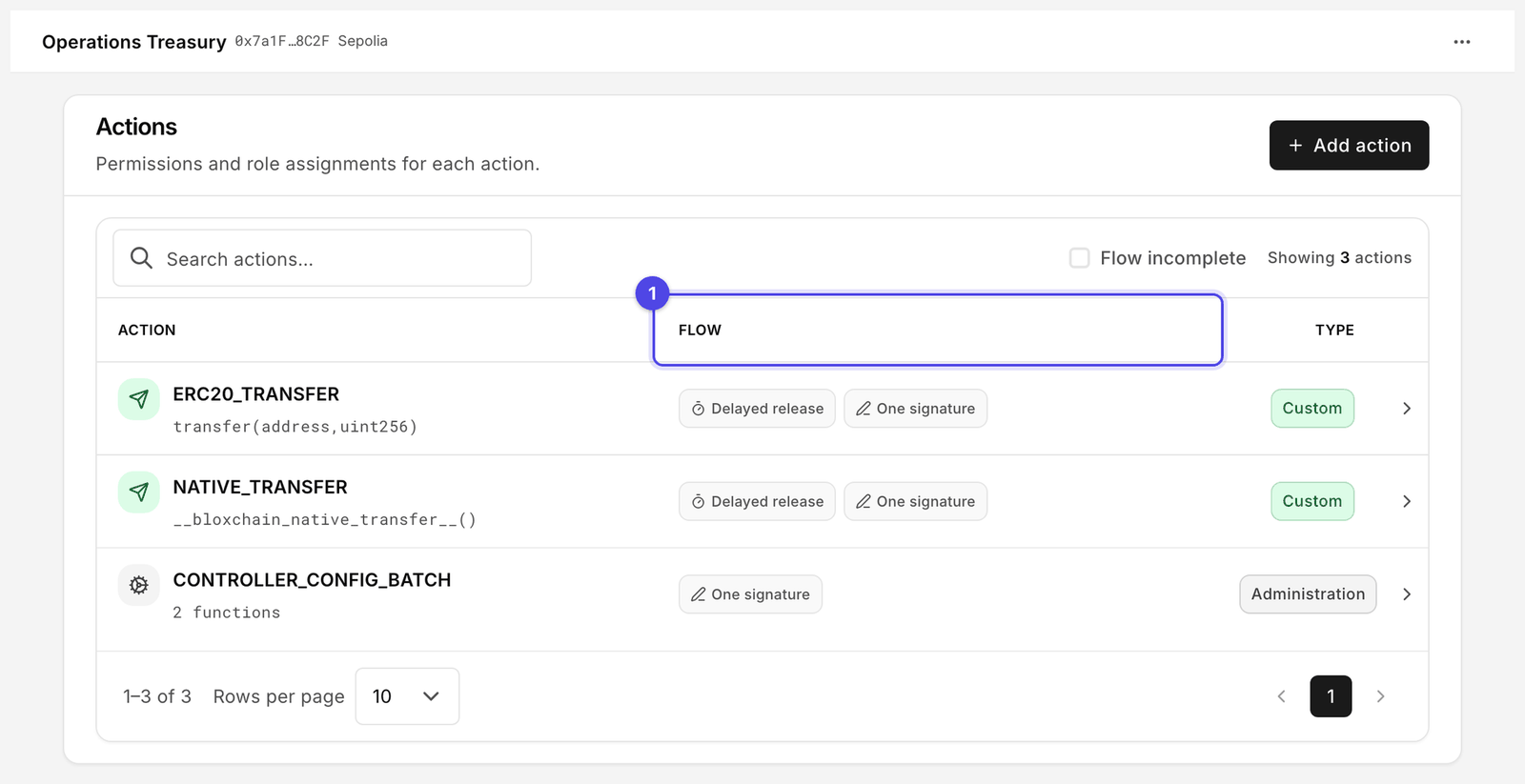
4. **Sign** and **Execute** the batch. Both rows show **Flow incomplete** for now.

<figure><img src="https://2633730519-files.gitbook.io/~/files/v0/b/gitbook-x-prod.appspot.com/o/spaces%2F0GcVTQuj6X0G3RZ3YY7r%2Fuploads%2Fgit-blob-d36592a4c483b4a8e038d6a04f52e4607a8d862e%2F32-actions.png?alt=media" alt="Policies Actions page with custom actions and their Flow status" width="1000"><figcaption><p>Custom actions appear next to the built-in ones with Type Custom. Flow (1) is where you confirm each one can actually run.</p></figcaption></figure>

## Phase 3: Allowlist the token contract

Mint and burn are calls to an external contract, so the token must be an allowed destination.

1. Open **Policies** → **Allowed contracts**.
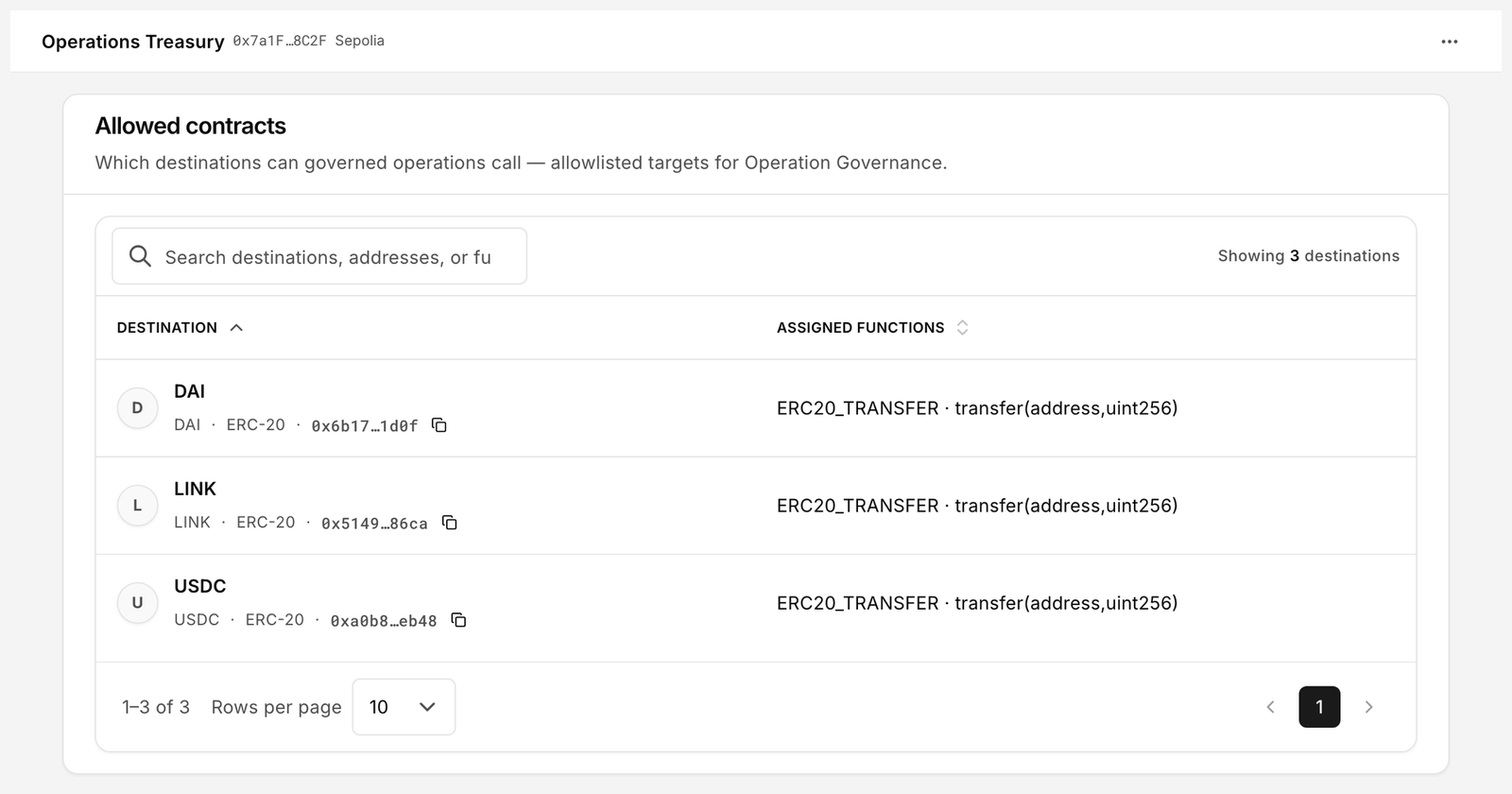
2. Add your token address as a **Destination** and assign the functions `mint(address,uint256)` and `burn(address,uint256)` to it.
3. Sign the batch.

<figure><img src="https://2633730519-files.gitbook.io/~/files/v0/b/gitbook-x-prod.appspot.com/o/spaces%2F0GcVTQuj6X0G3RZ3YY7r%2Fuploads%2Fgit-blob-1b024c6e71068e703ab466fe83ad5baa5ad38785%2F36-allowed-contracts.png?alt=media" alt="Allowed contracts page listing destinations and their assigned functions" width="1000"><figcaption><p>Only the listed functions on the listed destination can be called.</p></figcaption></figure>

If you later add a second token, add it as another destination. Nothing is shared between destinations.

## Phase 4: Create roles

1. Open **On-chain access** → **Roles** → **Create role**.
2. Create `Minter Requester` (**Max wallets** `2`) and `Compliance Approver` (**Max wallets** `2`).
3. Open each role, select **Manage role signers**, add the addresses and sign.

Do not put the same wallet in both roles. Compliance review only means something when the reviewer is not the requester.

## Phase 5: Manage permissions

Repeat this for **Mint** and for **Burn**.

1. In **Policies** → **Actions**, open the action and select **Manage permissions**.
2. **Delayed release** tab: **Request** → `Minter Requester`; **Approval** steps → `Compliance Approver`. This gives you a cooling period equal to the time lock.
3. **Signed approval** tab: **Request** → `Minter Requester`; **Approval** → `Compliance Approver`; **Execute** → **Broadcaster**. Use this when you do not want to wait for the time lock but still want two people.
4. Leave **One signature** empty.
5. Review and sign.

## Phase 6: Grant gates

1. Open **Policies** → **Gates** → **Needs attention**.
2. Select **Edit**, grant the gates for `Minter Requester` and `Compliance Approver`, confirm in **Update gates** and sign.
3. Return to **Actions**. Both rows should now read ready, not **Flow incomplete** or **Gates mismatch**.

## Phase 7: Test a mint request

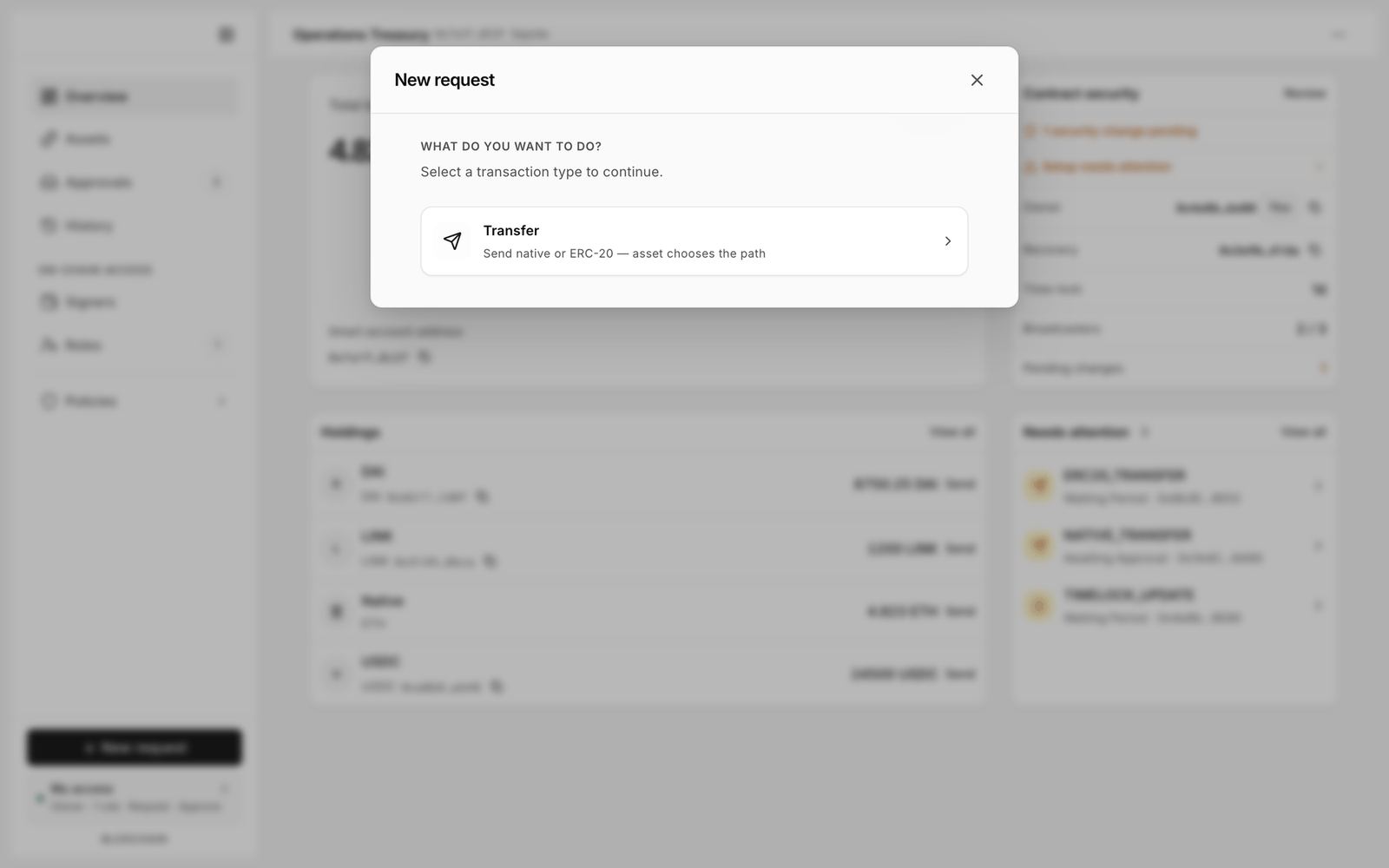
1. Connect the `Minter Requester` wallet and select **New request**. The **Mint** card ("Create tokens to a recipient") is now enabled. If it still says **Not configured**, go back to Phase 2.

<figure><img src="https://2633730519-files.gitbook.io/~/files/v0/b/gitbook-x-prod.appspot.com/o/spaces%2F0GcVTQuj6X0G3RZ3YY7r%2Fuploads%2Fgit-blob-db7f6c04e47a2933810816d981754228a74d9cd2%2F25-new-request.png?alt=media" alt="New request dialog asking what you want to do, with Transfer, Mint and Burn cards" width="1000"><figcaption><p>Mint and Burn become available once their actions are configured.</p></figcaption></figure>

2. Choose **Mint**, enter a recipient and a small amount, and select **Sign request** (the **Sign** path) or **Submit request** (the **Wallet** path).
3. Connect the `Compliance Approver` wallet, open **Approvals**, open the request and **Approve** (or sign the approval on the **Sign** toggle).
4. If you used the signed path, connect the **Broadcaster** wallet, open the item under **Approved** and select **Execute**.
5. Check the recipient's token balance in your wallet or on the explorer, and check **History** for **Executed**.
6. Repeat with **Burn** for a trivial amount from a holder you control.

Negative test: with the requester wallet, request a mint while the approver is offline. Nothing happens until the approver acts. A delayed request does not lapse on its own: it waits until someone approves or cancels it.

## Checklist

* [ ] Token's minter is the smart account address
* [ ] `mint` and `burn` registered as actions with the exact signatures from the ABI
* [ ] Token address allowlisted under Allowed contracts with both functions assigned
* [ ] Requester and approver are different wallets
* [ ] Gates granted; Actions shows ready
* [ ] One mint and one burn executed end to end on Sepolia

## Related

* [Allowlists](/platform-guide/policies/allowlists.md)
* [Manage permissions](/platform-guide/policies/manage-permissions.md)
* [New request](/platform-guide/operate/new-request.md)
* [Team treasury](/guides/team-treasury.md)


---

# Agent Instructions
This documentation is published with GitBook. GitBook is the documentation platform designed so that both humans and AI agents can read, navigate, and reason over technical content effectively. Learn more at gitbook.com.

## Querying This Documentation
If you need additional information that is not directly available in this page, you can query the documentation by asking a question.

Perform an HTTP GET request on the following URL with the `ask` and `goal` query parameters:

```
GET https://docs.bloxchain.app/guides/asset-issuance.md?ask=<question>&goal=<user_goal>
```

`ask` is the immediate question: it should be specific, self-contained, and written in natural language.
`goal` is what the user is ultimately trying to achieve, the reason they need the answer. Sharing it helps GitBook give you a better, more relevant answer. A goal is most helpful when it describes the outcome the user wants rather than restating the question. For example, with `ask=how do I create an API token`, a goal like `automate deployments from our CI pipeline` lets GitBook tailor the answer to that use case.

The response will contain a direct answer to the question and relevant excerpts and sources from the documentation.

Use this mechanism when the answer is not explicitly present in the current page, you need clarification or additional context, or you want to retrieve related documentation sections.