> For the complete documentation index, see [llms.txt](https://docs.bloxchain.app/llms.txt). Markdown versions of documentation pages are available by appending `.md` to page URLs; this page is available as [Markdown](https://docs.bloxchain.app/guides/agent-assisted-requests.md).

# Approve with an agent's help

Let an AI agent prepare a signed request for a smart account, then review it yourself and broadcast it from the Platform.

**Where:** your agent's environment, then Approvals → **Import signed file** · **You need:** an account with a **Signed approval** or **One signature** path, a signer wallet for the agent, a wallet that may submit

## The shape: authorize, then broadcast

The agent drafts and signs. A person reviews and broadcasts. Nothing the agent produces reaches the chain on its own.

1. The agent builds a request against a registered action and signs it as a meta-transaction, off-chain.
2. It writes the result to a `.bloxmeta.json` file.
3. You import that file into the Platform, read the decoded preview, and execute it with a wallet that may submit.

Call it **authorize, then broadcast**. The agent authorizes one specific operation. A human broadcasts it, or does not.

## Why it is safe

* **The signing key holds a narrow role.** Give the agent a requester-only custom role, nothing more.
* **The contract rejects anything that role may not do.** A signature from a role without the permission reverts at execution. An agent cannot widen its own access or sign its way past a gate or an allowlist.
* **A human sees the decoded request** before it goes on-chain.
* **The file expires.** A signature that is never broadcast stops being usable when its deadline passes.

## Set up the agent's wallet

1. In **On-chain access** → **Roles**, create a custom role for the agent, for example `TREASURY_REQUESTER`.
2. In **Policies** → **Manage permissions**, give that role the **Request** step only, on the one action the agent needs. Leave **Approval** and **Execute** to people.
3. Grant the role's gate in **Policies** → **Gates**, and add the destinations the agent may use to the allowlists.
4. In **Signers**, add the agent's address to that role.

Never give an agent the **Owner**, **Broadcaster** or **Recovery** role. Owner controls the account, Broadcaster can submit signed work, and Recovery can take ownership. Keep the private key in a secret store the runtime reads at call time, never in the agent's prompt, transcripts or logs.

## Steps

### 1. The agent builds, signs and exports

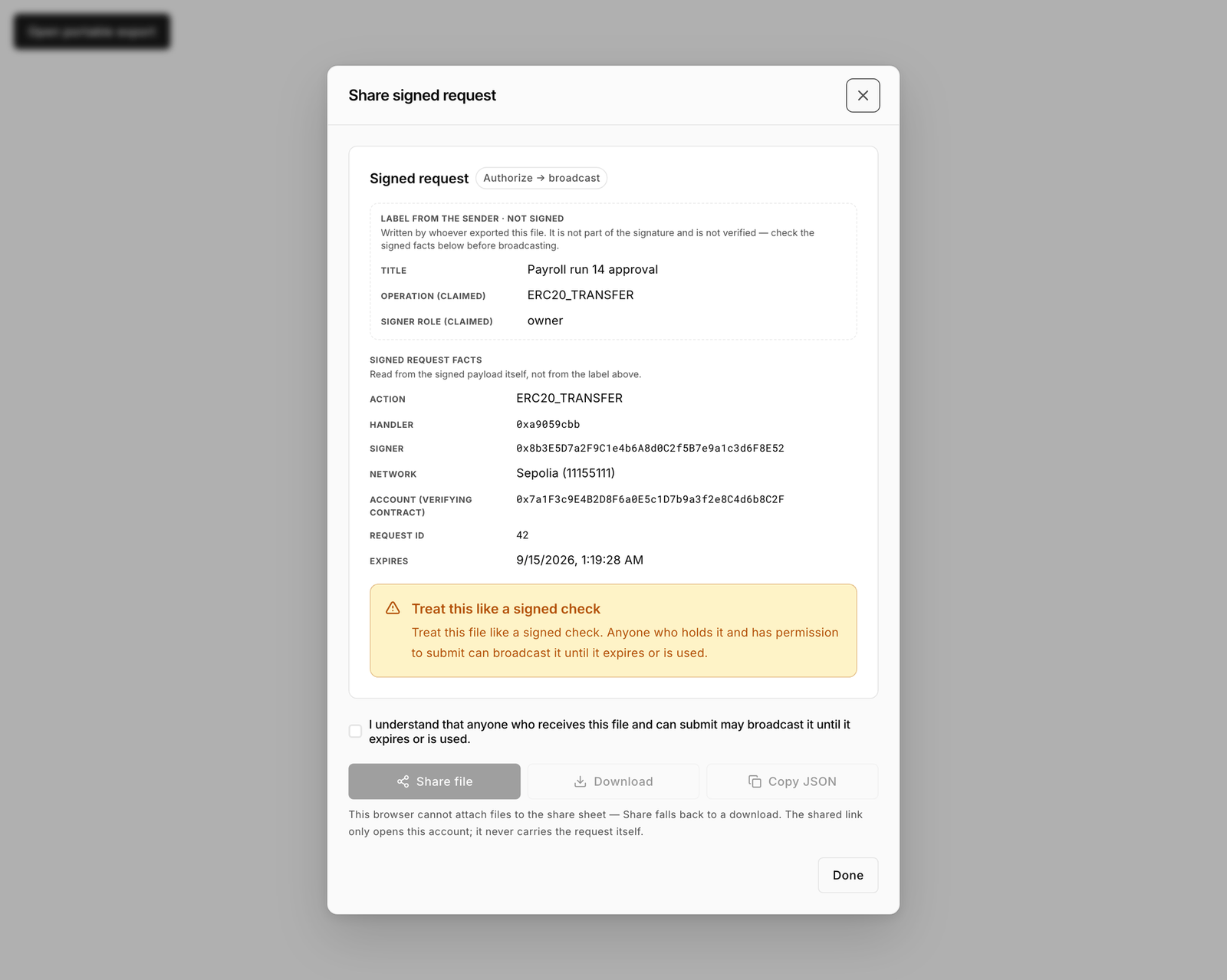
With the SDK, the agent reads the account's policy, builds the request payload for the action, and signs the digest the contract generates (see [Meta-transactions](/protocol-reference/api-reference/meta-transactions.md)). It saves the result as a `.bloxmeta.json` file and hands it to you over a channel you trust. This is the same file the Platform itself exports from **Share signed request**.

<figure><img src="https://2633730519-files.gitbook.io/~/files/v0/b/gitbook-x-prod.appspot.com/o/spaces%2F0GcVTQuj6X0G3RZ3YY7r%2Fuploads%2Fgit-blob-5949f66739c567a0d3510c227732bde2fef388de%2F46-share-signed-request.png?alt=media" alt="Share signed request dialog with the acknowledgement checkbox and Share file, Download and Copy JSON buttons" width="1000"><figcaption><p>The Platform exports the same file an agent produces. Anyone holding it who can submit may broadcast it.</p></figcaption></figure>

### 2. You import it

1. Open the account and go to **Approvals**.
2. Select **Import signed file**.
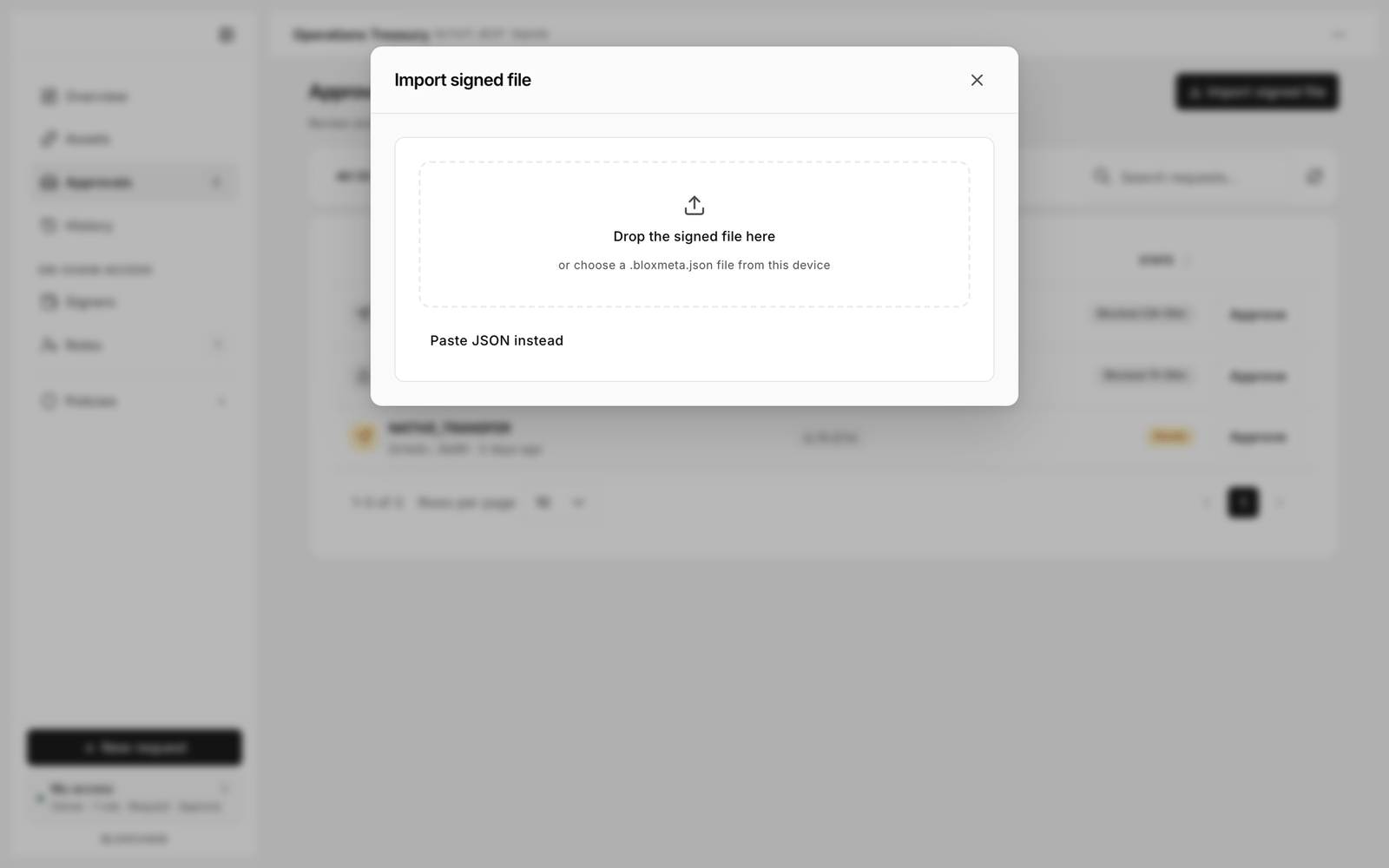
3. Drop the file, or select **Paste JSON instead** and paste its content.

<figure><img src="https://2633730519-files.gitbook.io/~/files/v0/b/gitbook-x-prod.appspot.com/o/spaces%2F0GcVTQuj6X0G3RZ3YY7r%2Fuploads%2Fgit-blob-53637e32971f69289abb778c0cc7d27284671a80%2F39-import-signed-file.png?alt=media" alt="Import signed file dialog with a drop zone for a .bloxmeta.json file and a Paste JSON instead link" width="1000"><figcaption><p>Import signed file accepts a dropped file or pasted JSON.</p></figcaption></figure>

### 3. You check the preview

Read every row against what you asked for:

| Check       | Why                                                                                  |
| ----------- | ------------------------------------------------------------------------------------ |
| Action      | The agent may only use actions you registered, but confirm it used the one you meant |
| Destination | The recipient or contract target                                                     |
| Amount      | Including decimals, not just the leading digits                                      |
| Network     | Sepolia today                                                                        |
| Account     | The smart account address this file belongs to                                       |
| Signer      | The agent's address, in the role you gave it                                         |
| Expiry      | Enough time left to execute                                                          |

Any label the sender wrote around the file (a filename, a message, a description) is not evidence of anything. Only the decoded rows are.

### 4. You broadcast

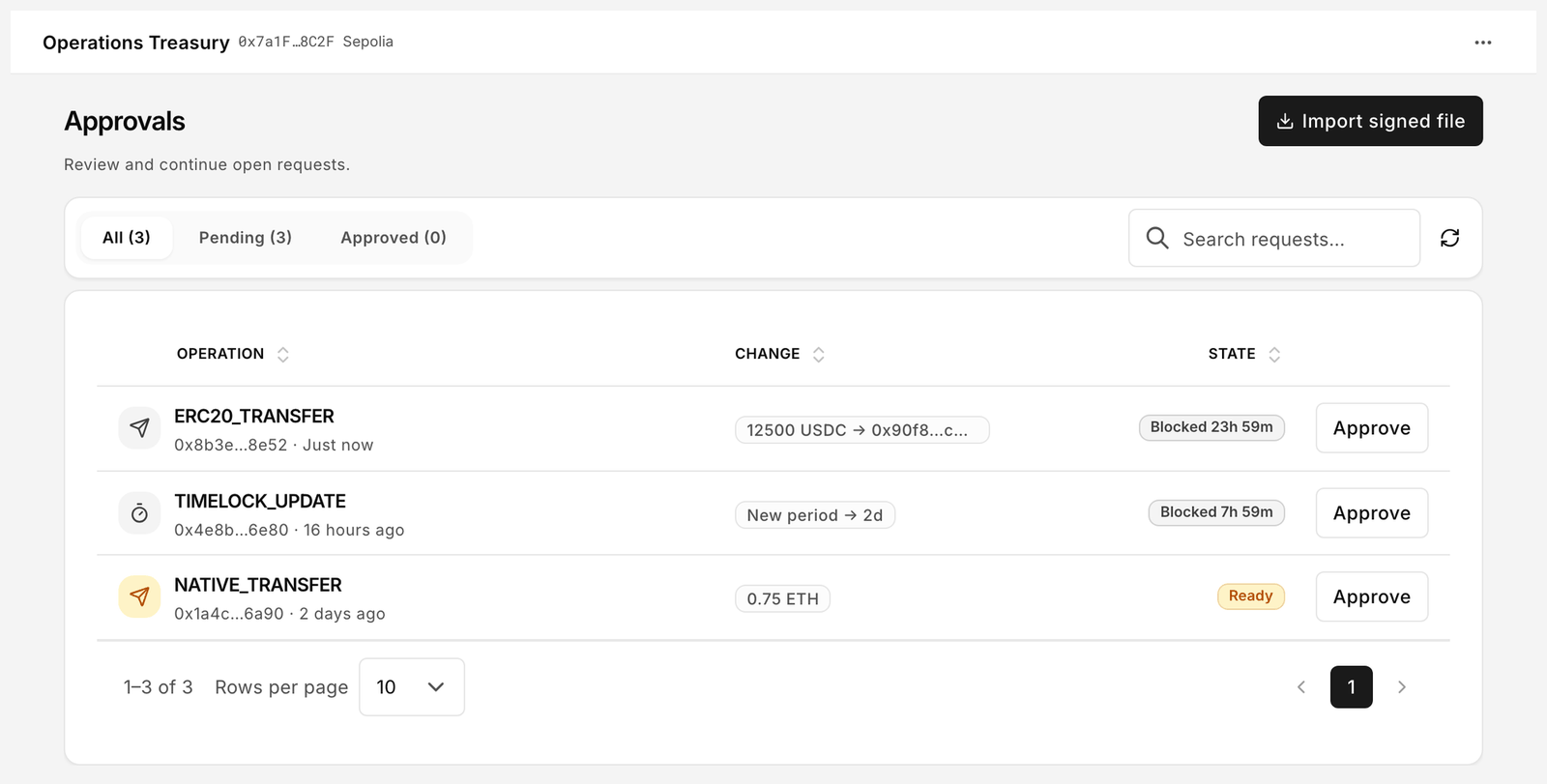
Select **Add to Approved**. The item lands on the **Approved** tab. Open it and select **Execute** with a wallet that may submit, usually a **Broadcaster**. That wallet pays gas.

<figure><img src="https://2633730519-files.gitbook.io/~/files/v0/b/gitbook-x-prod.appspot.com/o/spaces%2F0GcVTQuj6X0G3RZ3YY7r%2Fuploads%2Fgit-blob-f07c2af3d8a8cdf1c7c2bb346e43108126df891f%2F22-approvals.png?alt=media" alt="Approvals for the Operations Treasury account with tabs All, Pending and Approved, and an Import signed file button" width="1000"><figcaption><p>Imported work waits on the Approved tab until someone executes it.</p></figcaption></figure>

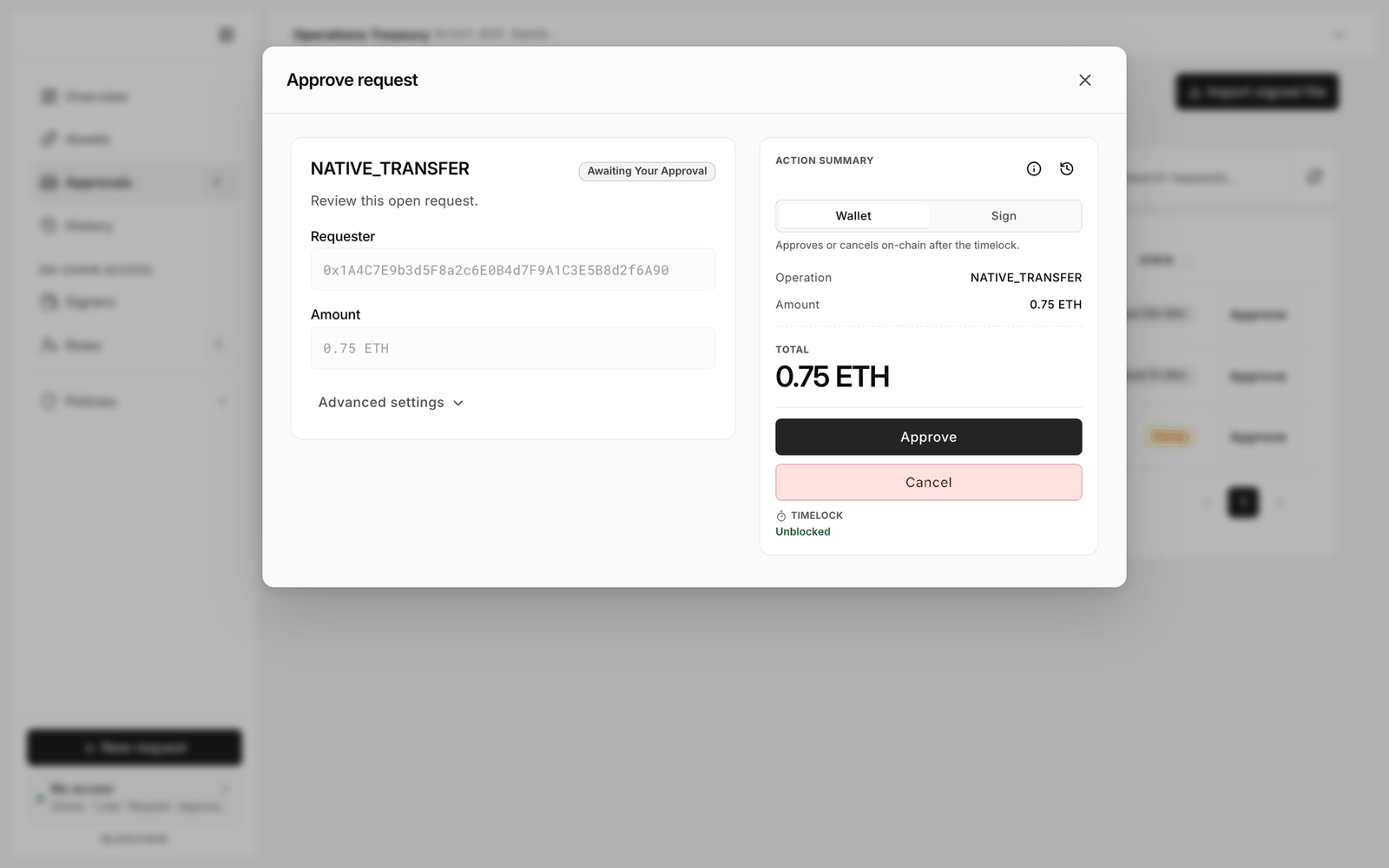
On a **Signed approval** path the agent signs an approval against a request that is already on-chain. The file and the review are the same; the dialog below is where a person would produce that signature by hand.

<figure><img src="https://2633730519-files.gitbook.io/~/files/v0/b/gitbook-x-prod.appspot.com/o/spaces%2F0GcVTQuj6X0G3RZ3YY7r%2Fuploads%2Fgit-blob-65d49e631b67dae23e76ec0036360b68687303f8%2F23-approve-request.png?alt=media" alt="Approve request dialog with the Wallet and Sign toggle, Approve and Cancel buttons, and the timelock state" width="1000"><figcaption><p>Sign produces the off-chain approval an agent can also produce with the SDK.</p></figcaption></figure>

## Safety rules

{% hint style="danger" %}
A signed file is a bearer instrument. See [Safety rules](/platform-guide/operate/signed-files.md#safety-rules).
{% endhint %}

## Troubleshooting

| Symptom                                                     | Meaning                                                               | Fix                                                                             |
| ----------------------------------------------------------- | --------------------------------------------------------------------- | ------------------------------------------------------------------------------- |
| The file cannot be added in this workspace                  | It was signed for a different account or network                      | Open the account and network the file names, then import again                  |
| Execution reverts on permission                             | The signer's role does not hold that step, or its gate is not granted | Fix it in **Manage permissions** and **Gates**, then have the agent sign again  |
| **Expired. Execution disabled. Delete this invalid entry.** | The deadline passed                                                   | **Delete** the entry and ask the agent for a fresh signature                    |
| The request is already settled                              | It was executed or cancelled, and the signer's nonce moved on         | Check [History](/platform-guide/operate/history.md); no new signature is needed |

## What is available today

The documentation is agent-readable: see [For AI agents](/developers/for-ai-agents.md). The import and broadcast flow described here works now. More AI tooling is in development.

## Related

* [Ways to configure an account](/guides/ways-to-configure.md)
* [Approve from another device](/guides/cross-device-approval.md)


---

# Agent Instructions
This documentation is published with GitBook. GitBook is the documentation platform designed so that both humans and AI agents can read, navigate, and reason over technical content effectively. Learn more at gitbook.com.

## Querying This Documentation
If you need additional information that is not directly available in this page, you can query the documentation by asking a question.

Perform an HTTP GET request on the following URL with the `ask` and `goal` query parameters:

```
GET https://docs.bloxchain.app/guides/agent-assisted-requests.md?ask=<question>&goal=<user_goal>
```

`ask` is the immediate question: it should be specific, self-contained, and written in natural language.
`goal` is what the user is ultimately trying to achieve, the reason they need the answer. Sharing it helps GitBook give you a better, more relevant answer. A goal is most helpful when it describes the outcome the user wants rather than restating the question. For example, with `ask=how do I create an API token`, a goal like `automate deployments from our CI pipeline` lets GitBook tailor the answer to that use case.

The response will contain a direct answer to the question and relevant excerpts and sources from the documentation.

Use this mechanism when the answer is not explicitly present in the current page, you need clarification or additional context, or you want to retrieve related documentation sections.